Isaac Maw
Technical Content Creator
Published January 02, 2026
Updated September 29, 2026

3 min


How to Generate Personalized PDF Certificates in PHP with Apryse SDK
Isaac Maw
Technical Content Creator
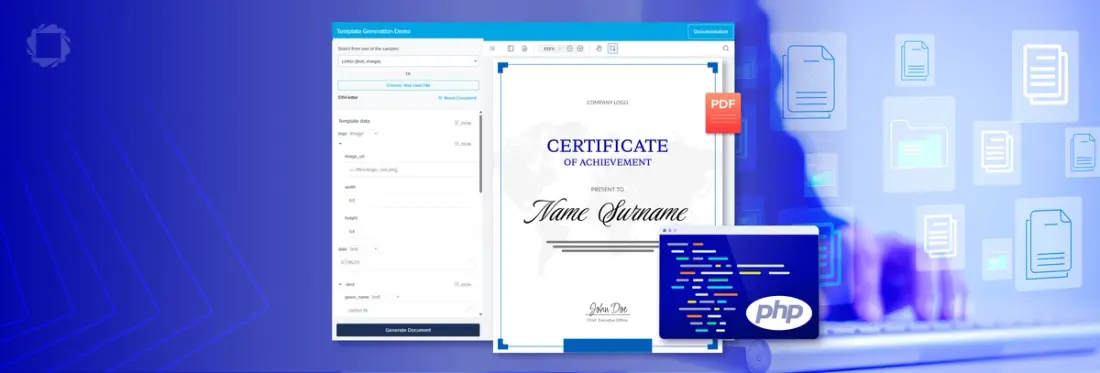
Summary: Using the Server SDK, easily set up a template using familiar Office tools, and replace content from a JSON file. Learn how in this blog post.
Automatically generated PDF Certificates are an important part of training, upskilling and education software, from K12 EdTech systems, to Higher education eLearning portals, to corporate Learning management systems (LMS). Easily generate professional, personalized PDF certificates for your users with Apryse document generation.
Apryse's office template generation framework enables the dynamic generation of PDFs from a template you design.
SDK For Generating PDF Certificates in PHP: Apryse
Apryse is the SDK of choice for generating PDF certificates. Here’s why:
- Securely merge data directly in your application. No need to share confidential data with anyone
- Use familiar tools (any word processor such as MS Word or Google Docs) to design professional looking templates with no plugins or extra tools required
- Top quality PDF generation of your templates with the market leading Apryse SDK
- Self-contained, with no third-party dependencies
- Generated PDFs have automatically generated accessibility tags
Getting Started
First, we’ll need to get set up with Apryse Server SDK.
Apryse Server SDK is a robust document library that empowers server and desktop applications with accurate, reliable, and lightning-fast document processing capabilities. Pre-built samples are readily available for quick and hassle-free integration.
PHP for the Apryse SDK is supported on Linux and MacOS. Follow the steps in our documentation guide to initialize Server SDK for MacOS or Linux. The guide includes a free trial license key.
Generate PDF From Template in PHP
Now that we have Apryse Server SDK ready to go, we can use the Office template generation framework.
Apryse's office template generation framework enables the dynamic generation of PDFs:
- You provide a template in the form of an Office document (such as .docx)
- You provide replacement data in JSON form
- Apryse SDK will efficiently generate a PDF by merging the data with the template
- Fully featured, with support for loops, conditionals, images, table generation, etc.
- Use your preferred office editor to design attractive templates, and Apryse will take care of the rest
- All logic is entirely contained within the SDK, with no external dependencies
You can try the template generation demo in your browser here.
Step 1: Initiate the Generation Framework
The generation framework requires minimal code to get up and running. Simply initiate a normal Office conversion, but with the optional TemplateParamsJson parameter set:
Find full sample code using Apryse SDK to generate a PDF from an Office document template and a JSON string here.
Step 2: Create Your Certificate Template
The template sets how your certificate will appear. You can create the template from scratch, or easily prepare an existing DOCX file for use as a template.
Set Up Certificate Generation with Your Existing Certificate Template
Because our Apryse template generation framework can use any Office file as a template, you don’t need to create the template from scratch. If your organization already has a certificate template, simply mark using {{moustache tags}}. If your template is in PDF format, you can easily convert it to DOCX using the Server SDK.
How Apryse Template Generation Works
The generation framework replaces {{tags}} in the template with strings from a supplied JSON file. You can design your certificate file using any formatting you like, and the string from the JSON will keep the formatting of the tag. For example:
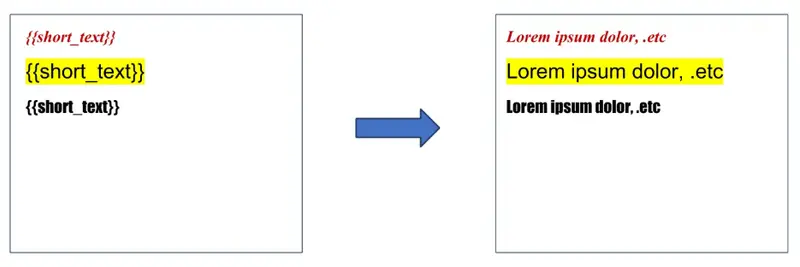
Figure 1: The JSON string replaces the tag, while maintaining the template formatting.
Create your template using any familiar tool, such as Google Docs or Microsoft Word. You could also create the template using the Apryse DOCX Editor.
In addition to text strings, the framework can also replace images and table content. As tags are replaced, text will automatically reflow according to the rules set in your template file, such as columns and justification.
Step 3: Set Up the JSON Replacement Data File
This JSON file contains data, such as student name, course completed, and date to be used to personalize the certificate template and generate the new PDF.
General principles for JSON document setup
- Each document will have one or more template keys, denoted by the {{ start tag, and }} closing tag -- these are often referred to as "moustache templates" (turn the { around 90 degrees, and it looks like a moustache...).
- The API should be supplied with a json dictionary, where each template key within the document is a property within the dictionary. The value associated with each key can take a number of forms, as described below.
- There are a number of error conditions for invalid template documents and invalid JSON. These errors will cause an exception to be thrown with a descriptive message.
Format for JSON Content Values
Text String
Can be one of:
- Simple string: "key":"Value Text"
- A JSON object with the text property: "key": {"text": "Value Text"}
- A JSON object with the text_lines property: "key": {"text_lines": ["Line 1", "Line 2"]}. The inserted text strings will be separated by line breaks.
Images
An image value is a JSON dictionary with the following required properties:
- image_url: [string] On web systems this can be a URL, on server/desktop systems it is expected to be a local filesystem path (absolute, or relative to the process working directory).
- both width and height, or size: [number or string] Physical image dimensions. If a number is used, it will be interpreted as points. If a string is used, it may be accompanied with absolute css length units, for example: "width": "1in".
- Take a look at the image insertion example to see this in practical usage.
QR code
A QR code can be generated to encode alphanumeric data using the following properties:
- qr_code: [string] this is the data that will be encoded in the QR code. As an example, this is commonly a URL.
- size: [number or string] Physical qr code size. If a number is used, it will be interpreted as points. If a string is used, it may be accompanied with absolute css length units, for example: "width": "1in".
- error_correction_level: (optional) [number or string] The QR code error correction level. Higher values allow data recovery with larger portions of the QR code damaged, but create more dense QR codes. Valid values are 0, 1, 2, 3 or "L", "M", "Q", "H". The default if this property is not supplied is "Q".
Structured input
Structured input inserts document content that is more powerful than simple text replacement. It supports dynamic document structure, formatting, and styling. To insert structured input, use a JSON dictionary with one of the following properties:
- html: [string] HTML input or
- markdown: [string] Markdown input
- Not all features of html and markdown are supported, for more information please see: structured input
Objects
The JSON data can also be organized into objects. The tag {{a.b}} will retrieve the value of property b in object a: {"a": {"b": "value"} }.
More Options
The data model supports other content values, such as loops, conditionals, and tables. However, these are not likely to be used in your certificates. To find these details, check out the documentation page.
Conclusion
In this post, we covered how to use the Apryse Server SDK to easily set up a DOCX template to generate personalized certificates using PHP, adding valuable automation for elearning, training or LMS platforms. If you’re not using PHP, you can visit the template generation documentation guide to try other languages, such as C++, Java, Javascript, and Python.
Check out our demo, start your free trial, and contact our sales team to get started.
FAQ
How do I generate PDF certificates in PHP?
Using Apryse SDK with Document Generation, tags in a DOCX template file can be replaced with data from JSON. The Apryse SDK supports PHP.
Can I generate certificates from DOCX templates?
Yes, template files can be in DOCX format. The replaced string will retain the formatting (text color, bold, italic, font size, etc.) of the template.
Does PDF generation run entirely on my server?
Yes, Apryse Server SDK runs entirely server-side. For client-side processing, check out Apryse Web SDK.
What languages and frameworks does Apryse SDK support?
Apryse supports a large number of frameworks and languages, including React, Angular, and .NET, as well as popular languages like Javascript, C++, PHP and Python. For the full list, visit our Get Started page.
What data types can be replaced?
Our SDK supports text strings, images, QR codes, structured input such as formatting and styling, objects, and other content values such as loops, conditionals, and tables, allowing for sophisticated automation of your certificate generation process.