Isaac Maw
Technical Content Creator
Published January 21, 2026
Updated September 30, 2026

5 min


How to Generate PDF Documents from a SQL Query
Isaac Maw
Technical Content Creator

Summary: This article overviews the workflow of SQL Query to JSON to generated PDF, including use cases, JSON data model, and SDK details for generating detailed, professional PDF documents with complex formatting on the server-side.
Picture this: you’re a developer with a database of customers, and you need to send customized PDFs to each customer that meets certain criteria, such as having expired credit cards on file. Wouldn’t it be nice if you could easily pass JSON from your SQL query to a backend process that would generate all of your PDF documents using a DOCX template you’ve created?
That sounds like it could save a lot of time and effort, especially if it’s all done with one unified SDK that provides all the document processing functionality you need, with no external dependencies.
Let’s get started.
Try the template generation demo in your browser using WebViewer
Using the Apryse Server SDK, developers can generate PDF documents on the backend with high-fidelity rendering and granular control over layout, fonts and tables that goes beyond the capabilities of open-source PDF generation libraries.
Apryse PDF generation requires a template and input data. The SDK accepts templates in the form of MS Office documents (Word, PowerPoint, Excel) and input data in the form of structured JSON.
Why Generate PDF Documents from SQL Query Results?
SQL databases are highly secure and simple to query, making them ubiquitous across industries. Reporting on this data is an essential part of many industry workflows, such as:
Finance and banking: generating financial reports from large datasets, analyzing risk in financial portfolios, ensuring regulatory compliance
Healthcare: generating documents from electronic health records, monitoring patient data, clinical research, administrative data reporting
Insurance: claims processing, risk assessment and underwriting reporting, fraud reporting, financial and regulatory documents
Server-side vs Client-side PDF Generation
Server-side processing means the user’s input is sent to a server, and the server uses the software and the PDF Generation SDK to process the information and create the document. After the PDF is generated, it is returned to the client or to any other destination where it is needed.
Client-side processing means the software handles the data and templates directly on the user’s device. This is typically done using JavaScript frameworks.
The two approaches have implications for performance, scalability, and security. Developers must consider the security and resources of client-side devices before choosing where sensitive input data is exposed, as well as the volume of users and potential loads on server resources.
You can learn more about client-side PDF generation from a JSON file in this detailed tutorial article.
How to generate PDFs from an SQL query
Prerequisites
To use the Apryse Server SDK for PDF generation using JSON data from a SQL query as input data, you will need:
- Backend environment (Node.js, Python, or another supported language)
- A JSON file of your SQL query result
- Apryse Server SDK (start your trial now)
- A tool for creating your MS Office template file, such as Office 365 or Google Workspace
Workflow Overview
Here’s what’s required to get your PDF generation workflow up and running:
- Execute SQL query and export query results in JSON format
- Create your document template, e.g. using DOCX
- Revise PDF features (tables, headers, layout)
- Run the sample code to generate the document
Your Query Result in JSON
For this article, we’ll assume you’re starting with the JSON file with the data from your SQL query.
JSON (JavaScript Object Notation) is a lightweight data interchange format that’s easy for humans to read and write and machines to parse and generate. It’s based on a subset of the JavaScript programming language and is commonly used for transmitting data between a web server and a web application, as an alternative to XML. JSON is built on two structures: a collection of key-value pairs, and an ordered list of values.
For example, here is a JSON file with data about some Apryse blog pages:
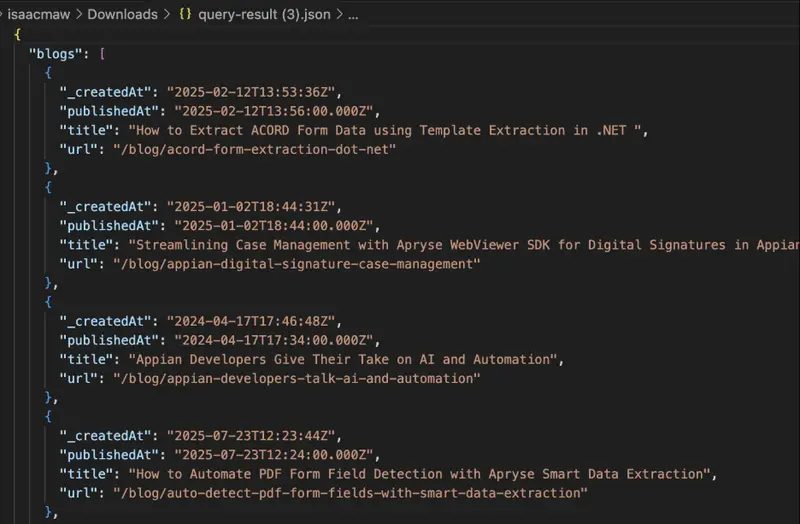
Because the Apryse SDK uses JSON data as input data for template generation, you can use your query result directly to start generating PDF documents right away.
Creating Your Template File
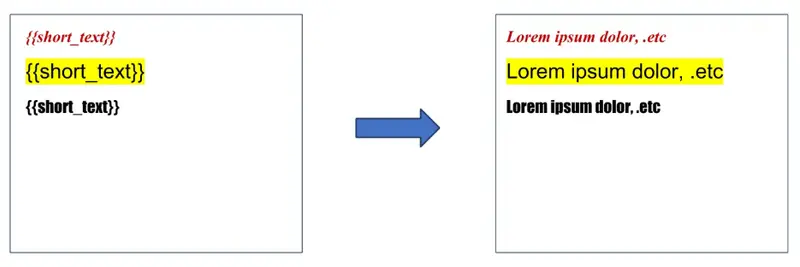
{ "short_text": "Lorem ipsum dolor, .etc" } Your template provides the document structure for your data. Use moustache tags for replacement data. Replacement data will take on the formatting (font, bold, italics, etc.) of the template file.
Sample Code
The following sample code is in JavaScript (e.g. for Node.js) but you can find sample code in other languages, such as C#, Python and PHP on our documentation page.
Pagination
Text reflows according to the rules set in the original template file, and will automatically generate extra pages if needed. Make use of column layouts and justification rules in your template file. You can also add page breaks to your template file.
Mapping JSON to the Template
How is your JSON data mapped to your template? This is defined by the SDK’s data model. The SDK includes error conditions for invalid template documents and invalid JSON, so you can check the descriptive message included with the exception to resolve any issues.
If you require a specific feature, or don't believe that the current template framework can meet your needs, then please contact us.
Currently, the model supports the following content values:
- Text string
- Images
- QR code
- Dynamic document structure (structured input)– html and markdown
- Objects, such as an address which includes street and number, for example
- Loops, which can be used to help generate multiple PDF documents from one JSON file, for example
- List loops
- Table row loops
- Conditionals
- Operators
- Learn more about advanced features
Conclusion
Document generation can be a valuable automated workflow helping you use the data in your SQL database faster and more easily, whether you’re in the insurance, finance or other industries. Because the Apryse SDK uses JSON format as input data for template generation, SQL queries are a natural fit for this workflow, generating production-quality reports on the backend with minimal effort.
Apryse offers a complete suite of document processing tools, making it the SDK of choice for developers that need to do more than just generate PDF documents. Find out more about our capabilities.
If you’re ready to try it out, get your trial key. Should you have any questions or are ready for production, please contact sales.