Garry Klooesterman
Senior Technical Content Creator
Published March 05, 2026
Updated May 18, 2026

5 min


How to Convert XML to PDF Using the Apryse Server SDK
Garry Klooesterman
Senior Technical Content Creator

Summary: If you’ve been tasked with turning raw XML data into a polished PDF report, you’ve likely realized that XML is the pointy bracket cousin of the CSV. It’s highly structured, usually verbose, but mostly unreadable for a human at scale. This blog will show you how to take that XML, turn it into a developer-friendly JSON structure, and use the Apryse Server SDK and a DOCX file to create a professional PDF.
Introduction
XML is fantastic for data interchange like financial transactions or medical records, but it has no clear visual representation that’s easily readable to a human. Converting XML to PDF means transforming structured XML data into a formatted, human-readable PDF document, typically by mapping XML elements to a template. To get from a .xml file to a meaningful PDF, you usually have two choices:
- Writing complex stylesheets that require significant coding.
- Using a library to manually draw every string at specific (x, y) coordinates.
With the Apryse Server SDK, you can go the template route for this document generation task by designing a DOCX file and then using JSON to map the data to that layout.
This blog will look at how to do this using the Apryse Server SDK in Python and look at some commonly asked questions.
Why This Beats Traditional Methods
- Template-driven layout: If the legal team wants to change the font from Arial to Calibri, you don't have to change a single line of code. Just update the DOCX file.
- Native document engine: Unlike HTML-to-PDF converters that struggle with page breaks and headers/footers, the Apryse engine is document-aware. It knows exactly how to flow a table across five pages while keeping the headers intact.
- Language agnostic: We’re using Python here, but the same logic applies to C#, C++, Java, and more.
How to Convert XML to PDF
Step 1: Convert Your XML to JSON
The Apryse Server SDK is optimized for JSON because JSON is the universal language of modern web data. To bridge the gap, we first need to convert our XML to JSON to make it truly usable.
Note: XML often includes attributes and nested tags that can be a bit redundant. When converting to JSON, your goal is to create a clean hierarchy that matches your document’s logical sections such as a "Customer" object containing an array of "Invoices".
Just like in our blog on generating a PDF from a CSV File, we’ll use the weather data for US cities. I’ve converted the CSV to XML using an online converter, and here’s an example of what it looks like when opened in Notepad.
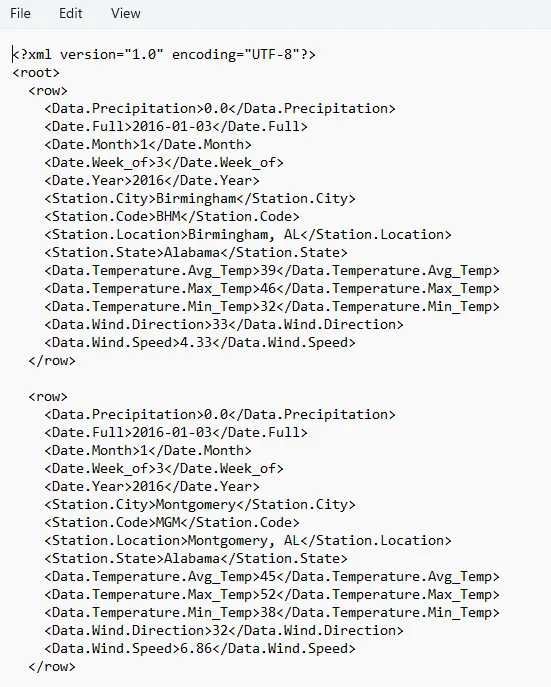
Figure 1: Raw data in XML file.
Now that we have our XML, we need to convert it to JSON. By doing a quick online search, you can find a number of XML to JSON converters. Or you can write your own script.
Here’s the same data converted to JSON. This example shows the data for Alabama. As part of the conversion, we’ve restructured it, removed unwanted data, and created just what we needed. You’ll need to do the same with your data for what you need.
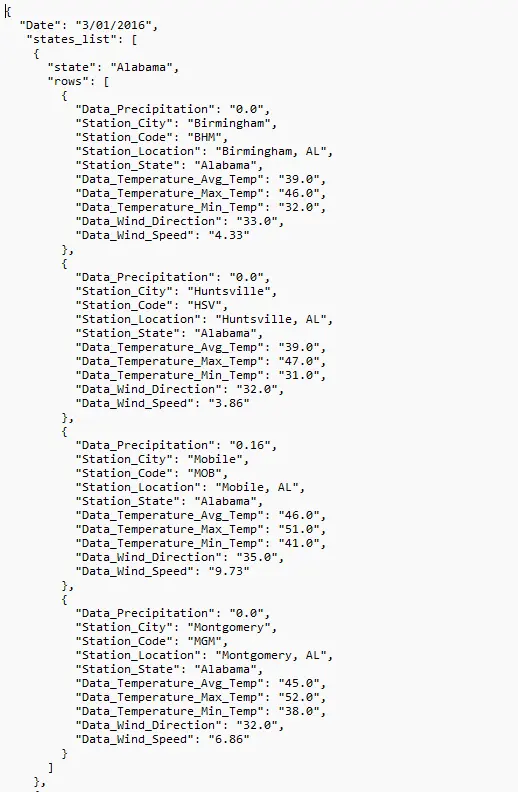
Figure 2: The same data converted to JSON.
Step 2: Map the Template
Now that our data is in JSON format, create a DOCX file with a table and use double curly braces {{ }} to mark where the data should go.
Loops: Use {{#rows}} and {{/rows}} to tell the engine: "Repeat this row for every city in my XML." Remember to use {{endloop}} to mark the end of the loop. Loops can also be nested.
Styling: Want the temperature to be Red if it’s over 90 degrees? You can handle conditional formatting or simply style the tag itself in the template. The SDK respects your fonts, margins, and colors perfectly.
Here’s the DOCX file with the tags set up.
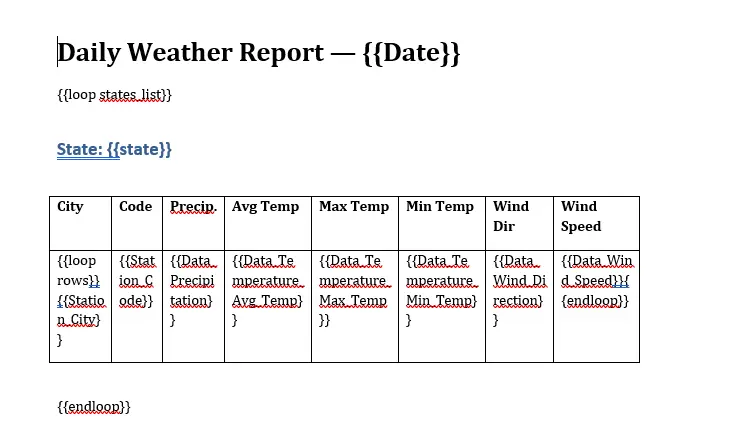
Figure 3: The DOCX template file we'll load the JSON data into.
Step 3: Merge Your Data into a PDF
Now that both the JSON data and the template are done, we’re ready to let the Apryse engine handle building the PDF for us. You don't even need Word installed on your server as this is a high-performance, standalone process.
Note: In this example, we’re using Python to handle the task, but this can be done in other languages as well such as C#, C++, Java, and more.
The following code creates a template from your DOCX file and then loads the JSON data file (day-3-01-2016-stringified_by-state.json). It fills in the template and saves the final file as a PDF.
Now here’s a look at the final file as a PDF with some weather data for Alabama and Alaska.
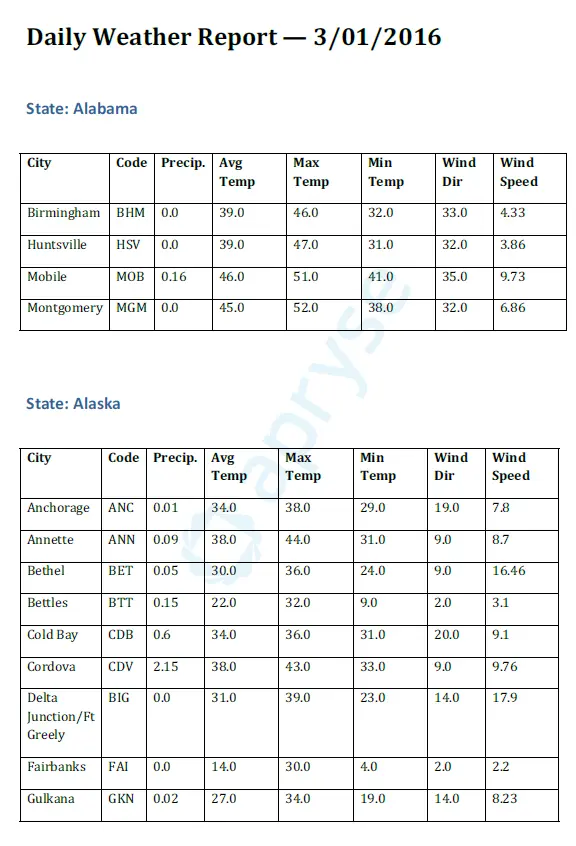
Figure 4: The end result saved as a PDF file.
Fluent as an Alternative
Just like converting CSV to PDF, we can handle this using Fluent for a way that involves less coding. Fluent is a document automation platform that simplifies report creation with minimal coding and allows users to design and manage data-driven Microsoft Office templates at scale to generate dynamic documents such as PDFs or Word files.
Key Features
- Integrate any data source
- Microsoft Office Plug-in
- Centralized Template Manager
- Microsoft Template SDK
FAQ
Can I handle very large XML files?
Yes. For large files, you can stream the XML parsing and generate the JSON in chunks. The Apryse engine is built for server-side performance and can handle high-volume document generation with a low memory usage.
What about complex nested loops?
Apryse supports nested loops. If your XML has Regions -> States -> Cities -> Districts, you can nest your {{#loop}} tags in your DOCX file to create nested tables or indented lists.
Do I need to worry about fonts?
As long as the font used in your DOCX file is available to the server SDK (or embedded), the PDF will look identical to the template design.
Conclusion
As we’ve seen, turning XML into a PDF isn’t as difficult as it seems. By using JSON as your data bridge and DOCX as your layout template, you can turn a complex coding task into a simple, maintainable workflow.
The Apryse Server SDK gives you the power to generate these documents at scale while maintaining total control over your data security and sovereignty. It also has many other benefits and features, such as digital signatures, redaction, and annotation that you can then use with your PDFs.
Try the Apryse Server SDK with a free trial or check out the documentation.
You can also contact our sales team for any questions and support.
Suggested Reads
- Blog: Generating Documents and Reports from DOCX Templates and JSON using Apryse and Ruby
- Blog: Exporting OCR Data to JSON with Apryse
- Blog: Generating Documents and Reports from DOCX Templates and JSON using Apryse and Angular
- Blog: Putting Apryse Smart Data Extraction to Work with JSON
- Blog: How to Generate a PDF from a CSV File