Garry Klooesterman
Senior Technical Content Creator
Published May 21, 2026
Updated May 21, 2026

7 min


Implementing PDF Measurement: A Developer’s Guide
Garry Klooesterman
Senior Technical Content Creator
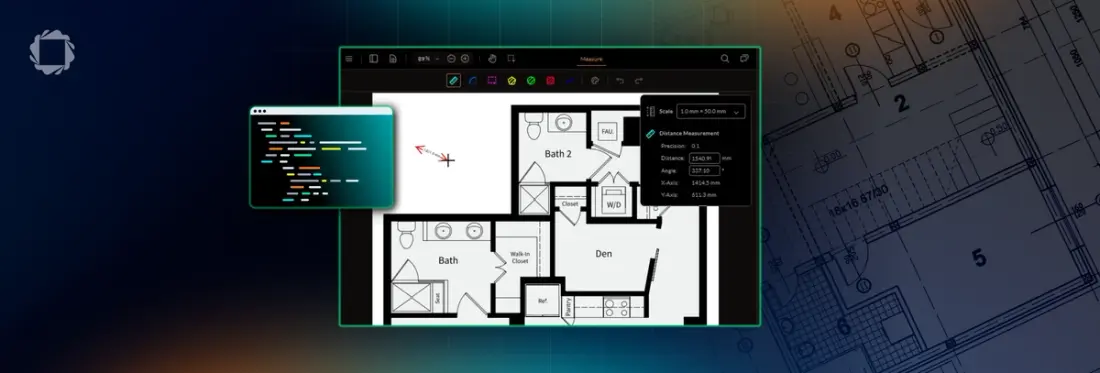
Summary: Adding measurement capabilities to a PDF viewer app requires accurate canvas scaling, calibration interfaces, and proper ISO-compliant annotation storage. This article walks through the architectural requirements of embedding PDF measurement tools, compares the four main implementation paths, and provides concrete code examples for both turnkey SDKs and building from scratch using PDF.js.
Introduction
Treating PDF measurement like a simple frontend drawing tool falls apart the first time a user uploads a real architectural or engineering blueprint. Blueprints are drawn to specific scales (for example, 1 in = 10 in), often contain different scales on different pages, and require highly precise snap-to-geometry logic. If your backend doesn't store these measurements using proper PDF standards, they won't show up when the file is opened in an external PDF reader.
This guide covers the code and data structures needed to implement production-grade PDF measurement.
What Embedding Measurement Actually Means
Before we get into the coding, let’s look at the full lifecycle of a document measurement. A complete implementation requires five distinct components:
UI Tool Activation: Updating your viewer's toolbar to support distance, perimeter, and area states, along with a custom crosshair cursor.
Scale Calibration: A utility that maps viewport pixels to real-world units (for example, translating a 100 px vector into 5.5 meters).
Vector Annotation Capture: Intercepting mouse or touch events on a canvas overlay to draw lines, rectangles, or complex polygons, while displaying a real-time tracking tooltip.
Standardized Metadata Storage: Serializing the calculated values into the document’s native annotation structure (XFDF/XML) using proper ISO dictionary keys, rather than burning flat text onto the page.
Hydration: Reading those stored coordinates and scale dictionaries on file reload to recreate interactive, editable measurement elements.
The Native Embedding Prerequisite
To add measurement tools, you must have control over the underlying rendering engine.
If your application renders PDFs by embedding the standard Adobe Acrobat Reader using an <iframe> or an <object> tag, you can't implement measurement. The free Acrobat embed is a closed ecosystem. It doesn't expose the low-level mouse-event APIs, canvas contexts, or annotation layers required to inject custom drawing tools or read vector paths. You need a programmable, client-side SDK.
Four Technical Approaches
When integrating these tools, your team will generally evaluate four paths. The primary choice comes down to whether document tooling is your core intellectual property or simply a feature on your roadmap.
Approach A: PDF.js from Scratch (Manual Canvas Drawing)
- Architecture: You use the open-source Mozilla PDF.js engine to render the document pages to HTML5 canvases. You must then build a custom canvas overlay system to capture mouse vectors, write your own geometry math, design a calibration UI from scratch, and manually handle zoom/pan responsiveness.
- Cost: Free (Open Source).
- Reality: High development cost. It takes weeks of senior developer time just to handle edge cases like page rotation and responsive zooming without losing measurement coordinates.
Approach B: PDF.js Express Measurement Module
- Architecture: A commercial UI layer that sits directly on top of open-source PDF.js. It replaces the basic PDF.js viewer interface with an expanded toolbar that includes pre-built distance, area, and perimeter utilities.
- Cost: Low-cost developer/SaaS license.
- Reality: Web-only. It provides the turnkey UI you need without requiring a massive enterprise budget, but it lacks advanced backend document processing.
Approach C: Apryse WebViewer Measurement Annotations
- Architecture: A complete commercial document engine that includes native CAD module support and advanced vector rendering out of the box. Measurement is a built-in feature controlled through UI flags and granular programmatic APIs.
- Cost: Commercial SDK licensing.
- Reality: It handles complex engineering requirements natively, including snap-to-object geometry, precision adjustments, and automatic calculation of overlapping perimeters.
Approach D: Nutrient / ComPDFKit
- Architecture: Alternative commercial PDF toolkits focused heavily on mobile and cross-platform native wrapper support (Flutter, React Native).
- Cost: Commercial SDK licensing.
- Reality: Strong options if your primary target is a native mobile app rather than a heavy web-based desktop engineering system. However, they lack native rendering for raw CAD files like DWG.
Walkthrough: Implementing with Apryse WebViewer
Implementing measurement using a commercial SDK takes minimal code because the underlying canvas interpolation and event tracking are completely abstracted away.
Once we have WebViewer set up as a basic PDF viewer, let’s take a look at the floor plan we’ll use in this example.
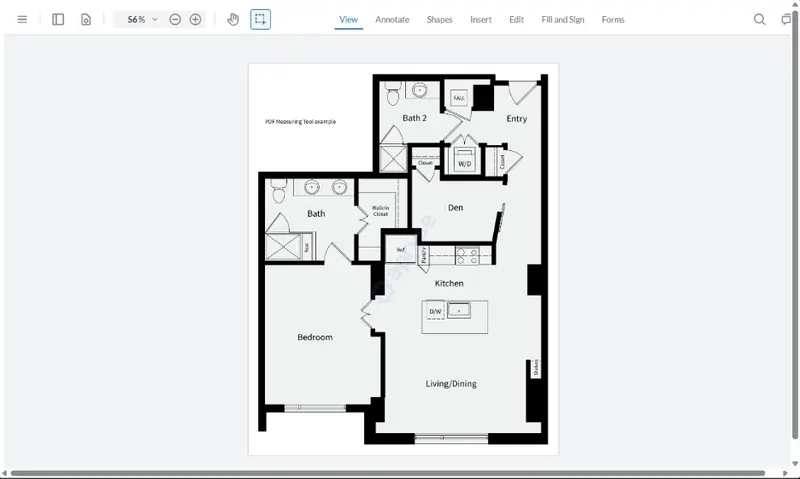
Figure 1: Our sample file opened in WebViewer as a basic PDF viewer.
Now we’ll implement measurement tools and open the same file.
First we’ll set up our index.html file.
Now we’ll add the JavaScript code we need in a <script> tag placed between the <div> tag and closing <body> tag.
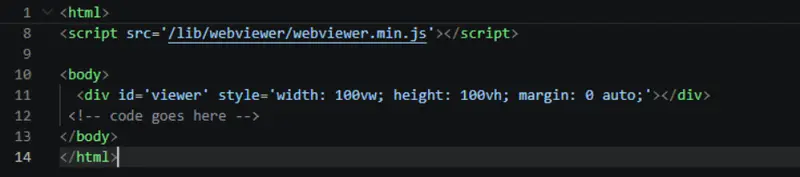
Figure 2: Where to add the code in the index.html file.
Let’s open the index.html file using the following command and see what we get.
npx http-server -a localhostAnd here’s the same file we looked at the first time. You can see that there’s a new Measure menu option and new tools for us to use.
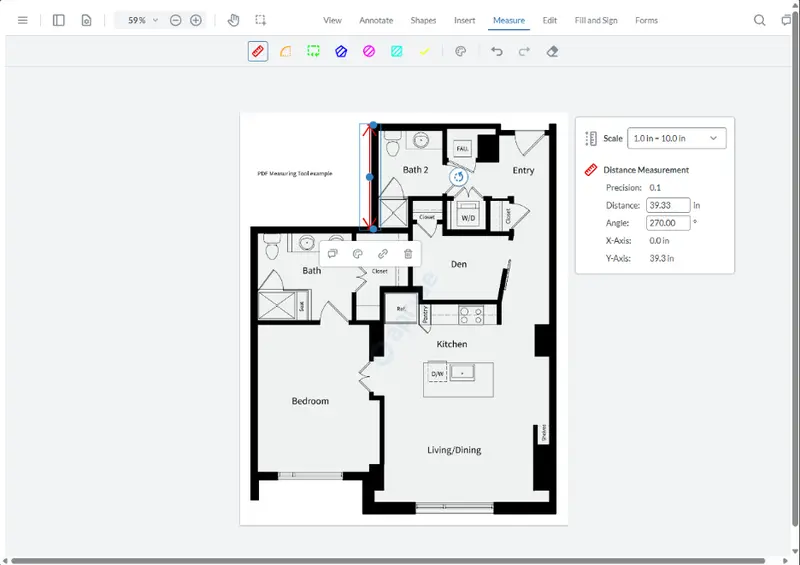
Figure 3: Same file opened in WebViewer with Measure tools.
Walkthrough: Implementing with PDF.js from Scratch
If you choose to build this on raw PDF.js without a commercial helper library, prepare your team for an extended engineering cycle. You cannot simply modify the PDF.js source code directly; you must build an independent application layer that sits synchronized on top of it.
The following set up is what your project would look like in this case. I won’t include the code here as it would be a lot.
To complete this implementation, your development team will need to build the following modules:
1. Coordinate Translation Layer: Read page.getViewport({ scale }).transform. When a user clicks at viewport position (X, Y), you must apply an inverse matrix transformation to calculate the actual PDF page coordinates points, accounting for variable browser zoom levels.
2. Stateful Event Handlers: Build a mouse/touch state machine. On mousedown, anchor the starting coordinates. On mousemove, clear the temporary canvas overlay and repaint a rubber-band vector line. On mouseup, finalize the vector array.
3. Math Translation Engines: Write specific calculation modules for geometric patterns:
- Distance: Standard Euclidean distance formula wrapped in your calibration factor.
- Perimeter: A running sum of consecutive vector lengths.
- Area: Implementation of the Shoelace Formula (Gauss's area formula) for arbitrary non-self-intersecting polygons.
4. Serialization Framework: Write a translator that takes your custom JS objects and maps them into valid XML strings matching the PDF XFDF specification, ensuring you include the required measurement dictionaries (/Measure, /Type, /Subtype).
Estimated Engineering Effort: Expect 4 to 8 weeks of active development for a senior frontend developer to bring a raw PDF.js custom measurement engine up to production standards.
Calibration UX Patterns That Don't Break
A measurement tool isn’t very useful if the system doesn't know the accurate drawing scale. When designing your UI, you need to handle three distinct layout patterns:
Pattern A: Reference Line Utility
The most reliable user-facing pattern. The user selects a known object on the blueprint (like a dimension callout or a doorway), draws a line across it, and manually inputs the real-world value (for example, typing "10 feet"). The system then computes the pixel-to-unit ratio based on that vector length.
Pattern B: DPI-Based Fallbacks
Many engineering files don't have explicit embedded scale metadata. Your system should read the PDF page boundaries (MediaBox / CropBox). By comparing the page points (72 points = 1 inch) to the expected physical sheet size (for example, Arch D, 24 in x 36 in), you can establish a baseline layout scale factor.
Pattern C: Multi-Page / Per-Page Scales
Never apply a single scale globally to an entire document. In CAD multi-sheet outputs, page 1 might contain a macro site plan scaled at 1 in = 50 ft, while page 2 contains a micro structural detail scaled at 1 in = 1 ft. Your annotation state manager must store scale ratios scoped strictly to individual page indexes.
Storing Measurements: Proper Database Architecture
The biggest architectural mistake developers can make is saving measurement values as simple strings inside the annotation text property (for example, writing contents = "12.5m"). This makes the data brittle. If another user moves the line vertices later, the text won't recalculate.
The ISO 32000 PDF specification defines a standard structure called the Measure Dictionary (/Measure). A real measurement annotation should be structured in your database or your XFDF data like this:
By storing data using this compliant layout structure, your measurements remain fully interactive and editable across the entire engineering document lifecycle, regardless of the software your client uses to open the file.
Handling Raw CAD Files (DWG / DXF)
If your application serves industries like architecture, AEC, or property insurance, you will eventually run into a major issue: users will try to upload native CAD files like .dwg or .dxf formats instead of flattened PDFs.
Standard PDF rendering libraries cannot parse native CAD vector layers. If your app needs to support direct drawing measurements on these formats without requiring users to purchase expensive CAD software licenses, you need an engine equipped with a dedicated file conversion pipeline.
Implementing a system like the Apryse CAD Module allows you to ingest native CAD layers on your server or directly in the client, extract the layered vector coordinates, convert them to high-fidelity PDFs, and immediately expose them to your measurement toolbar.
FAQ
Can I implement measurement tools using the Adobe Acrobat Reader embed?
No. The free Adobe Acrobat Reader web embed operates as a closed sandbox inside an iframe. It does not provide the programmable API access required to hook into mouse canvas events or inject custom drawing tools.
Do measurements survive if a user opens the PDF in external desktop software?
Yes, but only if you save them using ISO 32000-compliant annotations containing structural Measure dictionaries (using the /Measure key). If you just embed the measurement text onto the canvas as flat text, the annotation will lose its scaling data when opened in apps like the desktop version of Acrobat.
How do I handle files that have different scales on different sheets?
Your application must treat scale configuration as a property bound to the individual page index, rather than a global document variable. When the user switches pages in your viewer UI, your drawing manager must re-bind its pixel-to-unit logic to the current page's active scale matrix.
Conclusion
Integrating blueprint-grade measurement tools comes down to building or buying.
Choosing to build on top of raw PDF.js gives you complete freedom over software dependencies and infrastructure costs. However, it requires a dedicated deployment time of 4 to 8 weeks.
For platforms where document calibration is a secondary feature, leveraging a commercial framework like Apryse WebViewer allows your development team to focus engineering sprints on building core product metrics instead of rebuilding coordinate layout systems from scratch.
Whichever architectural choice your engineering team implements, prioritizing ISO 32000 metadata compliance ensures your data architecture remains flexible, standard, and perfectly integrated with external desktop rendering software throughout the entire lifecycle of an enterprise project.
You can try out the Apryse PDF Measurement Demo to see it in action.
You can also start a trial of WebViewer, which has many powerful features, such as digital signatures, redaction, annotation, and more.
If you have any questions, contact us for support.
Suggested Reads
- Blog: Best PDF Measurement Libraries for Developers (2026)
- Blog: Precision and Efficiency: How Apryse’s Measurement Tools Revolutionize AEC Projects