Native OOXML Editing vs JSON-Based Document Editors
Native OOXML editing means the document editor reads and writes the XML inside the DOCX file directly, with no intermediate format. JSON-based document editors convert DOCX to ProseMirror JSON or internal HTML on open, edits in that format, then converts back on save. The roundtrip loses OOXML-specific structures: tracked changes markup (w:ins and w:del elements), headers and footers, pagination, section breaks, and complex table formatting.
What Is Native OOXML Editing?
A DOCX file is a ZIP archive of XML parts, not a single binary blob. Unzip one and you find document.xml (the body content), styles.xml (paragraph and character styles), header1.xml and footer1.xml (headers and footers as separate files), and Content_Types.xml (a manifest declaring what each part is). The format is standardized as ECMA-376, also published as ISO/IEC 29500.
Native OOXML editing means the editor's in-memory document model maps directly to these XML structures. Inserting a paragraph creates a w:p element. Accepting a tracked change removes a w:ins wrapper and keeps the text inside it. The editor model is the OOXML. There is no separate internal representation that has to be translated into XML on save.
This is critical for anything beyond plain text. Paragraph styles, section properties, revision metadata, and table structure all live in specific XML elements with specific rules for how they nest and reference each other. An editor that models the document any other way must invent a mapping between its own model and OOXML, and that mapping is where fidelity gets lost.
How JSON-Based Editors Handle DOCX
Rich text editors take a different approach: content lives in the editor as ProseMirror JSON or an internal HTML representation, not as OOXML. Opening a DOCX file runs an import step: an importer parses the OOXML and converts it into that internal model. Editing happens entirely inside the internal model. Saving runs an export step: an exporter walks the internal model and generates new OOXML from scratch.
That is two conversion passes for every open-edit-save cycle, and each pass loses information differently. The importer decides which OOXML structures the internal model can represent and drops or approximates the rest. The exporter decides how to represent internal-model concepts, such as a JSON node for “inserted text,” back in OOXML, and it generates that XML fresh rather than editing what was already there.
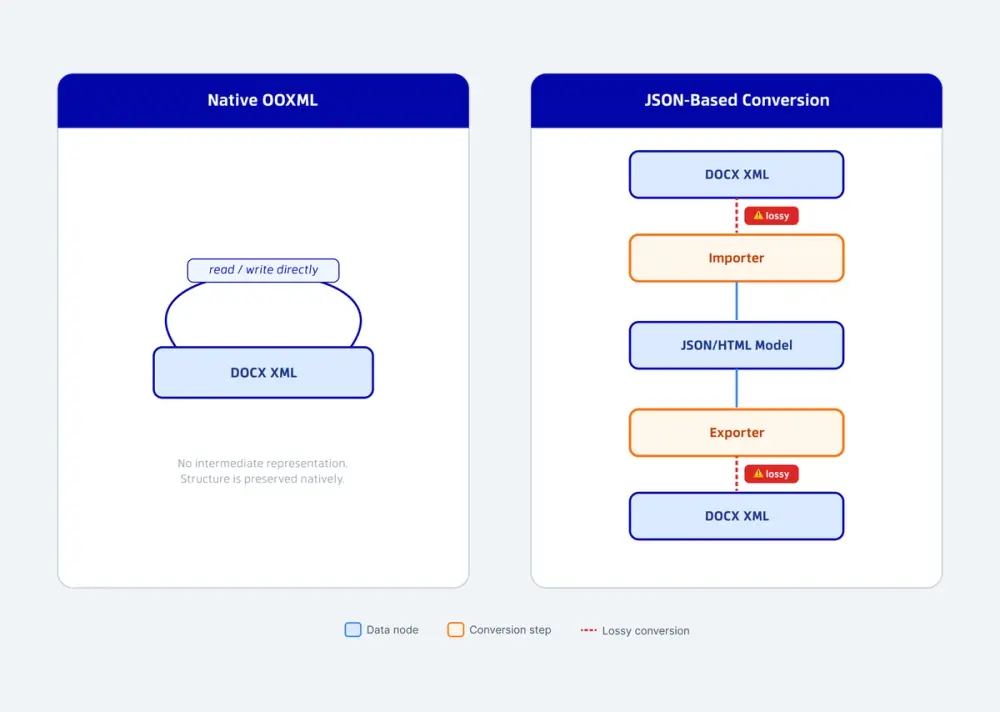
The practical result: content with a clean JSON or HTML equivalent, such as paragraphs and simple lists, survives the roundtrip well. Content specific to OOXML with no clean equivalent in a generic rich text model does not.
What Gets Lost in the Roundtrip
Four categories of OOXML structure consistently cause roundtrip loss in JSON- and HTML-based editors.
Tracked changes
OOXML represents an insertion as a w:ins element wrapping the inserted runs, carrying the author and timestamp as attributes:
A generic JSON or HTML model typically has no first-class concept of “this run was inserted by this author at this time.” Some editors approximate it with a custom mark or an <ins> tag, but the roundtrip back to OOXML has to reconstruct w:id, w:author, and w:date from whatever metadata the internal model kept, if it kept any. Apryse's DOCX Editor keeps the OOXML tracked-change structure as the source of truth throughout, and exposes it programmatically through the TrackedChangeManager API, so code can accept, reject, and inspect individual changes by ID without touching the underlying document model.
Headers and footers
In OOXML, a header or footer is not part of the main document flow. It is a separate XML part (header1.xml, footer1.xml, and so on) referenced from the section properties in document.xml. A conversion pipeline built around a single content stream has to decide where header and footer content goes in its internal model, and that decision is a common point of data loss or duplication on export.
Pagination and section breaks
OOXML stores page layout as section properties (sectPr): margins, page size, column count, and where one section ends and the next begins. A JSON or HTML model built for continuous, reflowable content generally has no equivalent concept, since HTML does not paginate. Section breaks and multi-column layouts tend to collapse into a single continuous flow on import.
Comments
OOXML anchors a comment to a text range using commentRangeStart and commentRangeEnd markers, with the comment content stored separately and referenced by ID. Reconstructing that anchor-and-reference relationship after a roundtrip through a generic model is a common source of comments landing on the wrong text or disappearing entirely.
Architecture Comparison
This table compares four architecture types by how they handle the structures covered above. “Office-style editors” refers to office-suite editors that are also native to OOXML but require a document server. “Rich text editors” refers to JSON- or HTML-based conversion editors. “Server-rendered editors” refers to editors that stream a server-rendered view of the document with no client-side document model at all.
Apryse is the only editor in the table that is both native OOXML and fully client-side. For a plain-language walkthrough of these same differences without the XML, see the WYSIWYG DOCX editor comparison.
The Server Dependency Question
Architecture and deployment are connected, not separate decisions.
Apryse's DOCX Editor runs entirely in the browser. The same C++ core that handles PDF rendering compiles to WebAssembly, and OOXML editing happens inside that WASM module with no document server in the request path.
Office-style editors that are also native to OOXML take the opposite deployment path. Producing correct OOXML output at the fidelity of a full office suite currently requires a server component: a document server running in Docker or Kubernetes that every edit round-trips through.
Server-rendered editors push the tradeoff further. The document never has a client-side model at all. A server-side renderer, typically built on an existing desktop office engine, renders each page and streams it to the browser as an image or a set of drawing commands, refreshing on every keystroke over a persistent connection.
Rich text editors sit in between. The editing surface itself is client-side, since the JSON or HTML model lives in the browser. But import and export, converting a real DOCX file in and out of that model, commonly runs through a server step, particularly for anything beyond simple documents.
Put the two variables on a grid, native OOXML on one axis, client-side execution on the other, and one quadrant stands out: native OOXML editing with no server dependency. Apryse is the only editor that fills that quadrant. For a closer look at what that removes from your deployment surface, see secure client-side editing.
When Architecture Choice Matters
Architecture differences stay theoretical until a document leaves your application and lands back in Microsoft Word or Google Docs, or until your infrastructure has to support the editor at scale.
Legal, financial, and healthcare workflows depend on documents surviving that trip intact. A contract redline that loses its w:ins attribution, a financial report that loses its pagination, or a clinical document that loses a comment thread is a fidelity failure in a regulated workflow, and the cause traces back to a JSON or HTML intermediate step with no OOXML-native way to represent what was lost.
Server dependency has its own cost, independent of fidelity. A document server adds a component to deploy, scale, patch, and monitor, and it puts document content on a server your team operates or a vendor's server you do not control. Either way, it widens the infrastructure and compliance surface around a task that, architecturally, does not require a server at all. For a closer look at building document logic against that surface programmatically, see programmatic DOCX editing.
If your workflow never needs the document to leave your application in native DOCX form, and a server component is acceptable, the roundtrip cost may not matter. If Word-correct fidelity and a smaller deployment footprint both matter, the architecture question comes before the feature-list question.
How Apryse Implements Native OOXML Editing
Apryse's DOCX Editor is built on PDFNetC, the same C/C++ core that powers every Apryse SDK. For the browser, that core compiles to WebAssembly, the same compilation path the rest of WebViewer uses. On iOS and Android, the identical core compiles to native binaries. There is no separate DOCX-editing engine maintained apart from the rest of the platform, and no intermediate JSON or HTML representation at any step between opening a file and saving it.
Editing operations, including text insertion, table edits, header and footer changes, and tracked-change accept and reject, act on the OOXML structures directly. TrackedChangeManager, available from officeEditor.getTrackedChangeManager() once the documentLoaded event fires, is one example: it operates on the same w:ins and w:del elements Word itself would produce, using numeric change IDs rather than document position.
Native OOXML editing is not the same claim as complete OOXML coverage. Where the DOCX Editor operates on OOXML, it operates on the actual structure, not an approximation of it.
For setup details, see the DOCX Editor setup guide and the track changes guide in the developer documentation. The XML structure is standardized in the ECMA-376 specification.
