Removing PII From Documents Before They Reach an LLM
A detection library finds Personally Identifiable Information (PII) in a document. It does not remove it. If a document enters a retrieval-augmented generation (RAG) index or reaches an agent with PII intact, detection has not solved the problem. Redaction destroys the content, and in a regulated pipeline the step must also be verifiable and leave an audit trail.
Detection Is Not Removal
A detection library returns findings: an entity type, a location in the text and often a confidence score. The PDF itself is unchanged. Every SSN the detector flagged is still in the file, readable by your chunker, your embedding job and any tool your Large Language Model (LLM) agent can call.
Removal is a different operation on a different object. A PDF redaction library, or a PII redaction SDK such as the Apryse Server SDK, rewrites the document so the matched content no longer exists in it. Redaction permanently removes text, images and vector content from the page. It does not draw a box over text that stays underneath.
That permanence cuts both ways. Redaction is irreversible once applied, so your pipeline keeps the original in your own storage and sends only the redacted copy downstream. Training pipelines have the same gap at larger scale, and the walkthrough on safer AI training data covers that case.
Where Redaction Sits in an Ingestion Pipeline
Redaction before RAG indexing runs between ingest and index, before anything downstream reads the file. The model, the index and the agent all sit after this step, so a PII value that survives it reaches all three.
Pipeline Stages
The SDK handles OCR, pattern search and applying redaction. Your code owns ingest, review routing, verification logic and indexing. Read redacting documents in bulk for running the sequence at volume, and redacting scanned documents for the OCR stage. For a language-specific walkthrough, see how to redact PDFs in Python.
Getting Started on the Server SDK
Follow the Python 3 get-started guide, then call PDFNet.Initialize once at process start with your license key, read from APRYSE_LICENSE_KEY. The Server SDK provides no work queue, job scheduler or batch orchestration, so your code owns the loop over documents. The Search and Redact guide has the working sample, including the apply step.
For the browser review step, set both fullAPI: true and enableRedaction: true in the WebViewer constructor, because Full API alone does not enable redaction. Wait for the documentLoaded event before any redaction call.
Search and Redact Scaffold
This example uses Python 3 on Linux. For other languages or platforms, see the Server SDK get-started guide.
This feature is included in the base Server SDK binary but requires a separate Redaction add-on license. See apryse.com/capabilities for licensing.
The scaffold marks every match in one pass and applies redaction once, so nothing is removed until the apply call runs. Apply cannot be undone, so run it on a copy and keep the original. The Search and Redact guide has the full sample.
Support Matrix: Server SDK and Web SDK
Rules-Based Pattern Matching or LLM Detection
Automatic PII detection splits into two approaches, and the choice is an engineering decision. Both find PII. Neither one removes it.
When Rules-Based Matching Wins
Rules win when the PII has a format. SSNs, credit card numbers and account numbers follow structures that a regular expression describes. A rule returns the same matches for the same document on every run, needs no model inference, and shows a reviewer exactly why a string matched. The Apryse Server SDK supports ambient string, wildcard and RegEx search patterns, with SSNs and credit card numbers as documented examples.
When LLM Detection Wins
An LLM wins when the PII has no format. A patient's name inside a clinician's free-text note, or an address written three different ways, matches no clean pattern. A model generalizes across phrasing where a rule cannot. The tradeoff is repeatability: output shifts between runs and between model versions, which makes the detection step harder to audit.
Using Both
Many pipelines run both, with rules for formatted identifiers and a model for free text. The detector decides what to remove. It does not remove it. Search by text string is documented for Redaction, so strings from an upstream detector can feed the same search-and-redact step. The detection capability documented for Apryse Redaction is pattern matching.
What a Detection Library Leaves Behind
A detection library leaves the document exactly as it found it. Three things stay in the file:
- The original text, still returned by any PDF text extractor.
- Images and vector content that carry identifiers, unchanged.
- Every false negative, because a missed match is never flagged for anyone to catch.
Masking PII in the extracted text protects the index but not the source file. Your retriever's citation links and your agent's file tools still open the original.
The common half-fix is a visual overlay. A black rectangle over matched text hides it on screen while the text stays in the file, so extraction still returns it. True redaction removes the content: the underlying text, image and vector content is destroyed, not covered.
Verifying the Document Before It Is Indexed
Verification is a step in your pipeline, not a setting in the SDK. Run the same pattern search against the redacted file, extract its text, and require zero matches before the file moves on.
Then write the record. Log the document ID, the patterns you ran, the match counts before and after, and a timestamp. Your app stores that log, and it is the audit trail the pipeline needs.
Verification proves what your patterns describe and nothing more. A name that no pattern covers passes the check, so pair the pattern check with the review step below for free-text risk.
Redaction removes visible content. Metadata, embedded scripts, form data and hidden layers sit outside the page and need sanitization, a separate capability in the base Server SDK package. Read redaction versus sanitization before you define a clean file for your pipeline.
Human Review in a Regulated Pipeline
Human in the loop (HITL) review belongs between mark and apply, because apply cannot be undone. In financial services, healthcare, government and legal workflows, a reviewer's sign-off before apply is often a policy requirement.
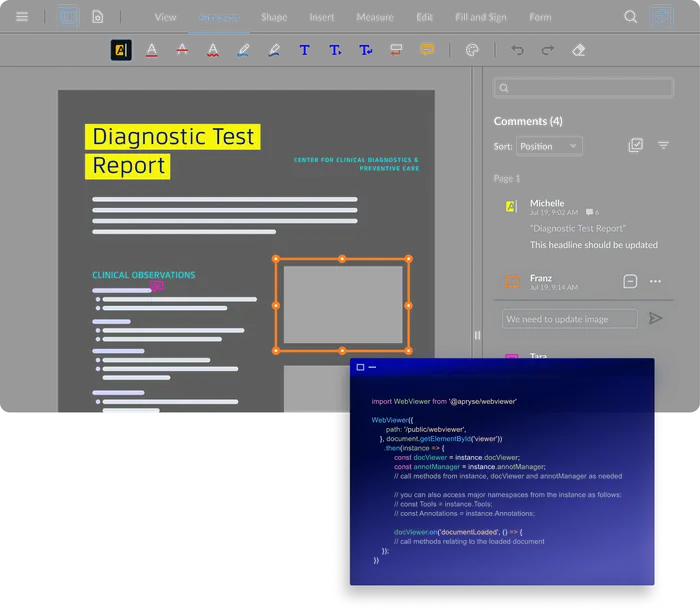
Your app owns that step: who reviews, what they can change and where the decision is recorded. The Apryse Web SDK (WebViewer) is where the reviewer works. Reviewers mark regions or text for redaction in the UI, and your app moves the document to apply only after approval.
Server SDK: Run the Pipeline
Pattern search, marking and applying redaction run on your own infrastructure, and no document content is sent to Apryse. Choose it when no person needs to open each file, or when review happens in a system you already run.

Web SDK: Review Before Apply
Add WebViewer when a person confirms marks before apply. Reviewers mark regions or text in the browser, including on mobile browsers. Keep the Server SDK for every document that skips review.
The Server SDK runs inside your own infrastructure, so you can keep documents on your own infrastructure from ingest to index. Compliance obligations stay with your team, and the SDK is designed to support them. For the sequence regulated teams follow, see the compliance redaction process.
Redacting Before Extraction, Not After
Extraction reads a document. Redaction removes content from it. Order them so redaction runs first.
Once a pipeline extracts text, tables or fields, those values live in a database, a prompt or a vector store, and redacting the PDF no longer reaches them. Redact the document, then run data extraction against the redacted file, and the extracted output never carries the PII. This page covers the removal side only.
Frequently Asked Questions
Detect the PII by pattern, mark the matched regions, apply the redaction so the content is permanently removed, then verify the output before indexing. The order matters: anything that indexes the document before the apply step has already ingested the personal data. Apply is irreversible, so keep the original in your own storage.
Detection alone does not remove anything, so a document that has been scanned for PII but not redacted still contains it. A pipeline built to support GDPR obligations needs three things: removal, verification that the matched content is gone, and a record of both. Your compliance team decides what satisfies your obligations.
Rules-based pattern matching is deterministic, auditable and repeatable, which is usually what a regulated workflow needs. LLM-based detection generalizes better to unstructured phrasing but is harder to audit and less repeatable. The detection capability documented for Apryse Redaction is pattern matching through ambient string, wildcards and regular expressions. Neither approach removes anything, so both still need an apply step.
Yes, and the order is the point. Redact the personal data first, then run extraction against the redacted document, so the extracted output never contains the PII. Running extraction first means the data has already left the document.
A scan has no text for a pattern to match against, so it runs through OCR first and detection works on the recognized text. OCR is a Server SDK add-on module with its own download, and Redaction is an add-on license, so both packages must be on your license key. The Web SDK does not provide this OCR module.
