
Isaac Maw
Technical Content Creator
Published February 04, 2026
Updated September 29, 2026

6 min


How To Generate PDF Documents from Dynamic Data in Node.js
Isaac Maw
Technical Content Creator
Generating PDF documents with dynamic data, such as database or customer input data, is tricky. Find out key considerations to evaluate Apryse SDK against other options, including jsPDF, HTML-to-PDF workflows, and API services to find the best solution for your Node.js application.
To generate PDF documents with dynamic data, such as from a database, user input, forms, or calculations, you need a solution that uses a template and JSON data to create a PDF document that reflows text to match the input data, and meets your specific style and branding requirements.
This article will help you find the right document generation workflow that meets your needs, from the most basic internal-facing report to a complex, polished multi-page document, all done on the backend in your Node.js application.
Use Cases
Creating PDF documents for dynamic data is essential for a number of common software workflows, such as:
- Event tickets and passes
- Mailing or shipping labels
- Personalized marketing materials, such as letters or offers
- Payroll documents, such as payslips and tax documents
- Dashboard reports and summaries, such as in manufacturing software
- Receipts, invoices, quotes and estimates
PDF Generation Solution Options
HTML to PDF Workflows
This is a popular technique for generating PDFs with dynamic data, but in practice, it can feel more like a hack or a workaround. Essentially, the idea is this:
- Create a HTML page programmatically, using your dynamic data and HTML/CSS for styling.
- Use headless Chromium to render your HTML file.
- Use a browser automation library such as Puppeteer to use built-in Chromium functionality to print your HTML file to PDF.
One issue with this workflow is latency and scalability, since using a browser like Chromium for this purpose can be resource-hungry. While a document generation SDK can generate a PDF in milliseconds, HTML-to-PDF could take 3-30 seconds to output a complex document. In addition, updates to Chromium can break your automation, requiring ongoing fixes and maintenance.
Another issue is with converting HTML to a PDF of sufficient quality. HTML is designed for fluid, responsive experiences, but PDFs are structured and paginated. HTML may not support headers, footers, margins and page breaks properly, depending on your needs.
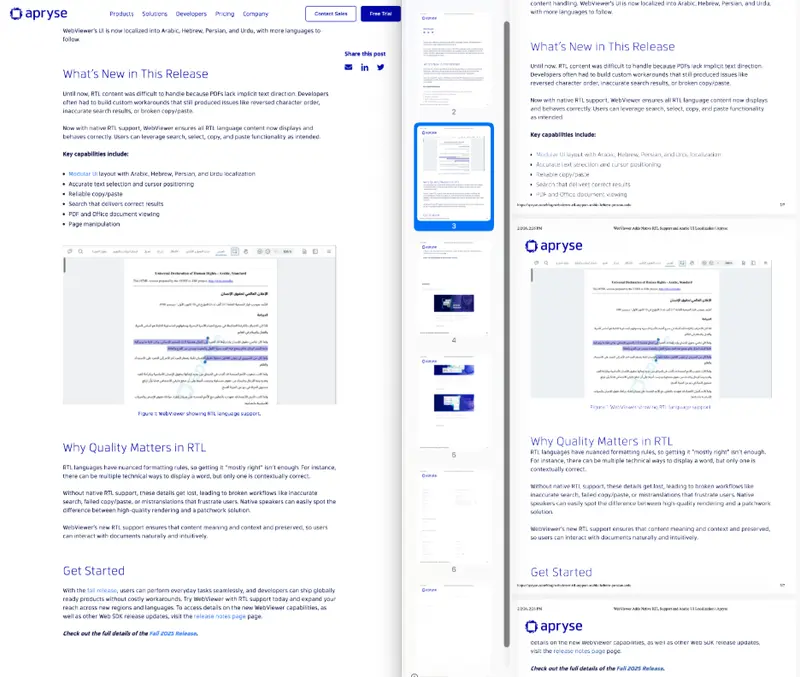
In this screenshot, a HTML webpage (left) is fluid. When it’s printed to PDF (right), Chrome automatically adds unwanted information to headers and footers. In addition, there are spacing differences, font differences, and body text in the “Get Started” section is cut off by the page break.
Open-Source Libraries
There are many innovative, easy-to-use open-source libraries for PDF generation that work with Node.js. For example, jsPDF and PDFKit are two popular options. These solutions are great when you need simple PDF files, but lack advanced features for creating professional documents, high-quality rendering, and predictable output at scale.
API Services
Another approach for PDF generation is to send dynamic data to a third party, and get a PDF back. However, this approach comes with drawbacks such as licensing, security and compliance constraints, and limited customizability.
Apryse SDK for PDF Generation
The first option is Apryse Server SDK. Our SDK allows you to own the full document and data lifecycle by deploying on your own infrastructure without worrying about third-party server dependencies.
With the Apryse SDK, Template Generation allows you to generate PDFs or MS Office documents from dynamic data, using a MS office template (such as DOCX) and JSON data. Input data is automatically styled according to the template, and content reflows automatically according to the length of the input data. Headers, footers and other layout elements are easy to customize and tweak to match your document needs. Document Generation also supports advanced features such as form fields and digital signatures. Visit our capabilities page to learn more.
You can get your free trial of the Apryse SDK today and generate whatever documents you want with an Apryse watermark. Get your trial key here.
What PDF Generation Solution to Choose: Key Considerations
No matter what type of document you are looking to generate, there are several important things to consider before you pursue a specific workflow.
How Many PDFs Does Your Application Need to Generate?
If generating a PDF document is a primary workflow in your application, such as a transaction receipt or event ticket, the application requires a different scale of PDF generation compared to an application that uses PDF generation less often, such as a medical data portal which offers PDF export as an option.
Whyit’s important: Open-source libraries or workarounds such as HTML-to-PDF conversion may not perform well at scale, while on the other hand, API services and commercial SDKs may offer licensing tiers based on scale.
How Good Do Your PDFs Need to Look?
If you’re building a way for an internal application to spit out a basic report and archive it, you may not need generated documents to look fancy.
However, for customer-facing documents such as tickets, invoices or marketing materials, you’ll need the ability to fine-tune styles, layout, fonts, and images.
Whyit’s important: Open-source libraries don’t always support complex styling features such as fonts, colors and images, and don’t always render high-quality documents. While HTML-to-PDF conversion workflows are often used because HTML and CSS allow for fine control over styling, HTML is designed for fluid, responsive documents while PDFs are rigid and paginated, so conversion isn’t always smooth and reliable. In addition, specific fonts you may require for branding may not be available to embed in your HTML document. Fonts that may encounter issues include Adobe fonts, Monotype fonts (such as Gotham and Futura) and more.
For pixel-perfect documents, Apryse offers superior rendering quality, as well as fine-tuned control over PDF features such as headers and footers.
Do You Anticipate Other File Format Needs?
Apryse document generation supports not only PDF output, but also Microsoft Office formats. That means you can easily meet evolving product requirements without additional developer overhead.
Whyit’s important: If your team builds a reliable PDF generation workflow using third-party API services or open-source JavaScript libraries, and your product requirements later change to include Office document generation such as XLSX, DOCX or PPTX, you may be back to the drawing board. With Apryse, you can change one line of code and have your solution.
What are Your Security, Privacy, and Uptime Requirements?
Using third-party document generation services via API may be a fast solution for generating your documents, but it may not meet the compliance requirements of your application or your customers. When PDF documents are generated using dynamic data via an external API, that means potentially sensitive data (such as financial, education or medical data) must pass through third-party servers. In addition, your document generation functionality will rely on third-party server uptime.
Secondly, open-source libraries may contain security vulnerabilities, especially older libraries that are not regularly maintained. Even if your chosen library is well maintained now, there’s no guarantee that updates and commits will continue for the life of your product.
Whyit’s important: Your customers may need to know where their sensitive data is going for compliance and security purposes. If your document generation solution relies on a third-party API, you may need to keep track of SLAs for uptime and performance.
What are Your Ease of Maintenance and Stability Needs?
There are a number of solutions to generate PDF documents from dynamic data, but they all have different maintenance requirements and offer different levels of stability for your application.
Whyit’s important: Different organizations and teams have different appetites for risk and maintenance. This consideration is especially relevant for HTML-to-PDF conversion workflows, which rely on tools such as headless Chromium. If Chromium changes in a future update, it could break your workflow and set you back.
In addition, using or forking an open-source library requires regular maintenance as well. Commercial SDKs, such as Apryse, require the least maintenance. Apryse includes regular releases, bug fixes, and updates to keep your application running reliably.
Do You Want Comprehensive Documentation, Support and Sample Code?
Having comprehensive and easy-to-understand documentation and support resources reduces developer overhead and speeds time to market. Apryse offers demos, sample code, human support agents and detailed get-started guides in our documentation to get you up and running faster.
Why it matters: Open-source solutions are well documented for common use cases, but if you’re doing something a little unique, it can be hard to find support. Commercial SDKs are often feature-rich, meaning if documentation isn’t comprehensive and clear, getting up and running can be complex.
Conclusion: Choose Apryse for Backend PDF Generation
We’ve reviewed a lot of information about PDF generation workflows. Here’s the key takeaway:
- For simple PDF generation at a small scale, such as outputting a text-only report for archiving, try an open-source JavaScript library.
- If you’re already using HTML documents such as emails, or HTML/CSS styling works better for you than a DOCX template, HTML-to-PDF conversion could work for your product. However, it’s more of a hack than a viable solution, and there are much better alternatives.
- Apryse SDK provides the best rendering quality for PDFs, and the most granular control over layout. Apryse SDK provides the most stable, scalable and low-maintenance solution. Finally, it’s extensible for advanced features such as digital signatures, annotations, and all the other features of the Apryse Server SDK.
If you’d like to get a trial key and start generating PDFs directly in your Node.js application (with an Apryse watermark), here’s how:
Apryse Document Generation: Getting Started
To get started, you’ll first need to set up Apryse Server SDK using the Node.js integration. Instructions for getting started can be found in our documentation. You can also watch the tutorial video for step-by-step instructions for using Apryse SDK in Node.js:
Using Template Generation
Apryse's office template generation framework enables the dynamic generation of PDFs:
- You provide a template in the form of an Office document (such as .docx)
- You provide replacement data in JSON form
- Apryse SDK will efficiently generate a PDF by merging the data with the template
- Fully featured, with support for loops, conditionals, images, table generation, etc.
- Use your preferred office editor to design attractive templates, and Apryse will take care of the rest
- All logic is entirely contained within the SDK, with no external dependencies
The generation framework requires minimal code to get up and running. Simply initiate a normal Office conversion, but with the optional TemplateParamsJson parameter set:


Contact Us
You can also try the browser-based demo of our template generation SDK in our Showcase. For more information about licensing, please contact sales.
