Nikki Manthey
Published January 12, 2024
Updated October 26, 2026

9 min


Automated Redaction for Legal Operations
Nikki Manthey
Summary: Legal teams redact to a different standard than most industries, because a production set goes to opposing counsel and a privilege call that goes wrong is not recoverable. This article covers the legal review workflow end to end, how discovery and privilege redaction differ from privacy redaction, how reviewer approval works before anything is destroyed, what the audit trail has to hold, and what still has to be sanitized before a production set leaves the firm.
This article covers the legal operations workflow. Review and approval run in the browser on the Apryse Web SDK; production-set volume and sanitization run headlessly on the Server SDK. Each section states which surface applies. For the generic redaction process that applies across regulated industries, see the compliance redaction process.
Redaction is one of the few steps in a legal document workflow where the mistake is permanent in the wrong direction. A missed identifier in a production set has already been disclosed by the time anyone notices, and an over-redacted production invites a motion. Both failure modes come from the same place: a review process that cannot be evidenced after the fact.
In a previous blog post, we covered the perks and pitfalls of AI in legal documents. In this post, we’ll dive into how automated redaction tools like those included with Apryse WebViewer can help law firms protect client privacy, reduce errors, meet deadlines, and maintain compliance.
Why Redaction is Essential in the Legal Sector
For legal professionals, handling documents with sensitive client info is business as usual. Redaction removes confidential details from these documents before they’re shared or submitted. Protecting that data via redaction is critical for maintaining privacy and ensuring customer trust.
Data privacy usually leads the pack for reasons to redact information in legal documents, and it can apply to many different situations. These can include protecting the identities of witnesses or victims to ensure they remain anonymous, mitigating the potential risk of identity theft if unauthorized parties gain access to documents, and preventing the accidental disclosure of confidential information or sensitive case details that may impact the integrity of judicial processes.
Privilege is the category that makes legal redaction different. Personal identifiers are either present or absent, and a pattern can find them. Privileged material is a judgment: whether a passage reflects legal advice, work product or a communication protected by privilege is a call a reviewer makes, not a rule a pattern applies. That distinction shapes the whole workflow below.
Discover redaction tips and best practices in our Ultimate Redaction Guide.
What Kinds of Data are Redacted in Legal Documents?
You can use automated redaction tools to easily identify and redact any type of information you want. Here are some common data points that are often removed from legal documents:
- Names
- Dates of birth
- Phone numbers
- Addresses and other location information
- Financial information including credit card numbers, bank details, and financial records
- Government info like Social Security Numbers (US) or Social Insurance Numbers (Canada)
- Privileged communications
- Images and videos that contain likenesses
Those eight do not behave the same way under automation, and it is worth separating them before building a rule set. Names, dates of birth, phone numbers, addresses, account and card numbers and government identifiers are structurally regular, so ambient string matching, wildcards and regular expressions will find most instances. Privileged communications and likenesses in images are not: privilege requires a judgment and an image has no text for a pattern to match until it has been through OCR.
You can also use redaction tools to automatically remove info from any kind of document a law firm might use, including:
- Agreements: This includes documents like non-disclosure agreements (NDAs) and lease agreements.
- Court documents: Documents used in legal proceedings, like affidavits, complaints, motions, and subpoenas, often need to undergo redaction before they’re submitted.
- Contracts: This covers a wide range of legally binding documents, including service agreements and employment contracts.
- Legal forms: These include power of attorney documents, divorce petitions, and other forms.
- Wills and trusts: In some cases, redacting names and other information may be necessary when distributing assets after a death.
Get 4 tips on how to securely handle redacted documents. Read the blog.
The Legal Review Workflow, End to End
A redaction step on its own is not a workflow. In legal operations the redaction sits inside a review sequence, and most of the risk lives in the handoffs rather than in the removal itself.
Intake and scoping: The document set arrives and the scope is set: which documents are responsive, what is being produced, and to whom. Who the recipient is changes what has to come out, so the same source document can produce different redacted versions for opposing counsel, for a regulator and for a public filing.
Detection: Automated rules find the structurally regular identifiers across the set and mark them as candidates. This pass is fast and it is not the review; it narrows what a human has to look at.
Privilege and exemption review: A reviewer works the candidates and the documents the rules could not judge. Privilege calls, work product and confidentiality designations are made here, document by document, and recorded with a basis.
Reviewer sign-off: Someone with authority approves the marked set before anything is destroyed. This is the last reversible moment in the workflow.
Apply: The redactions are applied and the marked content is permanently removed from the output. From this point the removed content cannot be recovered from the produced file.
Verification and production: The output is checked to confirm the marked content is absent rather than hidden, the hidden-data step is run, and the production set goes out with its log.
The sequence matters more than any single step, because the only part that cannot be redone is the apply step, and everything protective sits before it. For the generic version of this process across other regulated industries, see the compliance redaction process.
Discovery and Privilege Redaction
Discovery is where legal redaction stops resembling privacy redaction. In a privacy workflow the question is what personal data is present. In discovery the question is what the producing party is entitled to withhold, and the answer is usually privilege, work product or a confidentiality designation rather than anything a pattern can recognize.
That has three practical consequences for the tooling. First, automated detection cannot make the call, so it has to produce reviewable candidates rather than applied redactions. Second, the basis for each withholding has to be recorded alongside it, because a privilege log is a deliverable in its own right and it is built from the same decisions. Third, over-redaction carries its own cost: withholding more than privilege supports invites a challenge, and the challenge is argued from the log.
Partial redaction is the normal case rather than the exception. A document is rarely wholly privileged; a paragraph of legal advice inside an otherwise producible email is the typical shape, and the surrounding content has to stay readable and intact. That is precisely what redaction is for, as distinct from withholding the document entirely.
See redaction use cases by industry for how other regulated sectors structure the same decision.
Moving Away from Manual Redaction
Redaction technology has come a long way from the days of using markers or tape to remove sensitive information from reams of paper documents. Not only were these manual methods painfully time-consuming, they were also open to human error and data security risks.
For example, if you pass a marker over a handwritten document, the indentations made by the pen are still there. As a result, you might still be able to read the redacted information by tilting the paper or using an oblique light source. Not exactly an ironclad (or recommended) security method.
In the era of digital documentation, it might be tempting to use word processing programs or good old MS Paint to draw a black box over the info you want to remove. Though this slightly higher-tech method may seem effective, it’s not any more secure than a Sharpie, as the Canadian federal government found out in 2021.
Canadian Border Services Agency (CBSA) staff preparing for a court case redacted highly sensitive information related to national security by manually highlighting text in a word processing program, then changing the highlight color to black. When they converted the documents to PDF, that (somewhat redacted) information became readable.
Unfortunately, stories like this remain common, which highlights an urgent need for secure and permanent redaction solutions like those offered by Apryse.
The mechanism is the thing to take from that example. A highlight, a drawn rectangle or a changed fill colour is a visual layer over content that is still in the file, and converting or re-saving the document can expose it again. True redaction destroys the text, image and vector content inside the marked region, and the destroyed content is not hidden behind a clipping path or an image mask. See true redaction versus visual masking.
Check out this video for a demonstration of document redaction in WebViewer. (Feel free to rewind a bit if you’d like to see what else Apryse WebViewer can do.)
Explore the Benefits of Automated Document Redaction Tools
Not inadvertently revealing national security secrets and maintaining client data privacy are just two of the many advantages of automated redaction tools. Here are a few more ways Apryse WebViewer can help.
Reduce Human Error
As detail-oriented as law professionals are, nobody can achieve 100% accuracy all the time. Apryse WebViewer’s automated redaction greatly reduces the chances of important information being missed and staying visible. For example, if you need to redact a specific name, enter it into the search bar. WebViewer will mark all instances of that name for redaction, and then you just have to click “Redact All.”
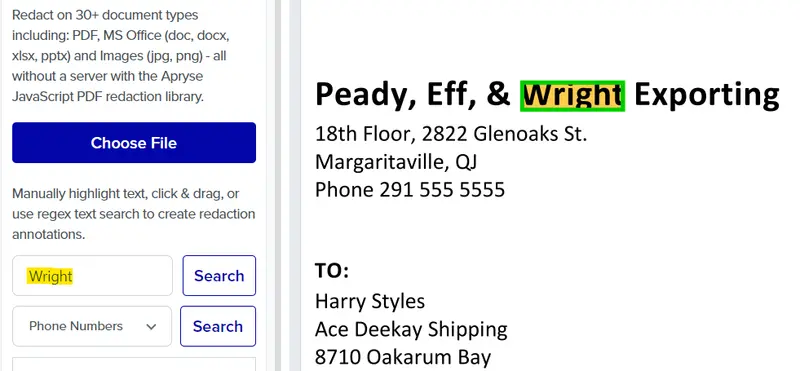
Note the order in that example: the search marks every instance, and a separate action applies them. The marking pass is what catches the instance a reviewer would have missed on page 340; the apply action is what makes it permanent.
Review Time Across a Large Document Set
There is a limited number of hours in a day, which can feel like a challenge when you’re working on a complex case with lots of paperwork. Automating the redaction process can save you a significant amount of time when it comes to document review, preparation, and submission, which is especially helpful when there’s a looming deadline.
Where the time is actually saved is in triage rather than in the removal. The automated pass handles the identifiers that follow a pattern, which is most of the volume, and leaves the reviewer with the privilege calls and the documents the rules could not judge. The reviewer's hours go to the decisions only a reviewer can make.
Meeting Regulatory and Court Requirements
Law firms have an obligation to stay compliant with regulatory requirements at federal, international, and state or provincial levels. This can be an extremely complex challenge, especially where data privacy and cybersecurity are concerned. Using automated redaction tools to protect sensitive info makes it easier and more efficient to remain compliant with strict regulations and mitigates risk if a data breach does happen.
To explore the benefits of automated document generation for legal workflows, visit our blog.

How Apryse WebViewer Works
Redacting information with WebViewer is as easy as using MS Paint to draw a black box, but it’s much more secure. Here’s a quick overview of how WebViewer works.
Automated Redaction for PDFs and More
The Apryse WebViewer SDK supports automated redaction across more than 30 document formats. It can precisely identify and redact confidential information in PDFs, MS Office files, images, and more. You can either select from predetermined redaction options like emails, phone numbers, and credit card numbers, or search for specific text. Then you can permanently and securely remove the info in just a couple of clicks.
Two constructor properties are required before any of this is available: both fullAPI: true and enableRedaction: true must be set, and Full API alone is not sufficient. All redaction operations wait for the documentLoaded event. See the secure PDF redaction developer guide.
Redact with Regex
If you need to define custom parameters for identifying and redacting specific types of content, the WebViewer SDK also supports regular expression-based (regex-based) redaction. This is useful if you want to search for and redact data that has a recurring pattern or format. For example, you can add a regex search pattern to automatically redact passport numbers.
Pattern matching covers ambient string, wildcards and regular expressions, with SSNs and credit card numbers as documented examples. For legal work the useful additions are matter numbers, client identifiers and Bates numbering formats, which are firm-specific and therefore exactly what a custom pattern is for.
Redacting Across a Production Set
WebViewer handles multiple occurrences within a document and across the documents a reviewer is working through. A production set is a different shape of problem: thousands of documents, no reviewer per file, and no UI in the loop. That workload runs headlessly on the Apryse Server SDK, applying the same detect, mark, apply and verify sequence per document.
Two things to plan for before scoping that work. Verification has to happen per document rather than per set, so a document that failed detection is held back instead of produced with the rest. And the Server SDK provides no work queue, job scheduler or batch orchestration, so the loop, the parallelism and the retry behaviour belong to your application. See redacting documents in bulk.
Reviewer Approval Before Redactions Are Applied
Since redaction via WebViewer is permanent and can’t be undone once it’s finalized, it includes a visual verification feature that enables you to review the info that’s marked for removal. You can then choose to either validate those redactions manually or automate using the "Redact All” button.
This is the mechanism the legal workflow depends on. Redact annotations mark the regions to be removed and stay visible, movable and re-definable for as long as they remain unapplied. A reviewer can approve a candidate, adjust its boundaries or reject it outright, and a supervising attorney can sign off on the marked set before anything is destroyed.
Applying the redaction is the irreversible step, which is why approval belongs before it rather than after. In a discovery context the practical pattern is: automated detection produces candidates, candidates go into a review queue with a privilege basis recorded against each one, a reviewer with authority approves the set, and only then is the apply step run and the production copy generated. See enterprise-grade redaction.
What Still Has to Be Sanitized Before a Production Set Leaves the Firm
Document metadata such as timestamps, author names and revision history can reveal what a redaction was meant to withhold, and in a production set that matters as much as the visible content. It is also a different operation.
Redaction removes visible page content: the text, images and vector regions inside the marked regions. Sanitization removes hidden, non-visual content from the file's internal structure: metadata, XFA and XMP data, embedded scripts, form data and hidden layers. Sanitization is included in the base Apryse Server SDK package and is Server SDK only, so a browser-only integration can redact but cannot sanitize.
For a production set the consequence is concrete. A document that has been redacted but not sanitized can go out carrying the author name, the revision history or form field values that the redaction was there to withhold, and it will pass a visual check on the way. Both operations belong in the production pipeline. See redaction versus sanitization and PDF sanitization.
Audit Trail For a Production Set
Applying a redaction destroys the content, which means the record of the process is the only thing left that can show how a production was handled. If a withholding is challenged, the removed material is not available to re-examine; the log is.
For a legal production that record should hold what was detected and by which rule, what the reviewer approved or rejected, the basis recorded for each withholding, who signed off and when, when the apply step ran, and what the verification check returned. The withholding basis is the part that distinguishes a legal audit trail from a privacy one, because the question on challenge is why something was withheld rather than whether something was missed.
Keep the original. Redaction is irreversible, so a firm that may have to revisit a privilege call needs the unredacted source still in the system of record, with the production copy as a derivative rather than a replacement. That also lets the same source produce different redacted versions for different recipients without re-doing the review.
For more technical details on Apryse redaction capabilities, check out our developer documentation. To learn about redaction features in WebViewer, read our web guide.
For server-side implementation in a production pipeline, see server-side redaction in C# and server-side redaction in Java.
Frequently Asked Questions
What are best practices for using secure redaction tools in legal work?
Detect by pattern first to narrow the set, keep privilege calls with a human reviewer, require sign-off before anything is applied, verify each produced document rather than the set as a whole, record the basis for every withholding, and run sanitization as well as redaction before the production leaves the firm. The sequence matters because applying a redaction cannot be undone.
How is privilege redaction different from redacting personal data?
Personal identifiers are either present or absent and a pattern can find them. Privilege is a judgment about whether a passage reflects legal advice, work product or a protected communication, so automated detection can only produce candidates for a reviewer. The basis for each privilege withholding also has to be recorded, because the privilege log is built from those decisions.
Can redactions be reviewed and approved before they are applied?
Yes, and in legal workflows this is the normal pattern. Redact annotations mark candidate content and remain visible, movable and re-definable until the apply step runs, so a reviewer can approve, adjust or reject each one and a supervising attorney can sign off on the set. Applying the redaction is the irreversible step.
Does redaction remove document metadata as well?
No. Redaction removes visible page content. Metadata, XFA and XMP data, embedded scripts, form data and hidden layers are removed by sanitization, which is included in the base Apryse Server SDK package and is Server SDK only. A production copy that has been redacted but not sanitized can still carry author names and revision history.
How do we redact a production set of several thousand documents?
Run the same detect, mark, apply and verify sequence over each document headlessly on the Server SDK, and verify per document so a file that failed detection is held back rather than produced. The Server SDK provides no work queue or job scheduler, so the loop, the parallelism and the retry policy belong to your application.
What should a redaction audit trail contain for a legal production?
What was detected and by which rule, what the reviewer approved or rejected, the basis recorded for each withholding, who signed off and when, when the apply step ran, and the verification result. Because the withheld content is destroyed, that record is the only evidence available if a withholding is challenged.
Can we produce different redacted versions of the same document for different recipients?
Yes, and it is usually cleaner than negotiating one version that suits everyone. Keep the unredacted original in the system of record and generate a redacted derivative per recipient, since what has to be withheld from opposing counsel, from a regulator and from a public filing is rarely the same set.
Can redaction run on scanned case documents with no text layer?
Not directly. A scan has no text for a pattern to match against, so it goes through OCR first and detection runs against the recognized text. Handwritten exhibits and older correspondence need ICR rather than OCR. Both OCR and Redaction are Server SDK add-ons and both packages must be on the license key. See redacting scanned documents.
Putting Automated Redaction into a Legal Workflow
Three things are worth carrying out of this article. Automated detection narrows the work but does not make the privilege call, so the review step is the workflow rather than an add-on. Applying a redaction cannot be undone, which is why sign-off sits before it and the audit trail is the only evidence afterwards. And redaction alone does not clear a document for production: sanitization is a separate Server SDK operation, and both belong in the pipeline.
If you’d like to try the redaction tool first, head over to our showcase. When you’re ready to build: Start a Free Trial (Web SDK) for the review and approval workflow, or Start a Free Trial (Server SDK) for production-set volume and sanitization. You can also get in touch with our team if you have questions.
See also redaction use cases by industry and PDF redaction.