Mia Perese
Published April 15, 2026
Updated May 18, 2026

3 min


Introducing Spreadsheet Editor In-App Chart Support
What's new in WebViewer 11.12: Spreadsheet Editor chart support
Mia Perese

WebViewer 11.12 adds chart support to Spreadsheet Editor, allowing users to view, edit, and save charts in XLSX files without leaving their browser-based workflow. Supported chart types, including bar, line, column, and pie, render with full fidelity and remain intact when the file is downloaded and opened in Excel. Additional chart enhancements are planned for WebViewer 12.0.
What's new in WebViewer 11.12: Spreadsheet Editor chart support
How chart support works
Spreadsheet Editor now renders charts contained in imported XLSX files and keeps them fully interactive throughout the editing session. Users can modify the underlying cell data, and the chart updates automatically, whether the value changes directly or when a formula recalculates.
Supported chart types
Chart support covers the four most common chart types found in XLSX files shared in data-intensive workflows: bar, line, column, and pie.
What's preserved throughout the session
When an XLSX file containing charts is loaded into Spreadsheet Editor, each chart retains:
- Layout: chart dimensions and placement relative to the cell grid
- Data references: the cell ranges each chart reads from
- Styling: colors, fonts, and formatting from the original file
- Positioning: charts stay fixed in their position when scrolling, and zooming in or out maintains rendering quality at all zoom levels
These properties are preserved not just on load but also during editing and on export. A file saved in Spreadsheet Editor and opened in Excel will have charts that look and behave the same as the original.
How charts update when data changes
When a cell value that a chart references is changed, the chart updates immediately to reflect the new data. Formula recalculation triggers the same behavior. Charts stay current throughout the editing session without requiring any manual refresh step.
Export and Excel compatibility
Edited files export with full chart fidelity. For example, the process of loading a workbook, editing data, saving, downloading, and opening in Excel will maintain all chart properties.
Why this matters for shared document workflows
Most users working with spreadsheets in web apps don't create charts from scratch. Instead, they handle files made in Excel, shared through data rooms, reporting tools, or client portals, which must be reviewed, updated, and returned intact.
With chart support in WebViewer 11.12, Spreadsheet Editor renders any charts that already exist in imported XLSX files with full fidelity. This in-app functionality makes software feel a little more intuitive when handling reporting or planning tasks.
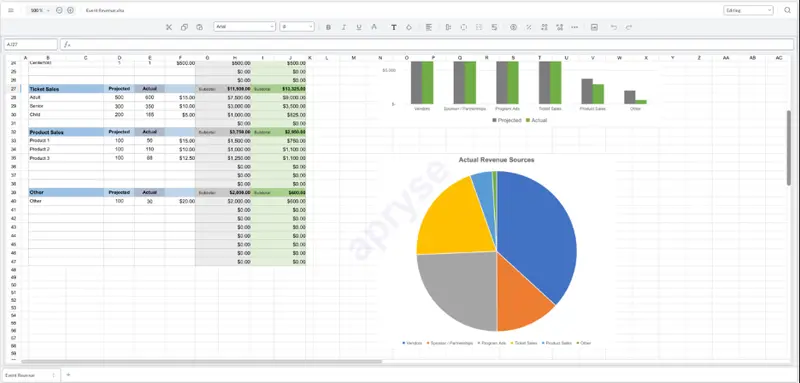
Figure 1: Spreadsheet with data and a chart.
Also new in WebViewer 11.12
Spreadsheet Editor's chart support is one of three editing updates in the Spring 2026 Web SDK release. The others address document and comparison workflows that often run alongside data work.
DOCX Editor's In-Document Commenting: DOCX Editor now supports threaded comments with role-based permissions, preserved on export and readable in Microsoft Word. Reviewers can give feedback tied to specific content without making direct edits.
Multiviewer's Side-by-Side Document Markup: Multiviewer now supports interacting in both panes simultaneously, not just viewing. Users can compare and markup two documents at once without switching contexts.
To explore everything included in this release, check out the detailed Web SDK release notes or start testing chart support directly in Spreadsheet Editor.
Frequently asked questions
Bar, line, column, and pie in WebViewer 11.12. More types are planned.
Not in this release. Chart support applies to charts already present in the imported XLSX file. The underlying data can be edited, but inserting a new chart from within the editor isn't supported yet.
Automatically. Change a value the chart references, directly or through formula recalculation, and the chart updates immediately. No manual step needed.
Yes. The full round-trip holds: load, edit, save, download, open in Excel. All chart properties come through intact.
Layout, data references, styling (colors, fonts, formatting), and positioning. Charts stay fixed in the grid while scrolling and render crisply at all zoom levels.