Mia Perese
Published April 15, 2026
Updated May 18, 2026

5 min


DOCX Editor Now Supports Comments: In-Document Review for Web-Based Document Workflows
What's new in WebViewer 11.12: DOCX Editor comments
Mia Perese
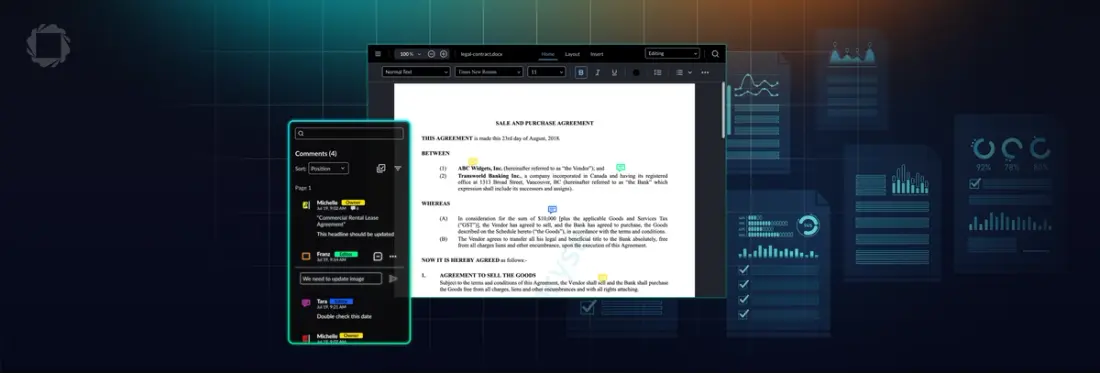
WebViewer 11.12 adds commenting support to DOCX Editor, giving developers a way to embed full document review workflows directly inside their web applications.
What's new in WebViewer 11.12: DOCX Editor comments
Document workflows vary widely, from generating content to contract redlining to reviewing AI-generated suggestions. But the needs at the center of these actions are universal: users must be able to view, interpret, and respond to document content without leaving their workflow. And until now, many review processes still required external communications to capture feedback.
WebViewer's DOCX Editor now supports a complete commenting layer for in-browser document review. Users can add comments anchored to specific content, reply to existing comments, and manage feedback without directly editing the document.
This release also adds a strikethrough toolbar button (keyboard shortcut: Ctrl/Cmd + S) to the DOCX Editor toolbar.
Commenting is available in both viewing and reviewing modes, and can be used simultaneously with tracked changes. For example, a reviewer can leave a comment on a tracked change to explain why a particular edit was suggested.
Why comments, not direct edits?
Not every reviewer should be making direct content changes. In many document workflows, the most common review pattern is:
- A document owner creates or generates the initial content
- Reviewers provide contextual feedback without altering the document
- An editor incorporates accepted feedback as direct edits
Without native commenting, that feedback loop leaks out into email threads, Teams, or Slack messages. Comments keep the conversation tied to the exact content they reference, within the application your users are already working in.
What's supported in DOCX Editor comments
Adding and managing comments
- Create a comment tied to selected text or a position in the document
- Reply to an existing comment
- Edit comments after posting
- Delete a comment
Export and Word compatibility
Comments created in DOCX Editor are fully preserved on export. When a user downloads the file and opens it in Microsoft Word, all comments are visible and functional within Word's commenting interface. This makes DOCX Editor's comments suitable for workflows where documents move between a web application and desktop Word at any point in the review cycle.
Role-based permissions
Comment access is controlled by three permission levels:
Role | What they can do |
|---|---|
Admin | Create, edit, and delete any comment in the document |
Standard user | Create, edit, and delete their own comments only |
Read-only user | View all comments; cannot create, edit, or delete |
Who this is built for
If your application handles documents where more than one person needs to weigh in before they're finalized, commenting helps bridge the gap between creating content and approving it. A few patterns where commenting adds the most value:
Multi-party review workflows
When a document passes through multiple stakeholders who each have their own feedback, comment threads keep that conversation organized and tied to the exact content it references. Instead of consolidating feedback from email chains or external tools, reviewers work directly in the document. This pattern applies to anything from contract negotiation to proposal sign-off to policy review.
Feedback on AI-generated content
Applications that programmatically generate DOCX content using AI often need a human review step before the document is considered final. Comments give reviewers a structured way to flag concerns, ask questions, or request changes on generated content without altering it directly, preserving the original output for comparison.
Embedded document workflows that need to stay in-app
Any SaaS product with embedded DOCX editing can now offer structured review as a native capability, rather than asking users to download the file, open it in Word, add comments, and re-upload. Keeping the review loop within the application reduces version confusion and prevents users from switching contexts at the most critical point in their workflow.
New Web SDK capabilities
Comments support is part of the DOCX Editor add-on for WebViewer. It does not require a separate license upgrade for existing DOCX Editor customers.
With comments support now available, DOCX Editor enables teams to handle reviews, discussions, and approvals directly within their document workflows. For workflows involving multiple files, the newest Multiviewer update allows direct editing while comparing document versions. Additionally, Spreadsheet Editor now includes in-app chart editing, allowing users to modify charts and spreadsheet content visually or within cells without switching tools.
Explore the full extent of new Web SDK capabilities in the Web SDK release notes and start testing DOCX Editor’s comment support today.
Frequently asked questions
Yes. When a reviewer posts a comment, other users can reply directly to it. Replies are displayed in a thread attached to the original comment.
Yes. Comments created in DOCX Editor are fully preserved in the exported DOCX file. When the file is opened in Microsoft Word, all comments and threaded replies appear natively in Word's commenting interface, with no loss of data or formatting.
Permissions follow three roles: admins can manage all comments in the document; standard users can manage their own comments; read-only users can view comments but cannot create or modify them.
Yes. Comments and track changes can be used simultaneously in the same document. Track changes is available in reviewing mode; comments are available in both viewing and reviewing modes. A reviewer can, for example, leave a comment explaining a tracked deletion without that being the same action.
WebViewer annotations are applied as a layer on top of rendered documents. They're well-suited for PDF markup and document review, where you're viewing but not editing the file. DOCX Editor comments are embedded in the DOCX file structure itself, meaning they travel with the file and are readable by Microsoft Word. Use annotations when you need PDF-compatible markup; use DOCX comments when the document is a live DOCX file being edited and reviewed collaboratively.