Finance, Insurance, HR, Compliance and More
Apryse Spreadsheet Editor embeds XLSX, XLS, and CSV viewing and editing directly in your application. The SDK runs using WebAssembly, meaning your sensitive document data never reaches a third-party server. Finance, insurance, HR, and compliance teams use Apryse SDK to review financial models, rate sheets, compensation grids, and audit documentation without adding a new data-residency risk to their stack. On this page, check out popular use cases and what makes Apryse Spreadsheet Editor stand out for developers in these industries.
What Apryse Spreadsheet Editor Does
Spreadsheet Editor is a Web SDK add-on that opens, displays, and edits XLSX, XLS, and CSV files in a familiar grid-based interface client-side, inside your application. XLS and CSV convert to XLSX on load; the source file in your storage is not modified. View mode, the default, gives read-only navigation with live formula results. Edit mode adds cell formatting, row and column management, and over 260 Excel-compatible functions spanning math, statistics, date and time, text, logical, lookup, financial, and engineering categories.
Because Spreadsheet Editor runs in a WASM module, no spreadsheet content is sent to a server for processing, which is key for regulated verticals that deal with information security compliance requirements. For more information about the underlying architecture and browser support, see client-side spreadsheet processing and XLSX Editor for web applications. For API reference and code samples, see the full Spreadsheet Editor SDK capability page.
Getting Started
Once you have WebViewer installed in your application, the Spreadsheet Editor activates automatically when your application loads an XLSX, XLS, or CSV file under an active add-on license, such as a trial license. No extra constructor option is required. The add-on opens in View mode by default. Switch to Edit mode with setEditMode() and the SpreadsheetEditorEditMode enum.
Spreadsheet Editor does not currently support mobile browsers, real-time co-editing, pivot table creation, conditional formatting, or sorting and filtering. You can save and download files as XLSX or PDF only, it does not save back to XLS or CSV.
Visit the WebViewer Get Started Guide in our documentation for detailed instructions and sample code.
Because Spreadsheet Editor is one part of our larger SDK capabilities suite, you can build DOCX, PDF, Spreadsheets, and additional workflows such as signatures and redaction, all with only one vendor. Developers can also explore the Excel API for developers for additional spreadsheet integration options.
Use Cases by Vertical
Finance: Financial Model Review and Editing
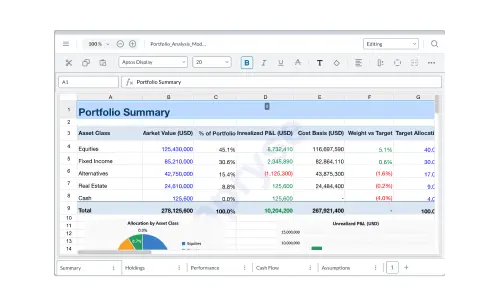
With Spreadsheet Editor, investment banks, asset managers, and FP&A teams can open financial models, rate sheets, and portfolio spreadsheets without leaving your application. With Apryse, formula evaluation and chart rendering keep calculations and visuals intact, and PDF export gives reviewers a fixed record of the file. Client-side processing keeps that data in the browser, which supports PCI-DSS and SOX-related data handling requirements. For teams that need to review supporting documents alongside financial models, an embedded document viewer SDK can provide document viewing directly within the same application.
Insurance: Rate Sheet and Policy Document Editing
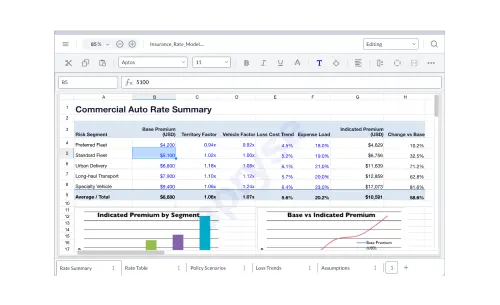
Insurance carriers, MGAs, and insurtechs can edit rate tables and actuarial spreadsheets without leaving your application. The formula engine handles rate calculations, and cell formatting keeps output consistent with your branded templates. Because rate and policy data stay in the browser, this supports state-level insurance data handling requirements without a separate data transfer step.
HR: Compensation Planning and Employee Data
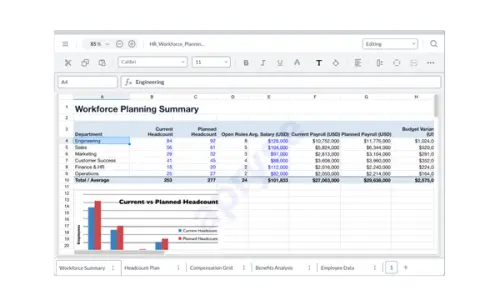
HR platforms and payroll providers use Edit Mode for compensation grids, headcount planning, and benefits analysis, and View Mode when a stakeholder needs read-only access. Cell-level formatting matches your application's branded templates, and keeping employee compensation and personal data in the browser supports your organization or regional handling requirements for employee PII.
Compliance: Audit Documentation and Regulatory Reporting
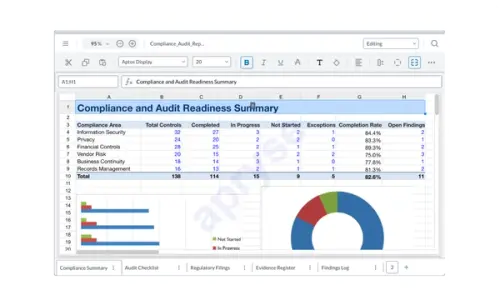
GRC platforms and compliance tools use Spreadsheet Editor for audit checklists and regulatory filings, exporting to PDF/A for the audit trail or keeping the working file in XLSX for record retention.
For narrative audit documents alongside the spreadsheet, see DOCX Editor use cases.