Isaac Maw
Technical Content Creator
Published March 17, 2026
Updated May 18, 2026

5 min


Client-Side vs Server-Side Document Viewing: Pros, Cons, and Use Cases
Isaac Maw
Technical Content Creator
Summary: Compare the use-case-specific advantages of frontend and backend document viewers. Get the information you need to make the best choice, including compliance considerations and key tradeoffs.
You’re probably familiar with the hamburger analogy for comparing client-side and server-side processing. At a “client-side” restaurant, when the client orders a burger, the kitchen serves up a bun, patty, and toppings, and the client assembles it. At the “server-side” restaurant, the kitchen serves up fully assembled burgers.
There are pros and cons to each approach. Depending on the resources of the “kitchen” and the volume of clients, we can easily imagine advantageous scenarios for both restaurants. Let’s abandon this analogy now, before you stop reading!
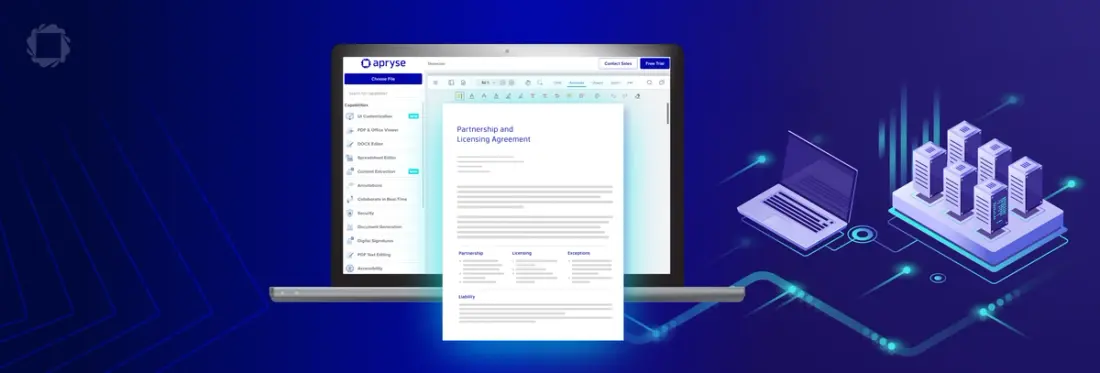
As a JavaScript Document SDK, Apryse WebViewer provides a fully client-side document viewer, including support for PDF, MS Office, CAD, and other document formats. As a client-side solution, the browser and hardware on the client device itself does the heavy lifting. Data doesn’t need to transmit back and forth to a remote server to deliver performance.
A fully server-side solution is uncommon for document viewing. Server-side processes are typically those requiring high security, centralized data integrity, or heavy processing power, such as authentication, database queries, payment processing, and document generation.
Keep reading to understand performance and scalability tradeoffs, key considerations by industry, and how to choose the best approach for your use case. Lastly, get started with your Apryse trial to test the SDK in your application for free.
Parameter | Client-side Document Viewing | Server-side Document Viewing |
|---|---|---|
Processing | JavaScript in browser | Code executed on the server |
Performance | Dependent on client device resources | Dependent on server budget |
Scalability | Best for high volume of clients | Server costs scale with usage |
Security | WebViewer is ISO/IEC 27001:2022 certified and SOCII Type 2 attested | Documents stay centralized, and aren’t downloaded to client devices |
Use-cases | Most use cases | Especially large and complex documents |
As shown in this table, client-side document viewing is the best choice for most document viewing use cases, with server-side viewing offering advantages for large and complex documents.
Why is PDF Viewing Needed in Web Apps?
Why display text and content in a PDF, when web pages can display content in HTML? For many industries, including legal, medical, insurance, and finance, documents and their content meet strict requirements, and it’s essential to display them in a predictable and accurate manner. The rigid, defined structure of a PDF document ensures fonts, layouts and structural fidelity is preserved, so the document is viewed in the web application exactly as it appears on paper.
For example, since HTML is a responsive layout, both the screenshots below display the same HTML document at different window sizes. For some use cases, this variability in how the user views the content is undesirable.
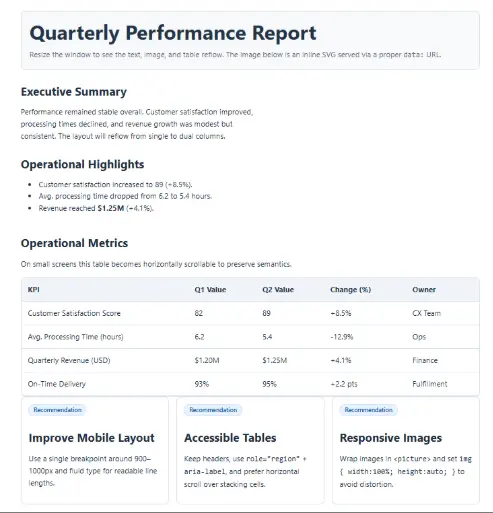
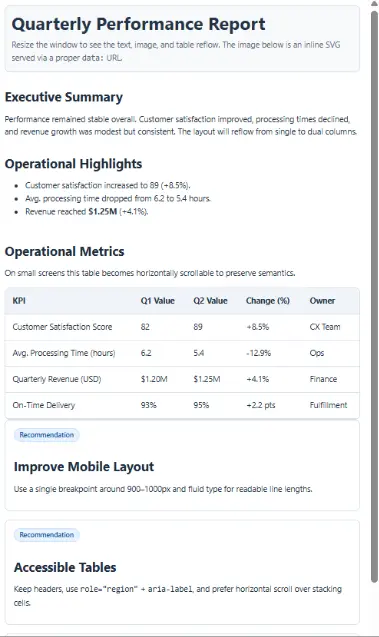
To support these documents, embedded PDF viewing capability is essential for web apps in these industries. By eliminating the need to download documents and open it in another app, developers can support data security and privacy, keep users in the application, and maintain control over document behavior, including support for other workflows such as form filling and digital signatures, for example.
Client-Side and Server-Side Document Viewing: What’s the Difference?
Viewing a document such as a PDF is a dynamic experience. As users scroll, zoom, and interact with the different pages of the document and the Viewer UI, different data is rendered in the web application. This processing can happen in the browser (using JavaScript, for example) or on the server.
Default Browser PDF Viewer Drawbacks: Native Browser PDF Rendering vs Dedicated PDF SDKs
Client-side processing using JavaScript was originally developed to support this type of dynamic experience. Local processing improves performance by eliminating the latency of data going back and forth from the server each time the user interacts with the UI. For this reason, fully server-side document viewing is rarely used.
However, on the server, developers have full control over software and OS versions, and servers have more computing power than client devices. For this reason, server-side document rendering is used as a solution for large, complex documents that client devices can’t handle, or to support weaker clients such as mobile or older browsers.
Client-Side Document Viewing
With a web SDK like Apryse WebViewer, JavaScript libraries update and re-render the page as the user interacts with dynamic features of the viewing experience, such as button presses, scrolling, and rendering the document.
Try the Apryse Showcase to demo client-side document features.
Server-Side Document Viewing
In server-side processing, each time the user interacts with a page element such as a UI button, a request is sent to the server, which processes the action and sends back the result. This can result in latency. However, for large, complex documents or weak client devices, this server latency may still deliver a faster result than client-side processing. In addition, the additional computing requirements and network traffic results in higher server costs.
Server vs. Browser Security and compliance Considerations
Client devices and servers have different vulnerabilities and attack vectors. The main difference is where sensitive and confidential data resides.
Security and compliance considerations depend on the specific compliance requirements of each industry and use case, but here are some key things to consider:
Code is Visible to the User
In a client-side approach, scripts run in the browser. This means that all the code is visible to the user. For this reason, services such as authentication are generally considered to be more risky and less secure than on the server.
The same applies to documents. With a server-side approach, documents aren’t downloaded to client devices. This could have some use cases for DRM, preventing saving or data extraction, and view-only requirements. For example, for copyright-protected documents such as a magazine, a server-side application could return an image of each page, so that the user never downloads the full PDF.
Client Devices are Unknown
Developers don’t have full control over client devices. This means that out-of-date browsers, malware, and other exploits can create security risks. However, Apryse WebViewer is built for security, including the following certifications:
- ISO/IEC 27001:2022 Certified | Our Information Security Management System (ISMS) is certified to the ISO/IEC 27001:2022 standard, reflecting our systematic approach to managing sensitive company and customer information. We have held certifications since 2018.
- SOC 2 Attested | We have successfully completed yearly SOC 2 Type II audits, verifying that our controls continue to meet the Trust Services Criteria for security, availability, and confidentiality.
A key advantage of client-side processing is that data does not leave your browser.
In addition to security and compliance, usability, performance, and cost are key considerations. For the vast majority of document viewing use cases, the benefits of client-side viewing outweigh those of server-side viewing.
Client-side vs Server-side Decision Summary:
Consider Server-side solutions if:
- You need a high-security way to prevent users from downloading or extracting documents from the application
- Your application serves client devices that are too weak, unreliable or out-of-date to meet compliance and performance requirements
- high server costs are acceptable
- Your document viewing use case tolerates high latency and potentially laggy user experience
Client-side processing is the right choice when:
- Your application supports a large volume of users and documents
- You want a fast, responsive user experience
- Your application replaces ad-hoc document workflows, like app-switching and emailing documents
Apryse has document viewer solutions for both approaches. Here’s how to get started.
Getting Started with Apryse
WebViewer
WebViewer is a JavaScript document library that delivers fast, accurate and reliable document capabilities.
You can follow the Quick Start instructions in the documentation to get your trial key and try the viewer experience for yourself, as well as other WebViewer document processing capabilities.
Once the SDK is installed in your application, it’s easy to load and display a document:
Behind the scenes a webcomponent is created which instantiates the default WebViewer UI and loads the document. APIs are available to customize the UI and manipulate the viewer and document. Lower-level APIs let you create your own viewer or process documents without a UI.
You can also check out the Apryse Showcase, which puts you inside the viewer experience right away.
WebViewer Server
WebViewer Server is a backend component provided by Apryse that enables server‑side rendering and processing for documents. It is built on top of the Apryse SDK and is designed to work seamlessly with the WebViewer client to enhance compatibility and performance. It can be deployed either as a docker container or for use with a Tomcat server. client to enhance compatibility and performance. It can be deployed either as a docket container or for use with a Tomcat server.
WebViewer Server increases viewing reliability across platforms by handling rendering on the server, which improves performance on devices with limited processing power (such as mobile devices or older browsers) and enables efficient handling of very large or complex documents.
This sample code shows how to call WebViewer constructor to instantiate and load document using WebViewer with WebViewer Server. You can upload local files or load files that are publicly accessible.
Next Steps
Whether you’re looking for client-side or server-side document processing, Apryse has the toolkits you need.
You can contact sales to get support and answers from our experts.
FAQ
What is the difference between client-side and server-side document viewing?
Client-side document viewing uses scripts that run in the browser to render the pdf and operate the UI. This provides a fast, low-latency experience. By comparison, Server-side document viewing keeps documents on the server.
Is client-side PDF viewing secure for sensitive documents?
Client-side PDF viewing can be secure, however, documents are downloaded to the client browser. If client devices are not trusted, this may not meet security compliance requirements.
When should I use server-side document rendering instead of client-side?
Because server-side document rendering uses more powerful server hardware, it may provide benefits for very large, complex documents compared to client-side rendering.
Can I combine client-side and server-side document viewing (hybrid approach)?
Yes, many solutions (such as WebViewer Server) combine the heavy lifting computing power of server-side processing with the speed and low latency of client-side UI elements.
How does client-side PDF viewing handle large documents?
Client-side PDF viewers can use streaming, preloading and PDF optimization to help improve performance for large documents. Demo large files in the WebViewer JavaScript SDK in the Apryse Showcase.
Does client-side viewing work offline?
Yes. Because documents are downloaded to the browser and all the scripts for viewing and rendering the PDF run locally, offline viewing does work with client-side viewers.