Isaac Maw
Technical Content Creator
Published June 11, 2025
Updated September 30, 2026

5 min


Getting started with WebViewer: What's included in WebViewer Base Package?
Isaac Maw
Technical Content Creator
Summary: WebViewer is a powerful JavaScript document SDK that puts document workflows directly in your application. For developers and product managers interested in implementing WebViewer in your project, read this blog to get an in-depth look at all the details of everything included in WebViewer base package, and available add-ons.
Documents power the flow of information in organizations, and managing, manipulating and creating documents requires effective workflows. To meet these needs, users could juggle several disconnected tools for writing, reviewing, converting, collaborating, and using documents—or they could do it all without leaving your environment.
Supporting PDF, Office, CAD, images, videos, and websites, WebViewer is a fully featured document processing SDK out of the box. It delivers the highest quality rendering, conversion, and document manipulation capabilities through a single, customizable component, delivering exceptional usability and functionality trusted by thousands. It’s also highly scalable and secure, running client-side to eliminate server-side and third-party dependencies.
See WebViewer in action: Try the Demo in our Showcase
What Core Features Are Included in the WebViewer Base Package?
In the base package, the WebViewer JavaScript document SDK includes PDF viewer, and the following capabilities:
- Annotation and collaboration
- Performance
- Search
- Form Filling
- Measurement
- Layers
- Accessibility
- UI Customization
How Does WebViewer Improve Document Collaboration and Annotation?
Annotation and collaboration
Review and approval processes are a major pain point with disjointed document workflows. Users struggle with version control, miscommunications, and delays. Collaboration features included in WebViewer such as stamps, e-signatures, comments, and permissions control help to streamline and simplify feedback processes to complete more approvals in less time.
While simple esignatures are included as an annotation, secure digital signatures are supported by the digital signing add-on module.
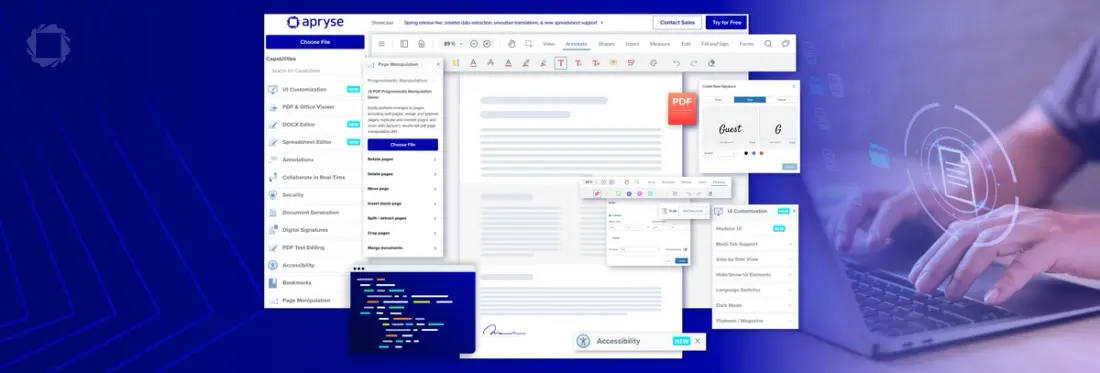
Try annotation tools in the showcase and find the items below in the showcase sidebar.
Performance
Handling large documents can present performance challenges. WebViewer includes technology to optimize performance of viewing large or complex PDFs by using linearization (streamlining via byte-range requests) or flattening to compress layers.
Search
Users can search text within PDF and other documents with advanced search functions available via the UI or programmatically, such as RegEx, case sensitive search and search using wildcards.
Form Filling
Users can fill in forms within WebViewer using the default view mode or alternatively using pre-existing JSON data. Forms can be flattened to permanently merge annotations and filled forms with page content.
To create forms requires the digital signing add-on module.
Measuring
WebViewer supports CAD formats .dwg, .dxf, .dgn, .rvt, and .dwf. For efficient review of these documents, engineers can use measurement tools included in the base package to quickly measure distance, arc, area, and more. Combine measurements with annotations for fast review of engineering drawings.
Layers
WebViewer supports PDF layers, or OCGs (Optional Content Groups), allowing users to toggle which layers they are viewing.
Why Is Accessibility Important and How Does WebViewer Support It?
Web accessibility is more than just a best practice—it’s essential for inclusivity and increasingly a legal requirement. Ensuring that digital experiences are accessible to people with disabilities not only supports equal access but also strengthens business performance. In many regions, including the European Union and the United States, accessibility is mandated by law.
With WebViewer, accessibility is built in, including enhanced keyboard navigation, screen readers, appropriate color contrasting between visual elements, and more.
UI Customization
While WebViewer keeps document workflows inside your application, UI customization keeps those workflows consistent with your branded experience as well. Customization is enabled via config file or by forking WebViewer and building a new UI from scratch. Check out this video to learn more:
What add-ons are available for WebViewer and what do they do?
WebViewer includes add-on upgrades to provide more advanced functionality and scale with your needs, such as:
- Conversion Tools
- Page Manipulation
- Comparison
- Digital Signatures
- Archive
- Redaction
- PDF Editing
- DOCX Editor
- Spreadsheet Editor
- Template
- Content Extraction
- Security
Document Conversion
Maximize flexibility by enabling conversion including HTML to PDF, image to PDF, PDF to image and CAD to PDF within WebViewer.
Page Manipulation
Page manipulation provides tools to merge, split, concatenate, and organize PDF pages across web, mobile, and server platforms for secure, automated document workflows, PDF editing, and document assembly.
Comparison
Side-by-side comparison allows users to compare and reference any two documents and images, and it comes with additional key features to help users find changes quickly, so they can complete reviews faster. With overlay comparison, users can easily spot differences in two versions of a PDF by overlaying them and generating a new PDF that highlights their differences.
Digital Signatures
The digital signature add-on enables creation of interactive documents. Advanced encryption and secure digital certificates protect documents, ensuring signatures remain valid until their expiration or unless revoked to prevent misuse of certificates.
In addition, this add-on enables creation, customization, and automation of fillable PDF forms—complete with digital signature fields—directly within your applications. Users can build dynamic, interactive forms that streamline workflows, improve user experiences, and maintain robust data security.
Archive
This solution supports PDF/A creation & validation for secure long-term storage of archival documents. PDF/A is a version of the PDF format that has been standardized by ISO for the purpose of long-term digital document preservation. Unlike regular PDFs, PDF/A restricts certain features—such as non-embedded fonts, encryption, and specific compression techniques—that could hinder reliable access or reproduction in the future.
Redaction
Incorrect methods of redacting data from documents can result in costly, embarrassing failures. Ensure total data privacy by permanently removing sensitive information from documents. Apryse’s redaction library enables you to delete text, images, or entire pages, ensuring that the content is unrecoverable.
Document Editing
PDF documents are designed to present text, not to edit it. To make changes to PDFs without the right tools, users are forced to navigate frustrating workarounds like converting the document and editing it in another application.
With PDF editing capability, users can resize, reflow, and reposition paragraph boxes to emphasize key points and optimize a PDF's layout within WebViewer. True WYSIWYG (What You See Is What You Get) editing enables users to make content and style changes with instant, real-time updates. This entirely client-side process offers an intuitive PDF editing experience.
For working with Microsoft Office formats, the DOCX Editor SDK for WebViewer provides a secure, reliable way to collaborate on DOCX files by integrating native DOCX editing into your web application, eliminating switching from Google to Microsoft Office, comparing edits between documents, or manually uploading and storing conflicting versions of files.
The Apryse Spreadsheet Editor SDK allows users to access and view files exactly as they would appear in Excel, directly within your applications, with full editing capabilities available in Summer 2025.
Try the Demo of Spreadsheet Editor
Template
This add-on enables secure merging of JSON data with MS Word, PowerPoint, and Excel templates.
Content Extraction
While the majority of Apryse’s smart data extraction tools are provided via the Server SDK, users can extract various content from a PDF into text and image formats including structured Unicode text extraction, low-level text extraction, images, fonts and glyph outlines, ICC color profiles, embedded files, layers and more using WebViewer.
Document Security
Secure your documents with this toolkit, providing custom encryption (RC4 and AES), permissions configuration, watermarking, and password-protected documents.
What’s Next?
Armed with this information, you’re ready to implement the WebViewer capabilities you need to enable the full scope of document workflows your users demand.
To learn more about WebViewer or to get started, check out the documentation guides, check out the showcase links above or contact us to get started.