Read Patch Code and Postal Barcodes From Scanned PDFs
The Apryse Server SDK Barcode Extraction Module reads Patch Code separator sheets and postal barcodes from scanned PDFs on your own Windows or Linux servers. Use the Patch Code results to split a scanned batch into separate documents. Use USPS Intelligent Mail and other postal barcodes to route mail. Each result comes back as JSON.
How the Apryse Barcode Extraction Module Reads Patch Code and Postal Barcodes in Scanned PDFs
The Barcode Extraction Module opens a scanned PDF, finds the barcodes on each page, and writes the decoded values to JSON. It belongs to the Smart Data Extraction add-on license and installs as a separate module download. Reading the codes is half the job. Your code uses the results to split the batch and route the mail, so the module rarely ships alone.
Split a Scanned Batch on Patch Code Separator Sheets
A Patch Code is the document-separation barcode printed on a separator sheet. An operator slips one between documents before the stack goes through the scanner. The module locates each Patch Code in the JSON, so your code knows which pages are separators. Your code then splits the PDF at those pages with Page Manipulation, and each document becomes its own file.
Route Mail by Its Postal Barcode
Postal barcodes sit on the mail piece. The module reads USPS Intelligent Mail (4-State), POSTNET, PLANET, Australia Post 4-State, and Royal Mail RM4SCC from the scanned PDF. By default, one extraction call searches for every supported type, so Patch Code and postal results arrive together in the same JSON. Your code maps each decoded value to a queue, a department, or a returned-mail record.
Settings by Batch Condition
Start with the default profile and change a setting only when the batch calls for it.
Profile, search types, orientation, and page range are options on the object you pass as the last argument to the extraction call. The example below sets the low quality source profile, the Patch Code, Four State, and Post Net Planet groups, and a page range. A page range takes a single page such as 1, or ranges such as 1-3,5,10-. The barcode workflow docs list each option.
Sample JSON Output
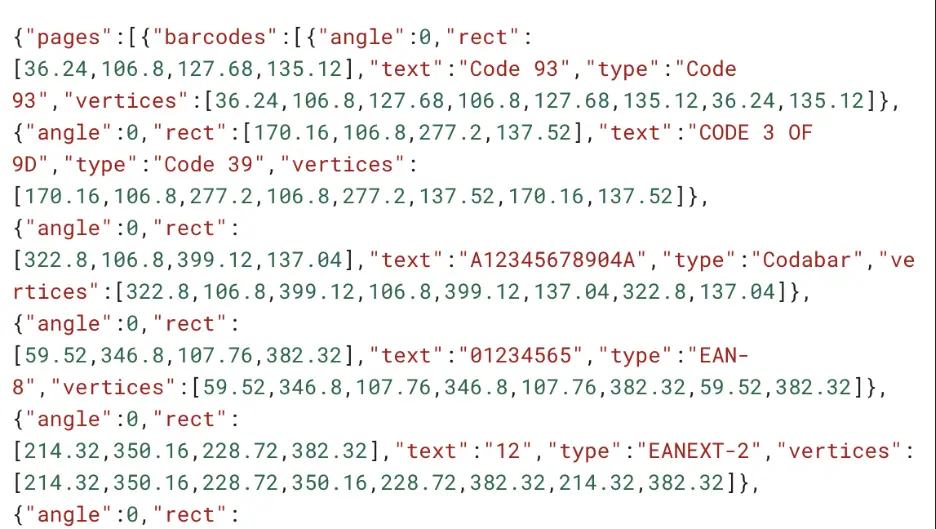
Figure 1: Sample JSON output.
This page covers Apryse Server SDK integration using C# on Windows and Linux. This feature requires the Barcode Extraction Module add-on, which is a separate download from the base Server SDK. See the modules documentation for download and installation instructions.
What You Need to Read Patch Code and Postal Barcodes on Your Own Server
Download the Barcode Extraction Module and expand it into your Server SDK directory. The module reads PDF input, so convert TIFF scans to PDF first. It runs on Windows and Linux only.
Document content stays in your infrastructure. Your code owns the batch loop, the split, and the routing, because the Server SDK provides no work queue, job scheduler, or batch orchestration. If codes still go unread, see fixing missed barcodes on scanned PDFs.
Setup Notes
- Convert each TIFF scan to PDF with the Server SDK, then extract. See how to convert a scanned TIFF, then extract and the conversion docs.
- Read the data field for any payload returned Base64-encoded instead of as text. The output format docs show both fields.
- Call IsModuleAvailable before extracting to confirm the module sits on the resource search path. The module setup docs show the check.
Where Patch Code and Postal Barcodes Fit in a Digital Mailroom
Inbound Mail Intake
Monday's mail arrives as one scanned PDF. Your code reads the postal barcode on each piece and sends it to the right queue, while your platform handles storage and notifications.
Batch Scanning With Separator Sheets
An operator drops a separator sheet between stacks of forms. The module reports each Patch Code, and your code splits the batch into one PDF per stack. After the split, run each document through OCR to read the text on each page.
Returned-Mail Handling
Scan the returned pieces, read the postal barcode on each one, and match the decoded value against your send records. Your team then knows which accounts need a new address.
Patch Code and Postal Barcode Support in Apryse and Scanbot SDKs
Both products read postal barcodes. Only the Apryse Barcode Extraction Module reads Patch Code.
If you scan envelopes with a camera, use the Scanbot SDK instead.
Each link opens the Server SDK get-started page for that language.
Get Started With the Barcode Extraction Module in Your Language