Roger Dunham
Published April 02, 2026
Updated September 14, 2026

6 min


How an AI Toolchain Can Transform Document-Heavy Workflows
Roger Dunham
Summary: Inconsistent formats, sensitive PII, and endless manual reviews make document workflows a bottleneck for any growing organization. AI promises a solution, but the real challenge is giving that AI the right toolbox to get the job done. Follow along in this three-part series on transforming a messy insurance claims process into a streamlined, automated pipeline using AI agents and the Apryse SDK. This first blog will focus on Model Context Protocol (MCP).
Introduction
For organizations that work with sensitive documents every day such as legal firms, hospitals, insurance companies, and government agencies, the challenges are always the same:
- Documents arrive in inconsistent formats.
- They contain sensitive personal information (PII) that must be protected.
- Teams need structured data to automate downstream systems.
- New documents must be generated from templates, accurately and at scale.
- Auditors need clear annotations and an audit trail.
- Everything eventually has to be packaged into a single, finalized document.
Potentially, AI tools could do all of this. They just need to know exactly which tools are available and how to use them. That is where Model Context Protocol (MCP) servers come in.
In this blog, we will walk through a real-life problem and explore how tools defined by an MCP server can streamline the entire workflow.
Don’t worry if you don’t know what an MCP server is at the moment. We will get there. This is the first of a three part series of blogs. In these we will cover:
- How AI can help your business.
- How to implement a simple MCP server that communicates with a separate HTTP server implements simple functionality.
- How to add the Apryse SDK to the HTTP server, and let an AI Agent work directly with PDFs.
At the end of the series, you will not only know what an MCP server is, but also be well on the way to being able to create tools that will let you implement a workflow that will save you time and money.
There are many scenarios where an AI tool could streamline working with documents, legal packets, medical forms, or financial disclosures are just a few. For this blog, we will look at handling insurance claims.
The Real-life Scenario: Automating an Insurance Claims Workflow
An insurance company typically receives thousands of claim submissions every month. These arrive as PDFs (or other documents) from customers, repair shops, law firms, police departments, each with its own layout, formatting, and data conventions.
The insurer needs to:
- Remove PII from claim packets before they are shared with external assessors.
- Extract structured data (names, dates, incident descriptions, invoice amounts) for their claims system.
- Generate new documents such as assessor summaries and customer communications.
- Add annotations to highlight missing information.
- Merge the final pack for regulatory compliance.
A manual approach is slow, error-prone, and costly. Surely, AI tools can help. Probably, but in a number of separate steps.
Let’s look at those steps in turn.
Step 1: The User Enters Details of Their Claim
A typical workflow is the user would enter their name and address, a description of the claim, and upload supporting documents such as PDFs.
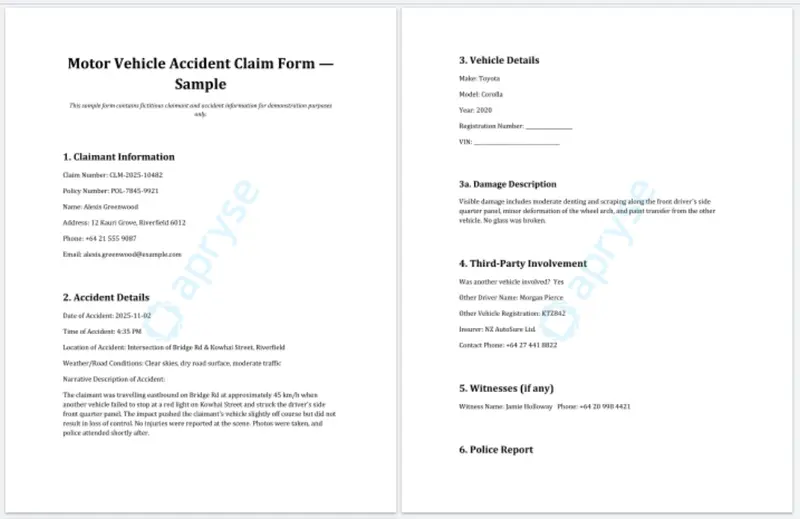
Figure 1: Example form for an insurance claim.
Already, there is a possibly problem. Those PDFs may contain Personally Identifiable Information (PII) that shouldn’t be shared with anyone that doesn’t need to know it in order to resolve the claim.
If the PDFs are just passed on as they are, then there is a risk of running afoul of privacy laws.
Step 2: Detecting and Removing PII
Before anything else, incoming PDFs must be sanitized.
There are some great tools for detecting PII. For example, Microsoft Presidio excels at detecting:
- Names
- Phone numbers
- Addresses
- Email addresses
- Credit card information
- National IDs (for example, SSN, passport numbers)
- Locations and medical information (with custom recognizers)
If we have a Remove PII from PDFs tool, then the pipeline can:
- Run each PDF through Presidio for detection.
- Pass the detection output into the PII removal tool.
- Produce a redacted, shareable version.
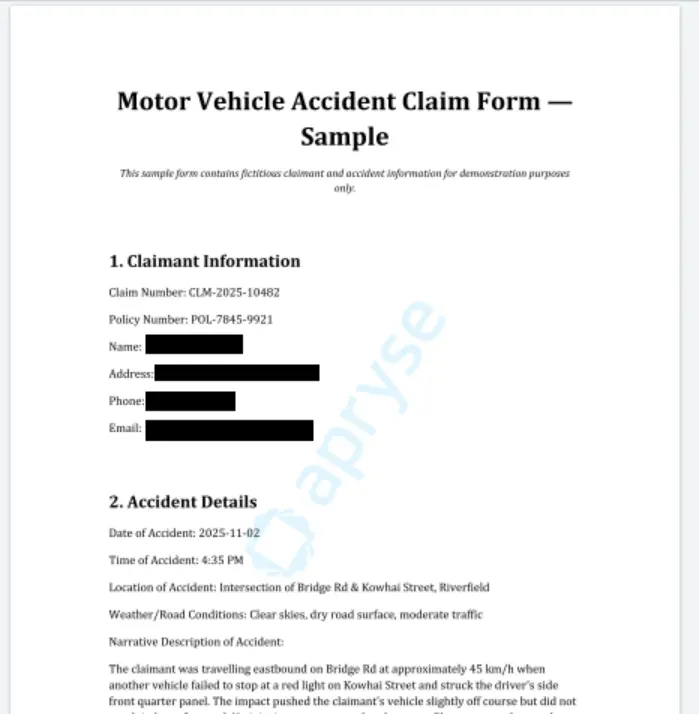
Figure 2: The claim form after redaction.
Now sensitive customer data is protected before a human or external partner ever sees the file.
Step 3: Extracting Structured Data Automatically
Once PII is removed or masked, the next step is extracting data for the claims system.
With an Extract structured data from documents tool, we could get lots of information from the document, for example:
- Claimant information
- Date of loss
- Vehicle details
- Repair costs
- Policy numbers
It would be great if that tool created structured JSON as its output. For example, you could get the following data relating to a vehicle claim:
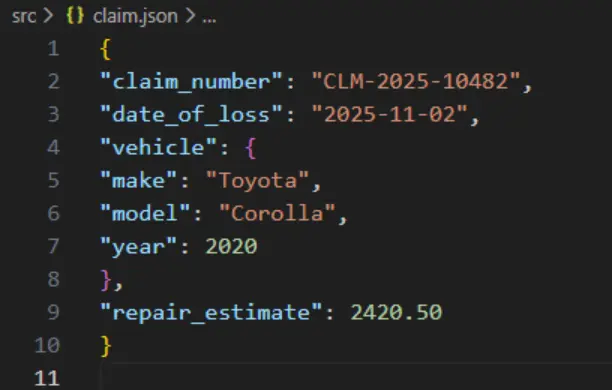
Figure 3: Data extracted from the form in JSON format.
JSON is a great format for working with and can be used in other parts of the workflow or even used for downstream analytics.
Step 4: Automatically Generate New Documents from Templates
With structured JSON available, and a Create new documents from templates + JSON tool, the system could:
- Load a Word (or PowerPoint or Excel) template
- Insert values from the extracted JSON
- Produce a polished document with no human typing needed
That way, a whole set of files can be quickly created with minimal human interaction.
- Assessor summary reports
- Customer communications
- Internal review checklists
- Regulatory forms
For example, within just a few moments you could have a summary document:
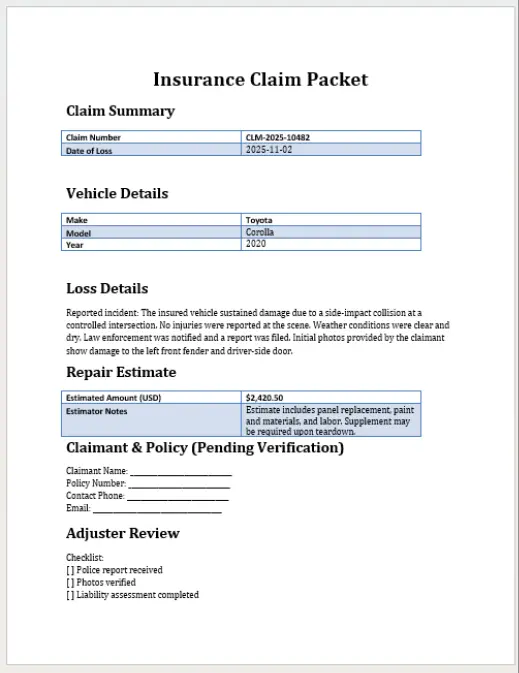
Figure 4: Example of a summary document created from a DOCX template and JSON.
Step 5: Adding Annotations for Reviewers
While AI can create great responses, it can also get things very wrong. It’s useful therefore to get a human to review the process.
Even if it weren’t for AI hallucinations, there may still be things that a human needs to check. However, if hundreds of reports are generated, and need to be reviewed, every day, then it’s useful to highlight things that definitely need to be looked at.
Just imagine that if you had some kind of Add annotations tool, then the system could flag:
- Missing data (for example, “No police report attached”)
- Conflicting information
- Values requiring manual confirmation
- Areas where handwriting was unclear
What’s more, those annotations could appear as callouts, highlights, or comments directly in the PDF.
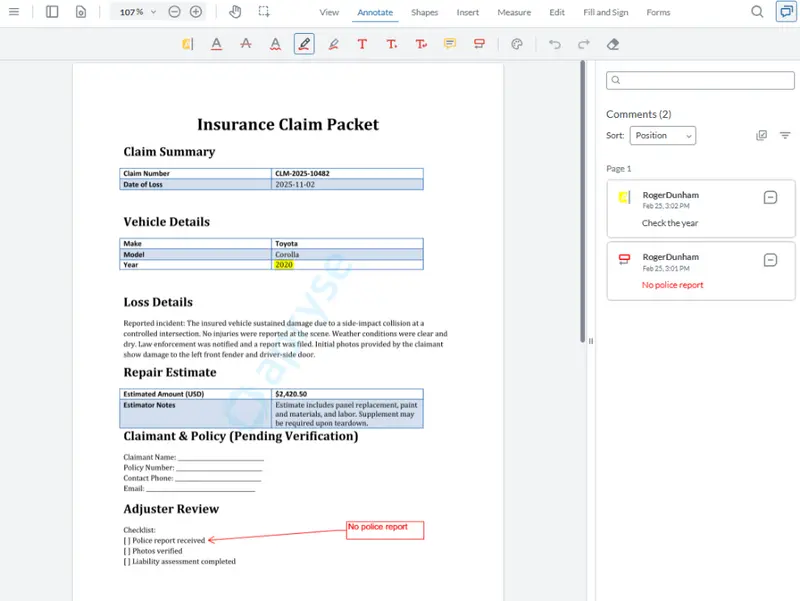
Figure 5: The same document with annotations added highlighting what needs to be reviewed. Shown here in Apryse WebViewer.
That system would ensure that reviewers know exactly where to look, cutting review time dramatically.
Step 6: Producing the Final Merged Document Pack
Having reviewed the documents, wouldn’t it be great if you could combine all of the documents associated with the claim into a single bundle, either a single PDF, made up of concatenated documents, or a single “Summary” document that has the other documents embedded.
That way you could have all the documents combined into one clean, finalised PDF.
- Redacted original claim
- Extracted data summary
- Assessor report
- Supporting images
- Any external attachments
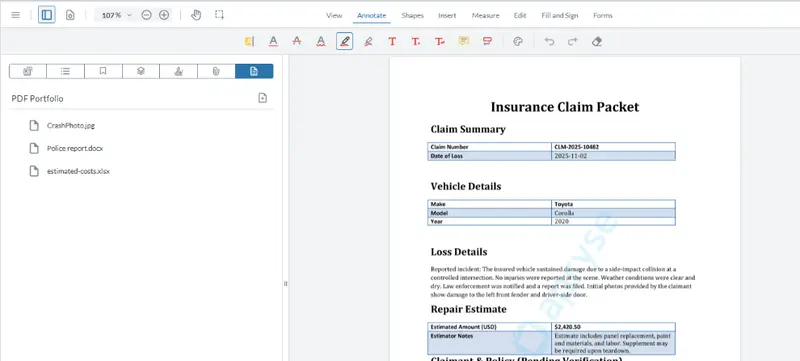
Figure 6: A summary document with other files embedded within it. Shown in Apryse WebViewer.
That PDF could then be:
- Sent to regulators
- Archived internally
- Shared securely with partners
- Returned to customers
All with minimal manual intervention.
How Would That Help?
A workflow like that would result in:
- Better compliance (automatic PII removal)
- Reduced manual labor
- Lower error rates
- Faster customer responses
- A more scalable document process
That all sounds like something that you would want.
When Can I Have This?
Now!
All the functionality described in this blog is available today.
Every single step can be helped with technology from Apryse.
The Apryse SDK supports redaction of PII, smart data extraction, document generation, addition of annotations, as well as file combining and embedding, and much, much more.
There is even a UI (WebViewer) that lets you work with the documents directly in the browser without needing to upload them to a server.
However, that functionality is not necessarily available via an HTTP endpoint, although some of our customers have implemented that.
It’s not difficult to create a server that exposes the functionality that you want to use as an HTTP endpoint. We will walk through how to implement that in a later blog in this series.
Being able to process a file using a tool via an HTTP endpoint is awesome, but in itself, that is not enough for an AI application to be able to do so.
AI applications, however clever, still need to be able to find those tools, know how to use them, and know what to expect back from them.
That is where an MCP Server comes in. The MCP server lets the AI application know what tools are available, and how to interact with them.
Once the AI application has that information, it can “glue” those parts together to create a workflow, such as in the one in this blog.
Still not making sense? Don’t worry. We will walk through step-by-step how to create an MCP server and a simple HTTP server in the next blog in this series.