Roger Dunham
Published October 28, 2026
Updated October 28, 2026

5 min


PCI DSS Compliance When Scanning Credit Cards with Scanbot SDK
Roger Dunham

Does scanning credit cards with Scanbot SDK make your app PCI DSS compliant? No, but it can help.
Scanbot Credit Card Scanner SDK extracts the card number (PAN), cardholder name, and expiration date locally on the device, without sending the card image to a server. That can limit unnecessary movement of card data, but compliance depends on what your application does with the data afterward: whether it logs, stores, or transmits it. PCI DSS applies to the complete card-data flow, not just the scanner component.
Below, we cover what PCI DSS means for developers, what data the SDK extracts, and four good practices for keeping card data under control.
Adding credit card scanning to an application can remove friction from checkout. Instead of manually typing a long card number, expiration date, and cardholder name, users can point their camera at a card and let the application capture the information.
But once your application handles credit card data, security and PCI DSS compliance become important architectural considerations.
Scanbot Credit Card Scanner SDK extracts the Primary Account Number (PAN), cardholder name, and expiration date locally on the device. The credit-card recognition process operates offline and does not require sending the card image to a server.
That local-processing architecture can help limit unnecessary transmission of card data, but it doesn't make an application PCI DSS compliant by itself.
While Scanbot works offline, the application in which it is used may have connections to licensing, payment, or analytic servers. That is a question for the application developers.
Let's look at what developers need to consider.
What is PCI DSS?
The Payment Card Industry Data Security Standard (PCI DSS) provides technical and operational requirements for protecting payment account data. It applies to organizations that store, process, or transmit cardholder data or sensitive authentication data, as well as entities that can affect the security of the Cardholder Data Environment (CDE).
The current standard is PCI DSS v4.0.1, which was published in June 2024.
An important point for developers is that PCI DSS isn't limited to databases containing millions of credit card numbers. If an application captures and processes cardholder data, the way that it does so also needs to be considered regarding PCI DSS.
What Data Does Scanbot SDK Extract?
The Scanbot Credit Card Scanner SDK recognizes three particularly useful fields:
- Card number (PAN)
- Cardholder name
- Expiration date
It supports major card types including Visa, Mastercard, and American Express.

Figure 1: An example credit card with fictitious data.
For example, rather than asking a customer to type:
- Card number: 5412 ...
- Name: Lee M Cardholder
- Expiration: 12/29
Your application can use the camera to take a photograph of the card, extract the cardholder data from it, and pass the resulting structured data into the next stage of your payment workflow.
That convenience creates an important security consideration: your application now has access to the PAN.
Read more about the Scanbot Credit Card SDK
Why On-device Credit Card Scanning Matters
Scanbot SDK performs credit-card recognition locally on the device. The card image therefore does not need to be uploaded to a remote Scanbot recognition service simply to extract the card details.
This removes one potential network transfer from the capture workflow. However, it does not eliminate the risks associated with any subsequent transmission, processing, logging, or storage performed by the host application.
Local processing does not, in itself, mean PCI compliant
The relevant question is not just whether the recognition component sends the image to a server. Developers must also determine what happens to the PAN and other card details after Scanbot returns the result. The application might have options that display the PAN, retain it in memory, copy it into application state, include it in logs or telemetry, transmit it to a backend or payment processor, or store it in a database. All of those might solve part of the application’s requirements, but they also add security concerns.
Those are application-architecture decisions outside the simple act of recognizing the card, and it is the application developer’s responsibility to manage that.
PCI DSS compliance must therefore be assessed across the complete card-data flow, not simply the scanner component. Application developers should work with the organization’s security, compliance, and payment teams to ensure that the complete implementation meets the applicable requirements.
Good Practices
1. Minimize the Cardholder Data You Retain
A good security design starts with a straightforward principle:
Don't keep cardholder data you don't actually need.
PCI DSS v4.0.1 Requirement 3.2.1 requires account-data storage to be kept to a minimum using retention and disposal policies, with retention limited according to legal, regulatory and/or business requirements and secure deletion when the data is no longer required.
For a scanning application, that principle can influence seemingly small implementation choices.
For example, if your payment workflow only requires Scanbot's extracted fields, consider whether your application has any business reason to retain an image of the physical card.
The Scanbot SDK exposes a returnCreditCardImage configuration option which is false by default.
If you don't actually need the image, don't introduce it into subsequent parts of your workflow. It’s not a risk if it doesn’t exist.
2. Watch Out for Accidental Storage
Developers also need to think beyond deliberate database storage.
During development, it can be tempting to do something equivalent to:
console.log(scanningResult);That's extremely useful when debugging ordinary application data, but in production it requires much greater care when scanningResult may contain a customer's PAN, since the information can end up in:
- application logs;
- crash reports;
- analytics events;
- error telemetry;
- debugging tools;
- screenshots;
- temporary files;
- application caches;
Do not log or retain the complete scanning result unless there is a documented requirement to do so.
3. Discard Data as Soon as It Is No Longer Required
Credit card recognition and payment authorization are different operations. Scanbot deals with the recognition. Your application and payment integration are responsible for the subsequent workflow. Once that workflow is complete, discard any card data that is no longer required.
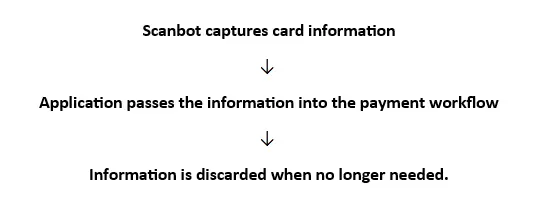
Figure 2: Workflow
Maintaining that separation can make the architecture considerably easier to understand.
4. Map the Complete Card-data Flow
Before releasing a credit-card scanning feature, draw the actual data path through the application.
For example:
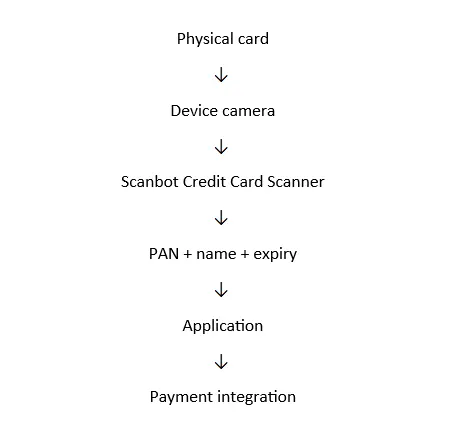
Figure 3: Data path
Then investigate every branch from that path:
- Does the camera image get retained?
- Are scanner results copied into application state?
- Are some of those values included in telemetry?
- Can an exception cause the object containing the PAN to be logged?
- Does your backend receive the PAN?
- Does a support or analytics system receive it?
- How long does the application retain the information?
This exercise is often much more useful than simply attaching the label "PCI compliant" to an individual SDK.
Wrapping Up
Scanbot SDK helps developers create an architecture in which credit card recognition occurs locally. The Credit Card Scanner supports mobile frameworks including iOS, Android, React Native, Flutter, Capacitor, and .NET MAUI. Scanbot has Credit Card Scanner modules for Web and Windows.
But PCI DSS compliance involves the broader environment.
The PCI Security Standards Council explicitly identifies merchants, processors, acquirers, issuers, and service providers among the entities within the intended audience for PCI DSS, while also noting that whether an entity must validate compliance is ultimately determined by the organizations managing the relevant compliance programs.
For applications handling real payment-card data, developers should therefore determine the applicable PCI DSS requirements for their particular implementation rather than assuming that selecting a particular scanning component, even one (such as Scanbot) that can do the scanning offline, establishes compliance.
The Takeaway
Credit card scanning makes payment workflows easier for users, but it should not make card data proliferate through your architecture.
Scanbot SDK provides an important building block: it can extract the PAN, cardholder name, and expiration date.
From there, responsibility shifts to the application.
A sound implementation should:
- understand exactly where cardholder data flows;
- avoid retaining information that isn't required;
- consider images as well as extracted values;
- prevent sensitive data from leaking into logs and telemetry;
- carefully control transmission and storage; and
- assess the complete Cardholder Data Environment against the applicable PCI DSS requirements.
In other words, on-device scanning can reduce unnecessary movement of credit card data, but PCI DSS compliance depends on what the rest of your application does with that data.