Isaac Maw
Technical Content Creator
Published March 23, 2026
Updated September 29, 2026

8 min


How to Choose the Best JavaScript Library for PDF Generation 2026
Isaac Maw
Technical Content Creator
Summary: Check out this guide to overview some popular open-source JavaScript PDF generation libraries, and how they measure up to Apryse capabilities.
Whether you’re generating tickets, invoices, reports or other customized documents at scale, a PDF generation library that pairs a custom template with JSON data is a great way to automate your process. For JavaScript apps running in frameworks such as React and Angular, many developers evaluate popular open-source libraries as well as commercial SDKs like Apryse. However, is there an open-source JavaScript library that can do template generation?
In this article, let’s overview some of the most popular open-source JavaScript libraries for PDF generation, including if they support template-based generation using dynamic data.
JsPDF
jsPDF is a lightweight JavaScript library that lets you generate PDF documents directly in the browser.
With JsPDF, simply initializing a basic PDF is easy. For example:
However, to generate a more complex, professionally styled document such as an invoice or account statement, developers must hard-code the formatting of the document, such as layout, colors, fonts and elements such as boxes and tables. If invoice content changes, such as the number of line items in the table or the number of pages in the document, this code would need to be manually changed. For many applications, that’s not a feasible solution.
Does JsPDF Support Template Generation Using Dynamic Data?
To generate a pixel-perfect PDF document with complex layout such as gradients, custom fonts and elements that resize, you’ll need to pair JsPDF with another library such as HTML2Canvas. First, The HTML2Canvas library builds an image based on the content on a webpage in the user’s browser (a little like taking a screenshot.) Next, you use JsPDF to embed that image into a PDF.
Ultimately, this is a workaround. Using HTML to PDF comes with some significant issues, such as that HTML is fluid and responsive, but PDFs are rigid and paginated. That can make it difficult to split pages correctly, especially with things like tables. Secondly, using the fonts you need can also be painful, as some fonts are not available for use with HTML or require licensing.
In addition, this multi-step process slows down document generation.
Verdict: JsPDF does not natively support template generation.
PDF-Lib
According to the website, PDF-Lib is a JavaScript library that allows developers to create PDF documents from scratch, or modify existing PDF documents. With PDF-Lib, you can draw text, images, and vector graphics; embed your own fonts, and embed and draw pages from other PDFs. But can it help a developer looking for template generation?
Creating a PDF from scratch with PDF-Lib looks like this:
Does PDF-Lib Support Template Generation Using Dynamic Data?
Because PDF-Lib also supports embedding images, you could use the same inferior HTML-to-image-into-PDF workflow we overviewed above in the JsPDF section. But let’s take a look at another method.
PDF-Lib supports PDF modification, form creation and form filling, so one way to build templated PDF documents could be to create a template of your document as a form or with blank text areas, then fill dynamic data in the spaces. For example, this sample code adds text over an existing PDF:
However, this isn’t a reliable solution for PDF generation. With this method, the template is completely static, with input data overlaid. This results in too many cases where input data breaks the template, such as too many characters overflowing the allotted space.
Verdict: While PDF-Lib offers form filling and PDF modification, it doesn't provide reliable template-based document generation.
PDFKit
PDFKit is a PDF document generation library for Node and the browser for makes creating complex, multi-page, printable documents. But can it help our template-seeking dev?
Creating a PDF using PDFKit is easier in a Node app than in browser, but instructions are easy to follow on the PDFKit documentation website here. Let’s try a method for template generation:
Does PDF-Lib Support Template Generation Using Dynamic Data?
PDFKit has the necessary functionality to support the template generation above, including:
- Hard coding the formatting directly in JavaScript
- The HTML workaround: adding dynamic data to a HTML document, then converting the HTML to another file format
- Overlaying text onto a static PDF
However, as of this writing, there’s not another viable method for template generation using PDFKit.
Verdict: PDFKit offers PDF creation, but lacks native support for template-based generation with dynamic data.
React-PDF
React-PDF is a popular library for rendering and creating PDF files on the browser and server.
Creating a document using React-PDF looks like this:
Does React-PDF Support Template Generation Using Dynamic Data?
While this library could be a good option for coding document formatting directly in JavaScript because it supports using CSS properties and Flexbox layout and is lightweight, fast and easy to use, it doesn’t support dynamic template generation using any method better than what we’ve seen above.
Verdict: No, React-PDF doesn’t support template generation.
Other Open-Source JavaScript PDF Creation Libraries
TL;DR: At the time of this writing, we couldn’t find any open-source JavaScript libraries that support template generation. Template generation uses a separate, editable template document such as a DOCX and adding dynamic data, such as JSON, to generate a polished, professionally-rendered document . This approach comes with significant benefits including reflowing text, resizing tables and elements, and paginating properly to give you a reliable document generation workflow. This includes options such as PDFmake, PDFme and PDF.js.
Fortunately, Apryse does support robust template generation. Let’s take a look!
Generate a Dynamic PDF using a Template with Apryse SDK
We’ve wandered in the open-source wilderness and found several lightweight PDF creation solutions, but none can do what we’re looking for. So, here’s how Apryse SDK does it (client-side or server-side).
With Apryse, you can populate any template with JSON data to generate your PDF, while retaining reflow, dynamic tables, images, styles. Add bookmarks, accessibility tags, and images. You can even create PDF portfolios to combine several documents into one package while keeping them separate.
How it Works
Here’s how Apryse's office template generation framework enables the dynamic generation of PDFs:
- You provide a template in the form of an Office document (such as .docx)
- You provide replacement data in JSON form
- Apryse SDK will efficiently generate a PDF by merging the data with the template
- Fully featured, with support for loops, conditionals, images, table generation, etc.
- Use your preferred office editor to design attractive templates, and Apryse will take care of the rest
- All logic is entirely contained within the SDK, with no external dependencies
Tags in the template document are replaced with a string from the supplied JSON. To control the style of the text, simply modify the style of the template tag as desired:
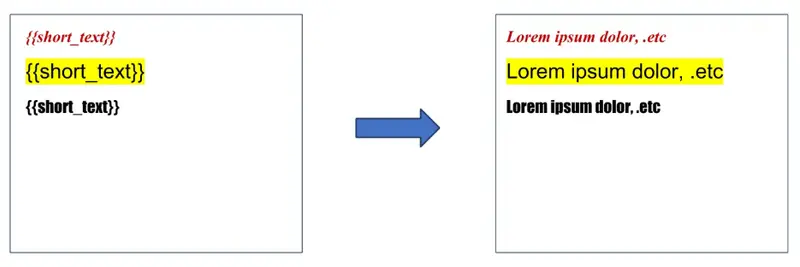
Content takes on the formatting of the template.
Conclusion
Open-source libraries like jsPDF, PDF-Lib, and PDFKit are solid choices for basic and simple PDF creation in JavaScript applications. However, none of them support reliable, template-based document generation with dynamic data – a gap that Apryse SDK is purpose-built to fill.
In addition, like other JavaScript libraries, Apryse SDK adds the required capabilities you need without introducing any external dependencies, and keeps your data inside your environment (unlike document generation API services.)
Additionally, Apryse SDK is actively maintained with regular updates, security patches, and dedicated support. If something breaks, there's a team behind it to help you fix it immediately, instead of waiting for a community fix or debugging an open-source dependency on your own. This means fewer integration points to maintain, a smaller attack surface, and full control over sensitive document data, with no need to send customer information to third-party services.
If you’re ready to start a free trial of Apryse SDK for your PDF generation, visit our documentation to get your trial key. With any questions, please reach out to our team.
FAQ
Q: What is the best JavaScript library for generating PDFs in the browser?
A: Apryse Web SDK is the best solution for generating PDFs in the browser, delivering high‑fidelity, reliable PDF rendering and native template‑based generation that open‑source libraries simply don’t provide.
Q: How can I convert HTML content into a PDF using JavaScript?
A: Apryse doesn’t rely on HTML‑to‑canvas workarounds for HTML‑to‑PDF conversion, because they often produce inconsistent layouts; instead, we offer a robust DOCX‑to‑PDF template workflow that ensures accurate, production‑ready output. Learn more
Q: Which JavaScript libraries support creating PDFs from templates with dynamic data?
A: Apryse uniquely supports true template‑based PDF generation using DOCX templates and JSON data, whereas open‑source JavaScript libraries do not provide native dynamic template merging.