Garry Klooesterman
Senior Technical Content Creator
Published June 11, 2026
Updated September 16, 2026

7 min


A Simple Guide to Handwriting ICR: How It Works and Best Tools
Garry Klooesterman
Senior Technical Content Creator
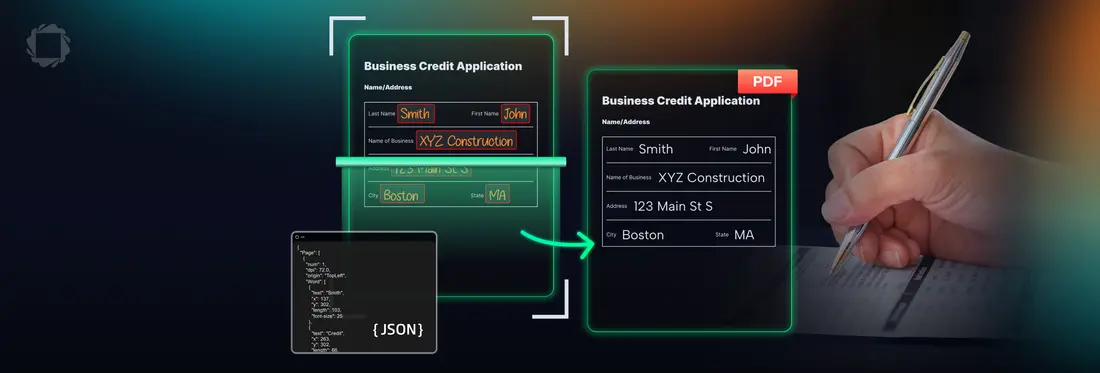
Summary: Handwriting ICR bridges the gap between old-school paper and digital databases. This beginner guide explains how the tech translates messy handwriting into typed characters, without the confusing technical jargon. We will look at real-world use cases, set honest expectations for accuracy, and compare the top software options out there.
Introduction
If you have ever tried to convert an image of a handwritten form into searchable digital text, you have likely run into Handwriting ICR. That's the everyday name most people use. In academic papers and cloud-vendor docs you'll also see it called Handwritten Text Recognition (HTR), and in the enterprise capture world, the technology that does this job and quite a bit more is called Intelligent Character Recognition (ICR). Standard, everyday OCR handles typed, printed text incredibly well, often hitting accuracy scores north of 99%. Handwriting is a completely different story. Real-world handwriting recognition typically lands somewhere between 80% and 95% accuracy. It fluctuates wildly based on how neat the penmanship is, and it delivers the best results when you are dealing with structured documents where users write inside clear, designated form fields.
What Exactly Is Handwriting ICR?
Let's start with standard Optical Character Recognition (OCR). Standard OCR reads clean, typed text like a book page, a digital invoice PDF, or a store receipt. Digital fonts use fixed, exact shapes, so the software matches those pixel patterns to digital letters almost instantly.
Handwriting ICR is a completely different challenge. Think about how you write a lowercase "g" or a number "7" compared to your friends or coworkers. Loop sizes change, lines tilt, letters run together, and people constantly mix cursive with print. There is no fixed font to match against.
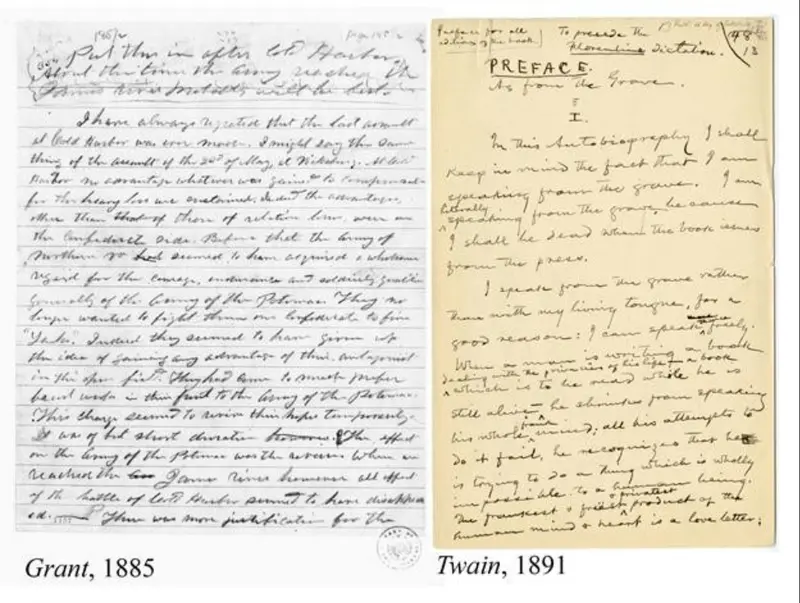
Figure 1: Handwriting comparison between Ulysses S. Grant and Mark Twain.
So the industry built a smarter recognition tier for the job: ICR. Instead of matching rigid font templates, it uses neural networks trained on millions of real handwriting samples to learn the general "idea" of each character shape. That's why it can decipher sloppy writing that would stop template-matching OCR cold.
How It Works
Good document software does not just look at a scanned page and make a wild guess. It passes the file through a four-part digital assembly line to clean up errors before the text ever hits your database.
1. Preprocessing: First comes the image cleanup. If a user took a crooked photo of a form on their phone, the software straightens it out. It also scrubs out scanner dust and increases the contrast, so the ink stands out clearly against the paper.
2. Field Detection: Next, the software maps the page layout to find where the handwriting actually lives. It zeroes in on the exact bounding boxes or lines where someone wrote.
3. Character and Word Recognition: This is the machine learning step. The neural network looks at the ink strokes, checks the surrounding words for context to figure out ambiguous shapes (like telling a "1" from an "l"), and translates the pixels into digital text.
4. Validation: Before saving the data, the system runs a quick check. It matches the words against spell-check dictionaries and ensures the data fits standard rules, making sure a phone number field actually contains numbers.
Where This Fits in the Real World
You’ll find handwriting extraction workflows running anywhere organizations still handle data on physical paper:
Insurance Claims: Reading handwritten accident descriptions or lists of damaged property on paper forms.
Medical Intake: Digitizing registration clipboards at clinics to pull names, policy numbers, and symptoms.
Banking: Processing handwritten check totals and cursive amount fields.
Government & Census: Indexing handwritten voter registration cards or processing physical census sheets.
Field Inspections: Extracting handwritten maintenance notes scribbled by technicians out on a job site.
Historical Archives: Converting old diaries, letters, and public records into searchable databases.
Realistic Accuracy Expectations
Managing your expectations is critical. Do not expect perfect data entry out of the box.
- Standard Printed Text: 99%+. It's near perfect. You rarely need a human to review it.
- Neat Printing in Form Boxes: 90% to 95%. Highly reliable. This is the sweet spot for automation.
- Average Everyday Handwriting: 80% to 90%. Pretty good, but your system will need a human reviewer to catch misspelled names or numbers.
- Messy or Cursive Notes: 60% to 80%. Hits a wall frequently. It's fine for making files searchable, but it will break a structured database.
- Doctor's Shorthand: Good luck. It's still one of the hardest problems in computer science.
Final accuracy depends far more on how well your document is designed (using clear boxes, bright contrast, and good print instructions) than the specific recognition engine you buy.
The Best Tools Available
The software landscape generally splits into three distinct lanes:
Cloud APIs (Google Document AI, AWS Textract, Azure)
These services offer great accuracy out of the box with zero local hardware setup. You just pay a small fee per page.
The Catch: Your documents have to leave your internal servers and travel across the internet, which is a total dealbreaker for strict privacy compliance.
On-Premises SDKs (Apryse Smart Data Extraction)
Built for enterprise apps handling sensitive banking, medical, or government records. The engine runs locally on your own private infrastructure, meaning data never leaves your network. It's fantastic at handling mixed printed and handwritten business forms.
Honest Opinion: If you are trying to read unstructured, freeform 19th-century cursive letters, cloud models have a slight edge purely due to the size of their internet-scale training datasets.
Open-Source Libraries
Tesseract: The most well-known free OCR tool. It's great for printed text, but it struggles heavily with handwriting unless you train custom data models yourself.
PaddleOCR: A modern open-source option that handles handwritten fields much better out of the box, especially if you are working with Chinese, Japanese, or Korean characters.
Neither open-source option gives you ICR's document understanding or validation, you'd be building those layers yourself.
Simple Tips to Boost Your Accuracy Rates
Here's a few things to watch for:
Watch the Resolution: Never pass low-res images into a recognition engine. Source scans or smartphone photos need to be 300 DPI or higher, or character curves blur together.
Box Layouts over Blank Lines: If you are designing paper forms, use grid-style character boxes instead of wide-open blank lines. Forcing people to space out their letters drastically reduces machine parsing errors and gives ICR's field detection clean targets.
Pre-Filter the Noise: Use basic contrast adjustments to strip out background shadows before passing files to your extraction engine.
Use Confidence Gates: Always use the confidence scores returned by the software. Set up a workflow where scores above 90% clear automatically, while anything lower gets routed to an internal dashboard for human verification.
Frequently Asked Questions
Can AI read cursive writing?
Yes, but with some major caveats. If someone fills out a paper form using neat cursive inside distinct, structured lines, modern machine learning tools can read it pretty accurately. However, if you hand the software a page of sloppy, freeform cursive notes scribbled across a blank sheet of paper; the accuracy rates drop severely.
Is handwriting ICR free?
Technically, yes. Open-source libraries like Tesseract are completely free to use. The catch is that Tesseract is built for typed print and performs quite poorly on handwriting unless you spend a lot of time training custom models. For reliable handwriting extraction, commercial cloud APIs or specialized developer toolkits are usually worth the cost, though many offer free tiers to let you test things out.
How is this different from regular OCR?
Standard OCR is designed to look for rigid, uniform digital font shapes that never change. Handwriting ICR relies on entirely different AI architectures. It uses neural networks trained specifically to handle changing stroke angles, erratic character spacing, and the unpredictable nature of human penmanship.
Can it read my doctor's notes?
Honestly, probably not with any real reliability. Rushed, messy medical shorthand remains one of the toughest, most frustrating challenges in the entire document processing field. If you are handling documents with that level of illegible scribbling, you will still need a human professional in the loop to review and correct the machine's mistakes.
Wrapping Up
If you're building a simple app or a public tool, cloud endpoints or open-source packages work fine. But if you are processing sensitive forms at scale on your own infrastructure, look into an enterprise on-prem SDK like the Apryse Server SDK to keep your data private and your workflows secure.
Apryse SDK is a robust document library that offers many document processing features and capabilities such as data extraction, file conversion, editing, annotation, digital signatures, and much more.
View our comprehensive documentation to get started with Handwriting ICR today.
Feel free to contact us for help or any questions you have.