COMING SOON: Spring 2026 Release Arrives April 15th
Isaac Maw
Technical Content Creator
Published April 01, 2026
Updated April 01, 2026
7 min
Isaac Maw
Technical Content Creator

Summary: This article explains how Apryse Smart Data Extraction converts unstructured PDFs into accurate structured JSON that developers can use in automation and AI workflows. It outlines the advantages of AI based extraction compared to OCR and template driven methods and highlights how Apryse improves data quality and security by running fully on premise.
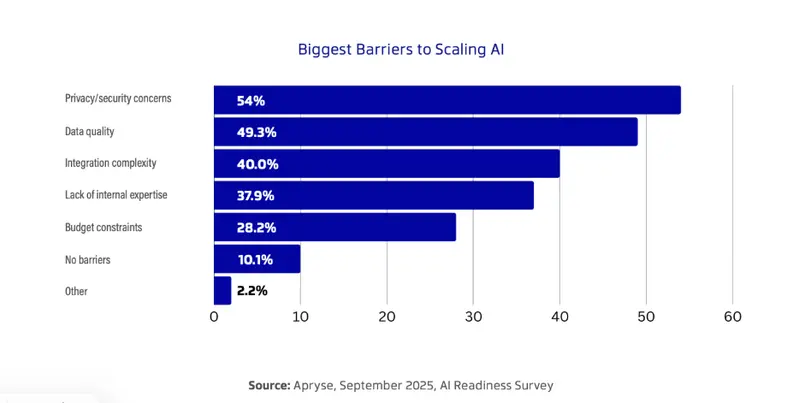
According to our 2025 AI Readiness Report, two of the largest barriers to scaling AI in enterprise operations are privacy/security concerns and data quality. With AI-powered tools such as retrieval-augmented generation (RAG) providing value for enterprises, solving these challenges is a key target for developers when it comes to document processing.

80% of enterprise data is unstructured, trapped in PDF documents, office files, emails, and even paper documents. The bottleneck is getting data out of PDFs into usable JSON, not the AI model itself.
Apryse Smart Data Extraction effectively addresses data quality and privacy/security concerns:
Let’s overview types of data extraction, important considerations for developers, and what makes Apryse Smart Data Extraction stand out.
PDF documents are designed to be readable by human users, not machines. Under the hood, content does not appear as simple text. This is why selecting text in PDFs isn’t always possible or reliable. The three types include:
This article focuses on AI-based extraction.
A document is more than just a string of text. Headings, paragraphs, tables, and other document structure communicate information beyond the text itself, and some text content is less valuable than others, such as letterhead and boilerplate, for example.
With basic OCR on a PDF document, all the content in a PDF is converted to text, but all the formatting is lost. This means additional processing is required to extract data such as dates and names, for example.
AI-powered Smart Data Extraction goes beyond OCR with tools to identify data based on its context within the document. Click the links to visit our Showcase and demo these extraction tools for yourself:
“documentClasses” : [
{
“type” : “resume”,
“confidence” : 0.927
}
]
Coming back to privacy and security concerns as an obstacle to AI in enterprise production, developers can choose between cloud-based and on-premise solutions for data processing.
In addition, within cloud-based processing, data extraction can take place within your own application’s cloud environment, or use a third-party API service such as AWS Textract or Google Document AI.
These cloud-based APIs come with privacy and security tradeoffs. While these cloud service providers such as Google, AWS and Azure do maintain their own security and privacy compliance certifications, transmitting data to a third party may still cause headaches for industry-specific compliance, such as For healthcare (HIPAA), finance (PCI-DSS), government (air-gapped).
By comparison, on-premise SDKs keep data in-house, ensuring data privacy, security and ownership.
Solution | Deployment Model | Strengths | Limitations | Ideal Use Cases |
|---|---|---|---|---|
AWS Textract | Cloud‑only (AWS) |
|
| Automated parsing of PDFs at scale, table-heavy docs, serverless workflows, already invested in AWS infrastructure |
Google Document AI | Cloud-only (GCP) |
|
| Invoice/receipt automation, form parsing pipelines, GCP-native workflows |
Adobe PDF Extract API | Cloud API |
|
| Publishers, content repurposing, precise JSON layout extraction |
Apryse Smart Data Extraction | Fully on‑premise, air‑gapped capable (also cloud) |
|
| Enterprise on‑prem IDP, regulated environments, embedded PDF workflows, full document pipelines |
ABBYY FlexiCapture | Cloud or on‑prem |
|
| Enterprise automation, high‑volume capture, workflow‑driven IDP |
PDFix | SDK (on‑prem or packaged) |
| Primarily an accessibility and compliance tool, not general data extraction Smaller ecosystem with fewer pre-built extraction models | Development teams requiring PDF accessibility and compliance at scale (PDF/UA / WCAG) |
Mindee | Cloud API | Strong invoice/receipt extraction Developer‑friendly REST API Simple pricing structure | Cloud‑only Limited outside receipts/forms unless using custom models | Finance automation, SMB invoicing tools, lightweight cloud apps |
It’s easy to get started with Smart Data Extraction with the Apryse Server SDK. You can get your trial key and start working with the SDK in your application today. Here’s how:
Enterprises use retrieval-augmented generation (RAG) to boost LLM output with their own data from an internal database. This is valuable tool for legal teams, for example, who can input massive quantities of discovery documents and use an LLM or AI agent to quickly process the data and get specific, relevant answers.
PDF extraction serves as a critical data prep layer for RAG systems. Apryse converts unstructured PDFs into clean labeled JSON that LLMs can consume.
To learn more about Apryse Smart Data Extraction solutions for LLM and RAG systems, check out the WebViewer Guide: Building a Great User Experience for Production LLM Applications.
To get started or with any questions, please contact sales.
Q: How do I convert a PDF to structured JSON using AI?
A: Apryse Smart Data Extraction uses AI to identify document structure, tables, and key value pairs and outputs clean JSON that stays fully inside your environment.
Q: Is there an on-premise PDF to JSON solution for strict compliance needs?
A: Yes. Apryse provides a fully on premise and air-gapped capable extraction engine that keeps all document processing and JSON generation in house for maximum security.
Q: What is the best way to prepare PDF data for LLM or RAG pipelines?
A: Apryse converts unstructured PDFs into structured JSON with layout, hierarchy, and confidence scores, producing high quality inputs that improve retrieval accuracy in AI workflows.

PRODUCTS
Platform Integrations
End User Applications
Popular Content
RESOURCES
#---------------------------------------------------------------------------------------
# Copyright (c) 2001-2025 by Apryse Software Inc. All Rights Reserved.
# Consult LICENSE.txt regarding license information.
#---------------------------------------------------------------------------------------
import site
site.addsitedir("../../../PDFNetC/Lib")
import sys
from PDFNetPython import *
import platform
sys.path.append("../../LicenseKey/PYTHON")
from LicenseKey import *
#---------------------------------------------------------------------------------------
# The Data Extraction suite is an optional PDFNet add-on collection that can be used to
# extract various types of data from PDF documents.
#
# The Apryse SDK Data Extraction suite can be downloaded from
# https://docs.apryse.com/core/guides/info/modules#data-extraction-module
#
# Please contact us if you have any questions.
#---------------------------------------------------------------------------------------
# Relative path to the folder containing the test files.
inputPath = "../../TestFiles/"
outputPath = "../../TestFiles/Output/"
def WriteTextToFile(outputFile, text):
# Write the contents of text to the disk
f = open(outputFile, "w")
try:
f.write(text)
finally:
f.close()
def main():
# The first step in every application using PDFNet is to initialize the
# library. The library is usually initialized only once, but calling
# Initialize() multiple times is also fine.
PDFNet.Initialize(LicenseKey)
PDFNet.AddResourceSearchPath("../../../PDFNetC/Lib/")
#-----------------------------------------------------------------------------------
# The following sample illustrates how to extract tables from PDF documents.
#-----------------------------------------------------------------------------------
# Test if the add-on is installed
if not DataExtractionModule.IsModuleAvailable(DataExtractionModule.e_Tabular):
print("")
print("Unable to run Data Extraction: Apryse SDK Tabular Data module not available.")
print("-----------------------------------------------------------------------------")
print("The Data Extraction suite is an optional add-on, available for download")
print("at https://docs.apryse.com/core/guides/info/modules#data-extraction-module . If you have already")
print("downloaded this module, ensure that the SDK is able to find the required files")
print("using the PDFNet.AddResourceSearchPath() function.")
print("")
else:
try:
# Extract tabular data as a JSON file
print("Extract tabular data as a JSON file")
outputFile = outputPath + "table.json"
DataExtractionModule.ExtractData(inputPath + "table.pdf", outputFile, DataExtractionModule.e_Tabular)
print("Result saved in " + outputFile)
#------------------------------------------------------
# Extract tabular data as a JSON string
print("Extract tabular data as a JSON string")
outputFile = outputPath + "financial.json"
json = DataExtractionModule.ExtractData(inputPath + "financial.pdf", DataExtractionModule.e_Tabular)
WriteTextToFile(outputFile, json)
print("Result saved in " + outputFile)
#------------------------------------------------------
# Extract tabular data as an XLSX file
print("Extract tabular data as an XLSX file")
outputFile = outputPath + "table.xlsx"
DataExtractionModule.ExtractToXLSX(inputPath + "table.pdf", outputFile)
print("Result saved in " + outputFile)
#------------------------------------------------------
# Extract tabular data as an XLSX stream (also known as filter)
print("Extract tabular data as an XLSX stream")
outputFile = outputPath + "financial.xlsx"
options = DataExtractionOptions()
options.SetPages("1") # page 1
outputXlsxStream = MemoryFilter(0, False)
DataExtractionModule.ExtractToXLSX(inputPath + "financial.pdf", outputXlsxStream, options)
outputXlsxStream.SetAsInputFilter()
outputXlsxStream.WriteToFile(outputFile, False)
print("Result saved in " + outputFile)
except Exception as e:
print("Unable to extract tabular data, error: " + str(e))
#-----------------------------------------------------------------------------------
# The following sample illustrates how to extract document structure from PDF documents.
#-----------------------------------------------------------------------------------
# Test if the add-on is installed
if not DataExtractionModule.IsModuleAvailable(DataExtractionModule.e_DocStructure):
print("")
print("Unable to run Data Extraction: PDFTron SDK Structured Output module not available.")
print("-----------------------------------------------------------------------------")
print("The Data Extraction suite is an optional add-on, available for download")
print("at https://docs.apryse.com/core/guides/info/modules#data-extraction-module . If you have already")
print("downloaded this module, ensure that the SDK is able to find the required files")
print("using the PDFNet.AddResourceSearchPath() function.")
print("")
else:
try:
# Extract document structure as a JSON file
print("Extract document structure as a JSON file")
outputFile = outputPath + "paragraphs_and_tables.json"
DataExtractionModule.ExtractData(inputPath + "paragraphs_and_tables.pdf", outputFile, DataExtractionModule.e_DocStructure)
print("Result saved in " + outputFile)
#------------------------------------------------------
# Extract document structure as a JSON string
print("Extract document structure as a JSON string")
outputFile = outputPath + "tagged.json"
json = DataExtractionModule.ExtractData(inputPath + "tagged.pdf", DataExtractionModule.e_DocStructure)
WriteTextToFile(outputFile, json)
print("Result saved in " + outputFile)
except Exception as e:
print("Unable to extract document structure data, error: " + str(e))
#-----------------------------------------------------------------------------------
# The following sample illustrates how to extract form fields from PDF documents.
#-----------------------------------------------------------------------------------
# Test if the add-on is installed
if not DataExtractionModule.IsModuleAvailable(DataExtractionModule.e_Form):
print("")
print("Unable to run Data Extraction: PDFTron SDK AIFormFieldExtractor module not available.")
print("-----------------------------------------------------------------------------")
print("The Data Extraction suite is an optional add-on, available for download")
print("at https://docs.apryse.com/core/guides/info/modules#data-extraction-module . If you have already")
print("downloaded this module, ensure that the SDK is able to find the required files")
print("using the PDFNet.AddResourceSearchPath() function.")
print("")
else:
try:
# Extract form fields as a JSON file
print("Extract form fields as a JSON file")
outputFile = outputPath + "formfields-scanned.json"
DataExtractionModule.ExtractData(inputPath + "formfields-scanned.pdf", outputFile, DataExtractionModule.e_Form)
print("Result saved in " + outputFile)
#------------------------------------------------------
# Extract form fields as a JSON string
print("Extract form fields as a JSON string")
outputFile = outputPath + "formfields.json"
json = DataExtractionModule.ExtractData(inputPath + "formfields.pdf", DataExtractionModule.e_Form)
WriteTextToFile(outputFile, json)
print("Result saved in " + outputFile)
#-----------------------------------------------------------------------------------
# Detect and add form fields to a PDF document.
# PDF document already has form fields, and this sample will update to new found fields.
print("Extract form fields as a pdf file, update to new")
doc = PDFDoc(inputPath + "formfields-scanned-withfields.pdf")
DataExtractionModule.DetectAndAddFormFieldsToPDF(doc)
outputFile = outputPath + "formfields-scanned-fields-new.pdf"
doc.Save(outputFile, SDFDoc.e_linearized)
doc.Close()
print("Result saved in " + outputFile)
#-----------------------------------------------------------------------------------
# Detect and add form fields to a PDF document.
# PDF document already has form fields, and this sample will keep the original fields.
print("Extract form fields as a pdf file, keep original")
doc = PDFDoc(inputPath + "formfields-scanned-withfields.pdf")
options = DataExtractionOptions()
options.SetOverlappingFormFieldBehavior("KeepOld")
DataExtractionModule.DetectAndAddFormFieldsToPDF(doc, options)
outputFile = outputPath + "formfields-scanned-fields-old.pdf"
doc.Save(outputFile, SDFDoc.e_linearized)
doc.Close()
print("Result saved in " + outputFile)
except Exception as e:
print("Unable to extract form fields data, error: " + str(e))
#---------------------------------------------------------------------------------------
# The following sample illustrates how to extract key-value pairs from PDF documents.
#---------------------------------------------------------------------------------------
if not DataExtractionModule.IsModuleAvailable(DataExtractionModule.e_GenericKeyValue):
print()
print("Unable to run Data Extraction: Apryse SDK AIPageObjectExtractor module not available.")
print("---------------------------------------------------------------")
print("The Data Extraction suite is an optional add-on, available for download")
print("at https://docs.apryse.com/core/guides/info/modules#data-extraction-module . If you have already downloaded this")
print("module, ensure that the SDK is able to find the required files")
print("using the PDFNet.AddResourceSearchPath() function.")
print()
else:
try:
print("Extract key-value pairs from a PDF")
# Simple example: Extract Keys & Values as a JSON file
DataExtractionModule.ExtractData(inputPath + "newsletter.pdf", outputPath + "newsletter_key_val.json", DataExtractionModule.e_GenericKeyValue)
print("Result saved in " + outputPath + "newsletter_key_val.json")
# Example with customized options:
# Extract Keys & Values from pages 2-4, excluding ads
options = DataExtractionOptions()
options.SetPages("2-4")
p2_exclusion_zones = RectCollection()
# Exclude the add-on on page 2
# These coordinates are in PDF user space, with the origin at the bottom left corner of the page
# Coordinates rotate with the page, if it has rotation applied.
p2_exclusion_zones.AddRect(Rect(166, 47, 562, 222))
options.AddExclusionZonesForPage(p2_exclusion_zones, 2)
p4_inclusion_zones = RectCollection()
p4_exclusion_zones = RectCollection()
# Only include the article text for page 4, exclude ads and headings
p4_inclusion_zones.AddRect(Rect(30, 432, 562, 684))
p4_exclusion_zones.AddRect(Rect(30, 657, 295, 684))
options.AddInclusionZonesForPage(p4_inclusion_zones, 4)
options.AddExclusionZonesForPage(p4_exclusion_zones, 4)
print("Extract Key-Value pairs from specific pages and zones as a JSON file")
DataExtractionModule.ExtractData(inputPath + "newsletter.pdf", outputPath + "newsletter_key_val_with_zones.json", DataExtractionModule.e_GenericKeyValue, options)
print("Result saved in " + outputPath + "newsletter_key_val_with_zones.json")
except Exception as e:
print("Unable to extract key-value data, error: " + str(e))
#-----------------------------------------------------------------------------------
# The following sample illustrates how to extract document classes from PDF documents.
#-----------------------------------------------------------------------------------
# Test if the add-on is installed
if not DataExtractionModule.IsModuleAvailable(DataExtractionModule.e_DocClassification):
print("")
print("Unable to run Data Extraction: PDFTron SDK AIPageObjectExtractor module not available.")
print("-----------------------------------------------------------------------------")
print("The Data Extraction suite is an optional add-on, available for download")
print("at https://docs.apryse.com/documentation/core/info/modules/. If you have already")
print("downloaded this module, ensure that the SDK is able to find the required files")
print("using the PDFNet.AddResourceSearchPath() function.")
print("")
else:
try:
# Simple example: classify pages as a JSON file
print("Classify pages as a JSON file")
outputFile = outputPath + "Invoice_Classified.json"
DataExtractionModule.ExtractData(inputPath + "Invoice.pdf", outputFile, DataExtractionModule.e_DocClassification)
print("Result saved in " + outputFile)
#------------------------------------------------------
# Classify pages as a JSON string
print("Classify pages as a JSON string")
outputFile = outputPath + "Scientific_Publication_Classified.json"
json = DataExtractionModule.ExtractData(inputPath + "Scientific_Publication.pdf", DataExtractionModule.e_DocClassification)
WriteTextToFile(outputFile, json)
print("Result saved in " + outputFile)
#------------------------------------------------------
# Example with customized options:
print("Classify pages with customized options")
options = DataExtractionOptions()
# Classes that don't meet the minimum confidence threshold of 70% will not be listed in the output JSON
options.SetMinimumConfidenceThreshold(0.7)
outputFile = outputPath + "Email_Classified.json"
DataExtractionModule.ExtractData(inputPath + "Email.pdf", outputFile, DataExtractionModule.e_DocClassification, options)
print("Result saved in " + outputFile)
except Exception as e:
print("Unable to extract document structure data, error: " + str(e))
PDFNet.Terminate()
print("Done.")
if __name__ == '__main__':
main()