Document Parsing: What It Is and What It Returns
Document parsing starts with deterministic structure recovery. Purpose-built AI interprets the result afterward. Apryse Smart Data Extraction returns the recovered structure as JSON, table data or Markdown. This page shows what each format returns from one source document. It is part of document extraction and parsing.
What Is Document Parsing?
Document parsing recovers a file's structure and geometry deterministically: where each heading, paragraph, list, table, header and footer sits on the page, and in what reading order. Extraction comes after parsing. It interprets what the recovered content means, such as which value is an invoice total or which pages form a contract. That interpretation layer uses purpose-built AI and is probabilistic by design, so key-value pairs, form fields and classification results each carry a confidence score. OCR is a separate step. It generates a text layer for scanned pages that have none, and parsing reads that text. In the Apryse Server SDK, the Smart Data Extraction add-on returns parsed structure as JSON with page numbers and bounding boxes, table data or Markdown.
The rest of this page works through that distinction with one source document. The sequence is parse first, interpret second. The output format you pick decides what your next job can do with the result.
Parsing Versus Extraction Versus Structure Recovery
Three terms get used interchangeably, and they name different layers. Document structure recovery is the deterministic foundation. It works out where every block sits on the page and what role each block plays. Parsing and extraction both depend on it.
Interpretation is where key-value extraction sits. Your application decides what happens to a low-confidence result, because the score is an input to your logic, not a verdict. Table results are the exception: they do not include a confidence score.
OCR belongs to neither layer. It generates a text layer where a page has none, and parsing reads the text a page already has.
Where Parsing Sits in the Pipeline
Parsing runs after OCR and before interpretation. A scanned page gets its text layer first. Structure recovery and parsing return the layout. Extraction then reads that layout for meaning. Four stages result, and only the first three are document work:
OCR:
When the page is image-based. Smart Data Extraction runs a built-in OCR step before it recovers structure.
Structure recovery and parsing:
Smart Data Extraction returns the layout in your chosen format.
Extraction:
Smart Data Extraction returns key-value pairs, form fields or page classifications, each with a confidence score.
Your application:
Validation, routing, storage and review belong to your code.
Apryse supplies the building blocks for stages one through three. Your team owns the pipeline around them. The Server SDK provides no work queue, job scheduler or batch orchestration, so you write the loop that feeds documents in and acts on what comes out. Each stage runs inside your own infrastructure, which means no document content leaves your environment. For the pipeline view in blog form, read document parsing and data extraction.
What You Get Back
Smart Data Extraction returns four output formats from the same source document. Every sample below comes from one file, run through the Server SDK. Call PDFNet.initialize() before any extraction operation. The DataExtractionTest sample ships in the main SDK download, and the workflow guide covers setup and options.
Each output is one call against the same source file. Python shows the pattern, and the other Server SDK languages follow the same shape.
Source File
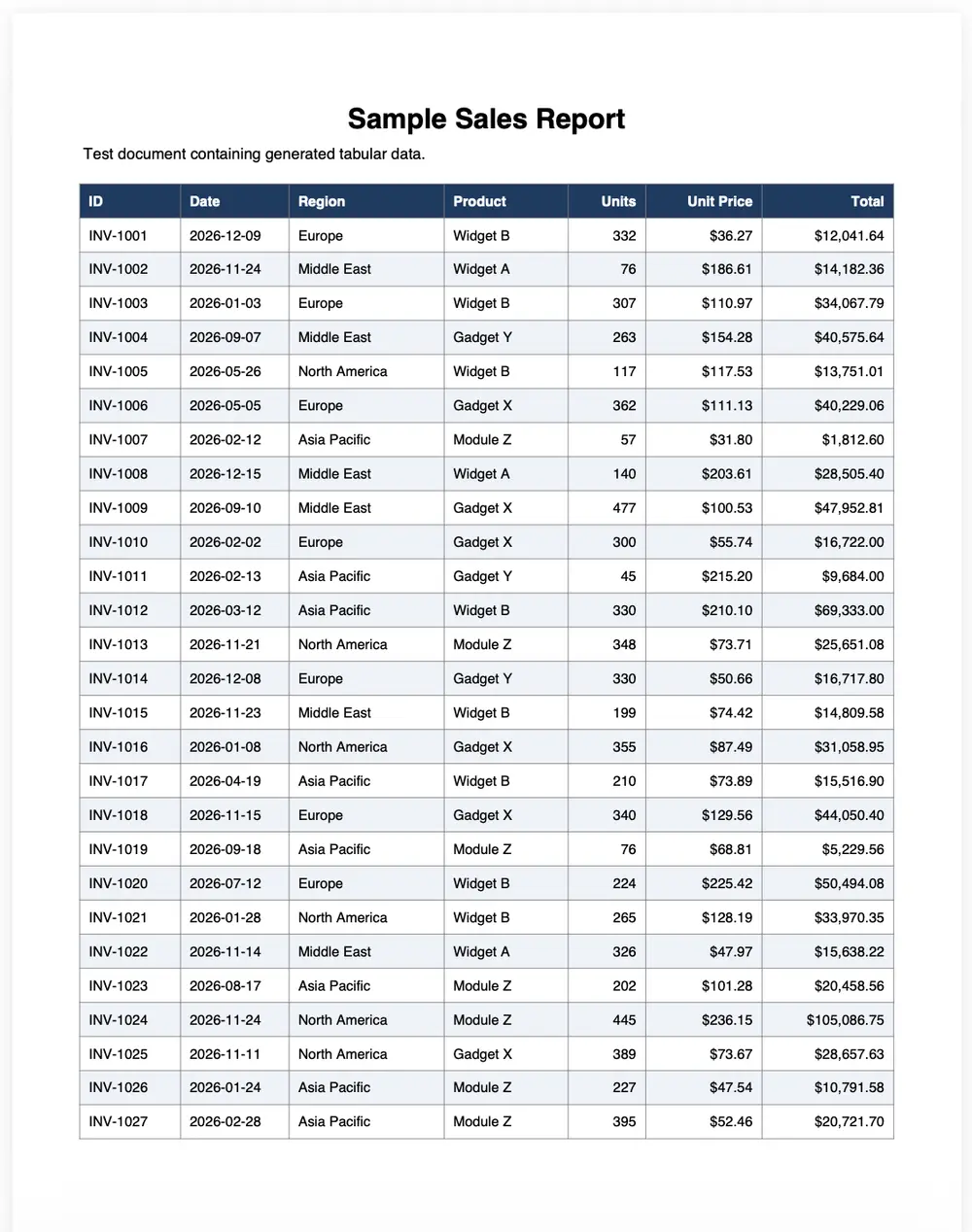
Source PDF Document
SDK Outputs
The below are samples of the outputs for the above PDF document, stopping at “Widget B” in the PDF table.
JSON With Coordinates
JSON is the output for work that needs to know where things are. It carries page numbers and bounding boxes, so your application can place an overlay or an annotation on the source page, route content by position or feed a compliance check. The JSON specification documents every field.
Tables to JSON or Excel
Table extraction finds the tables in a PDF, including merged cells and multi-row headers, and exports them to JSON or Excel. Table results do not include a confidence score. Whole-document PDF to XLSX conversion is a different add-on, the Structured Output Module. The Excel export on this page covers the tables Smart Data Extraction finds, not the whole document.
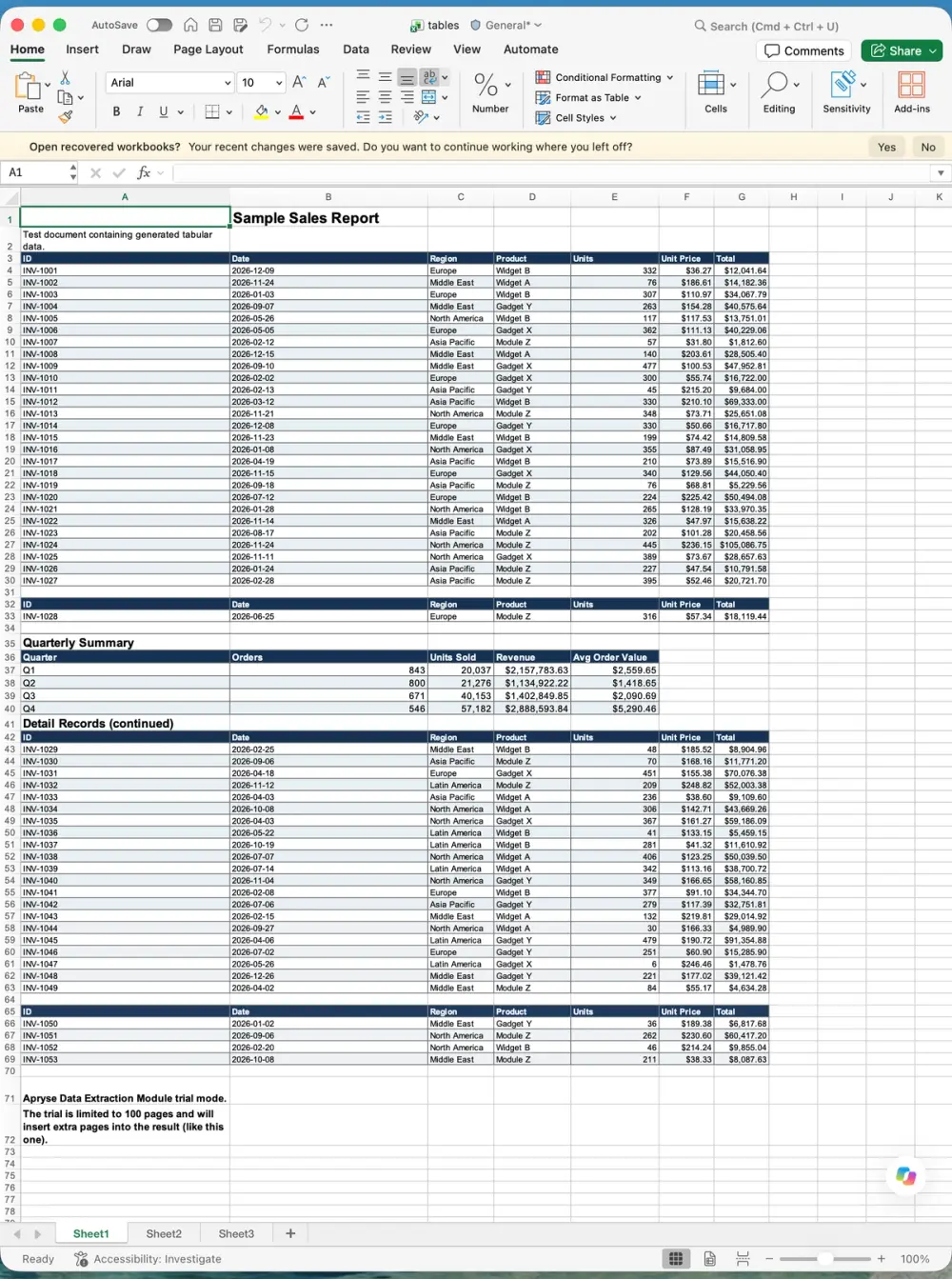
Table output in .XLSX format
Markdown for AI and RAG Pipelines
Markdown output is generated from the StructuredOutput document structure, not from flat text extraction. That mechanism is why headings, lists, tables and reading order carry through. The output keeps paragraphs in reading order, heading levels 1 to 6, nested bulleted and numbered lists, tables with headers and merged cells, images with alt text, links and bookmark anchors. Nested tables come through as inline HTML. For image-based PDFs, hidden text is reprocessed with OCR before export.
Markdown is data for a pipeline, not a visual copy of the page. It is the RAG-ready format, and extraction for RAG and LLM pipelines makes that argument in full. Markdown output runs on Windows and Linux in every supported SDK language and is included in your existing Smart Data Extraction add-on license. For an editable DOCX, XLSX, PPTX or HTML copy of the whole document, use the Structured Output Module, which does not output Markdown.
Choosing an Output Format for the Job
Pick the format by what your next job does with the document, not by which is easiest to produce. The formats are not exclusive. Run the same source file through two of them when two jobs need it, such as JSON for a review overlay and Markdown for a model.
What Breaks When Parsing Is Skipped
Flattening a document to a string drops information the page carried. Text extraction is the right tool when you need the words. When your next step depends on layout, three failures show up, and none of them appears in an error log.
Without that structure, the output still looks like text. The damage surfaces later as a wrong answer from a model or a value filed under the wrong label.
Setup, Licensing, and Platform Support
Smart Data Extraction is a Server SDK add-on module. The table lists what you need before the first call.
