Mia Perese
Published July 15, 2026
Updated July 15, 2026

3 min


Programmatic Tracked Changes in DOCX Editor: What's New in WebViewer 12.0
Mia Perese
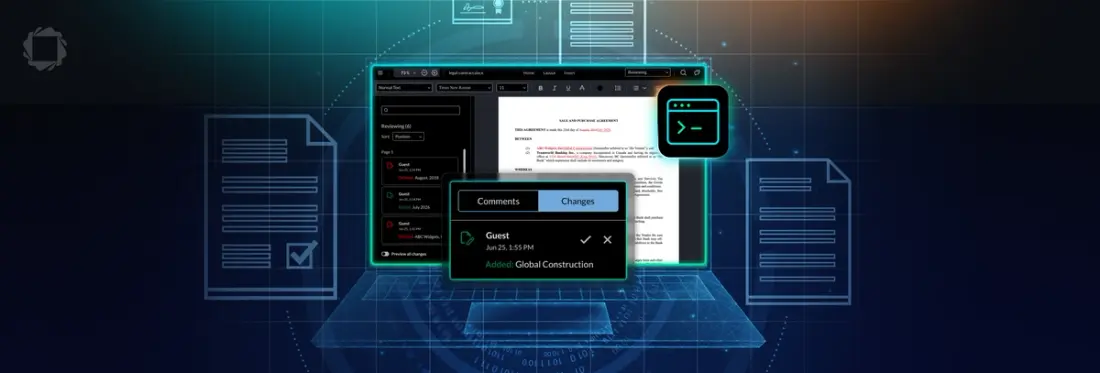
Summary: WebViewer 12.0 introduces TrackedChangeManager, an API for working with tracked changes in DOCX Editor directly from code. It lets developers accept, reject, navigate to, and retrieve tracked changes without requiring interaction through the editor UI.
Tracked Changes Are Now Directly Accessible via the API
Before WebViewer 12.0, accepting, rejecting, navigating to, and retrieving tracked changes in DOCX Editor all required user interaction through the editor UI. TrackedChangeManager removes that requirement, so developers can call these actions from their own application logic instead.
Why does programmatic access to tracked changes matter?
Tracked changes are how people propose and review edits to a document, so any tool that automates part of that review has to be able to read and act on them. An AI tool that suggests edits to a contract, for example, can return them as tracked changes, and your application can accept or reject each one based on its own rules or a reviewer’s input, without leaving your interface.
What can you do with TrackedChangeManager?
DOCX Editor’s new API supports five actions: accepting a change, rejecting a change, navigating to a change, retrieving all changes in a document, and retrieving OOXML IDs for all changes. Each tracked change has a numeric ID, so your application can act on one specific change instead of the whole document.
What else shipped in v12?
WebViewer 12.0 adds two more capabilities that support the same use case: building a custom review experience on top of DOCX Editor. Editor text navigation APIs give developers programmatic control over cursor and selection positioning, the foundation for review interfaces and automation pipelines that move through a document without user input. Copy and paste also changed: an HTML-based approach better preserves structure and formatting when content comes in from outside the editor. Together, these additions point to a larger difference in how WebViewer handles document automation.
What makes browser-based programmatic tracked changes different?
TrackedChangeManager runs in the browser, on top of the same editor a person uses to review the result, with no server component required. The automated step and the human review step happen in one SDK, not split across a server process and a separate UI.
How do you get started with TrackedChangeManager?
TrackedChangeManager requires WebViewer 12.0 with the DOCX Editor add-on license. Check the docs for setup and integration details, or browse the release notes for everything else in 12.0.
More from this release
Programmatic tracked changes ship as part of the Summer 2026 Release, alongside the WebViewer UI consolidation and new XLS/CSV and chart support in Spreadsheet Editor, plus more updates across the Server and Scanbot SDKs. For more details on what's new in WebViewer, see the WebViewer 12.0 blog and the Spreadsheet Editor blog.