Candice Cheng
Product Manager
Published October 14, 2026
Updated October 28, 2026

3 min


The End of Portrait Lock: What Android 17 Means for Scanning Apps
Candice Cheng
Product Manager
For years, many Android scanning applications relied on portrait lock to provide a consistent and predictable user experience. As Android expands across tablets, foldables, Chromebooks, and desktop-style environments, Google is increasingly pushing developers toward adaptive layouts that work across different screen sizes and orientations.
Android's Shift Toward Adaptive Apps
In January 2025, Google announced changes in Android 16 that allow the system to override certain orientation, aspect ratio, and resizability restrictions on larger devices. To ease the transition, PROPERTY_COMPAT_ALLOW_RESTRICTED_RESIZABILITY property was included to allow developers to opt out and preserve existing behaviour.
Android 17, released on 26 June 2026, removes this opt-out. For apps targeting Android 17, orientation restrictions, aspect ratio limitations, and resizability restrictions are ignored on large-screen devices, requiring applications to adapt to the display size and orientation selected by the user.
What This Means for Scanning Applications
Scanning applications need to preserve an effective scanning experience as screen dimensions change by balancing the navigational controls, camera preview, user guidance, and scan results. Simply rotating a portrait layout can significantly reduce the available space for the camera preview, especially on phones, making scanning less comfortable and efficient.
This is particularly important for workflows where users need to quickly scan barcodes or documents, as well as kiosk and mounted-device deployments where scanning distance may already be constrained.
Scanbot SDK Now Supports Landscape Orientation
To help developers prepare for increasingly adaptive Android experiences, the latest Scanbot SDK release introduces Landscape Orientation Support in the Ready-to-Use UI.
Rather than simply rotating existing screens, the UI adapts key workflows to make better use of available screen space while preserving room for the camera preview and viewfinder.
Document Scanner
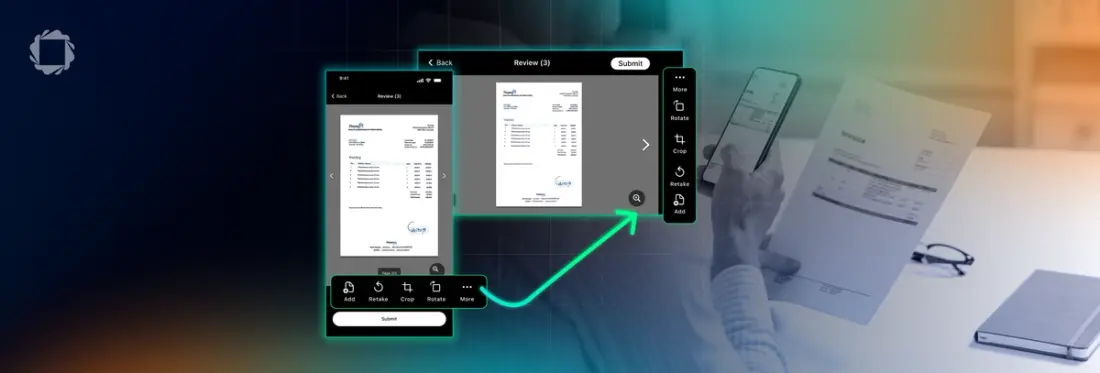
- The bottom toolbar moves to the side of the screen in landscape mode, freeing up additional vertical space for document capture.
- On the Review Screen, the Submit button moves from the bottom action area to the top bar, allowing more space for document preview.
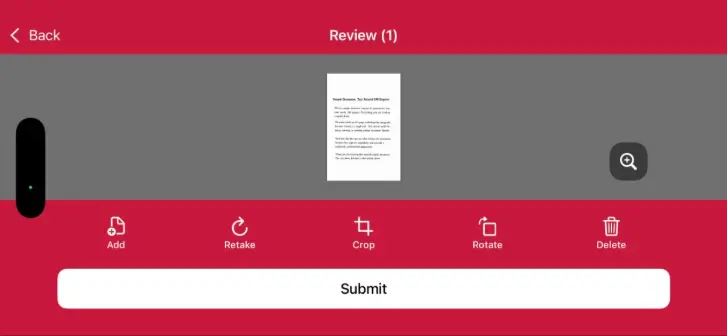
Landscape orientation Review screen in V9
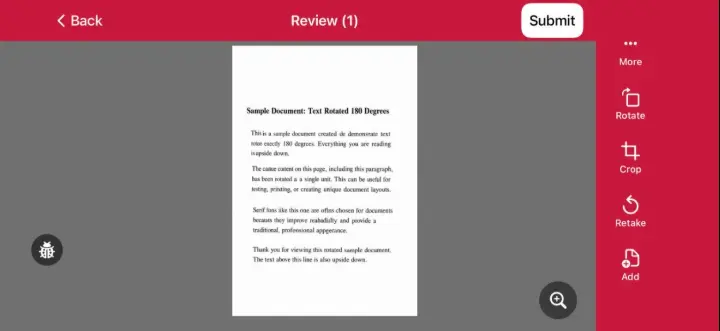
Landscape orientation Review screen in V10
Barcode Scanner
- In Multi Scan and Find & Pick modes, scan results can be displayed alongside the camera view when sufficient width is available, allowing users to review results without leaving the scanning view.
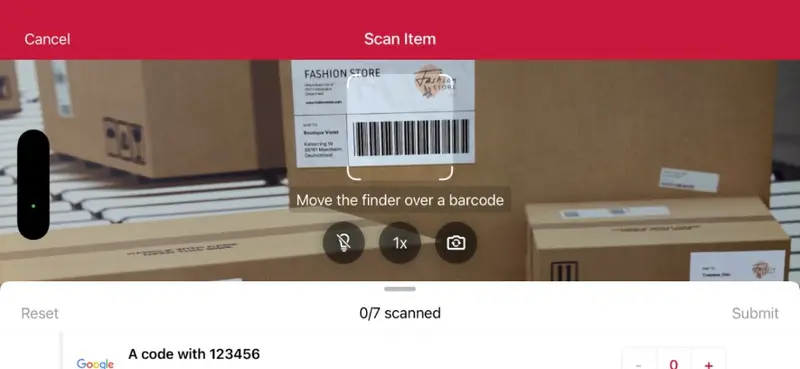
Landscape orientation Multi-scan screen in V9
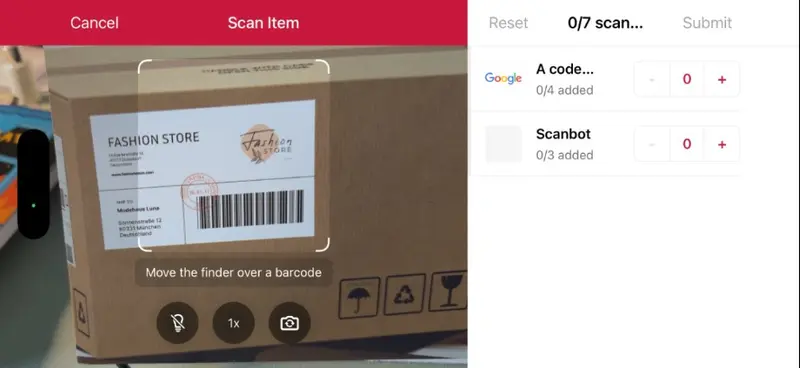
Landscape orientation Multi-scan screen in V10
Data Capture
- Zoom and flash controls move from the bottom of the viewfinder to the side, helping maximise the available scanning area in landscape orientation.
These improvements are available in the Ready-to-Use UI. Developers building custom scanning interfaces should evaluate how their own layouts, camera previews, controls, and workflows adapt across phones, tablets, foldables, and other large-screen devices.
Looking Ahead
While apps do not need to immediately target Android 17, Google Play requires new app submissions and updates to target Android 16 or later by August 31, 2026. Based on Google's established pattern of annually increasing target SDK requirements, Android 17, could reasonably become a Google Play requirement in 2027, although Google has not yet announced a specific deadline.
Check out Scanbot SDK version 10.0, you can explore the latest Ready-to-Use UI improvements and see how Landscape Orientation Support can help your app adapt across phones, tablets, foldables, and other large-screen devices.
Start a free trial to evaluate them in your workflow, or talk to our team about how we can support your use case.