Garry Klooesterman
Senior Technical Content Creator
Published November 18, 2026
Updated November 18, 2026

7 min


How to Extract Barcodes from PDFs in C#
Garry Klooesterman
Senior Technical Content Creator
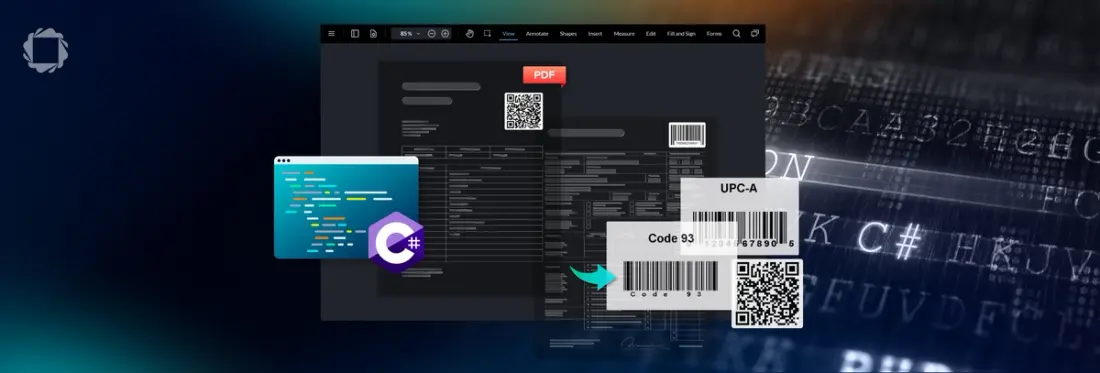
To extract barcodes from PDFs in C#, add the Apryse Server SDK for .NET to your project, download the Barcode Extraction Module into the SDK's Lib folder, and call BarcodeModule.ExtractBarcodesAsString on your PDF. You get every barcode as JSON with its type, position, rotation and value, from born-digital or scanned PDFs, on Windows or Linux servers.
Why Read Barcodes from PDFs in C# with an SDK That Opens the PDF Directly
Picture a freight-forwarding service that receives bills of lading as PDF packets. Page one has a clean Code 128 label, and page nine is a driver's scan with a coffee ring across the pallet barcode. An open-source decoder takes images, not PDFs, so your code renders each page to a bitmap first and picks a resolution for it. Pick low and small barcodes lose detail. Pick high and memory climbs on every page of every packet.
One approach is a C# barcode extraction SDK that opens the PDF itself. The Barcode Extraction Module detects and decodes barcodes in PDFs, covers 100+ barcode types, and returns the results as JSON. It runs on Windows and Linux x64 inside your own infrastructure, so no document data leaves your environment. It is not a camera scanner: the Scanbot SDK captures barcodes through a device camera, while the Barcode Extraction Module reads barcodes already inside PDFs.
The Barcode Extraction Module falls under the Smart Data Extraction add-on license and installs as a separate module download. Compared with an open-source decoder, the choice is a license cost against engineering and maintenance time.
This post covers Apryse Server SDK integration using C# on Windows and Linux, and shows how to extract barcodes from PDFs to JSON. It does not cover QR codes from PDFs in C#, how to send barcode values to a database, or camera scanning, which belongs to the Scanbot SDK. For other languages or platforms, see the Server SDK get-started guide.
Extract Barcodes from a PDF to JSON in C# with the Apryse Barcode Extraction Module
Extracting barcodes from a PDF to JSON in C# with the Apryse Barcode Extraction Module takes one call after setup. Start with the packet from the story above: a bill of lading with one born-digital page and one scanned page.
This feature requires the Barcode Extraction Module add-on, which is a separate download from the base Server SDK. See the modules documentation for download and installation instructions.
License keys are confidential. Do not commit them to public repositories. Use environment variables or a secrets manager to inject your key at runtime.
The code initializes PDFNet, points the SDK at the Lib folder, checks that the module loaded, extracts the barcodes, and terminates.
Run it from the project folder on Windows or Linux:
# Run from the project folder. The Lib location is set in code through AddResourceSearchPath
dotnet run
PDFNet.Initialize registers the license key. AddResourceSearchPath tells the SDK where the Lib folder sits, relative to your executable, and one path covers every installed module. IsModuleAvailable returns false when the module is missing or the path is wrong, so the code stops with a clear message instead of returning nothing. ExtractBarcodesAsString reads the PDF directly and returns the detected barcodes as a JSON string, which the code prints. The input and output file names follow the form on the Barcode workflow page. One call covers the whole packet.
.NET Framework projects reference PDFNetLoader.dll and PDFNet.dll, and keep the PDFNetLoader.Instance() line shown in the BarcodeTest sample.
Here is the JSON from the BarcodeTest sample, run against its barcodes.pdf:
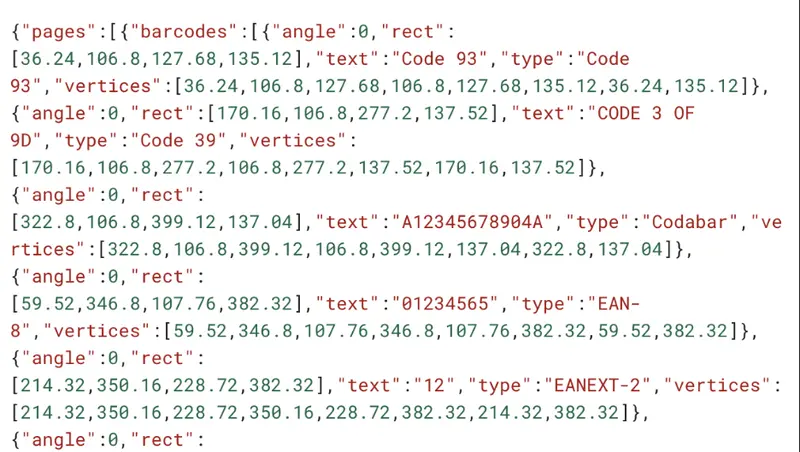
Figure 1: Sample JSON output.
Every option used later in this post is documented in the Barcode workflow docs.
Running C# Barcode Extraction on Windows and Linux Servers in Production
Running C# barcode extraction on Windows and Linux servers in production comes down to five habits.
Initialize once per process: The sample above initializes and terminates around a single run. In a long-running .NET service, call PDFNet.Initialize at startup, leave it initialized for the life of the worker, and call PDFNet.Terminate at shutdown. Repeated calls to Initialize have no extra effect, but the first call carries the setup cost.
Process one document per thread: Give each worker thread its own PDF and its own extraction call. Sharing one PDFDoc across threads without locking gives undefined behavior, including crashes. The queue that feeds those workers is yours to build, because the Server SDK does not include batch orchestration.
Convert scanned TIFFs to PDF first: The Barcode Extraction Module reads PDFs, so a TIFF from a scanner goes through the Server SDK's image-to-PDF conversion before extraction. That conversion is part of the base Server SDK license and needs no extra module. The conversion guide covers the call.
Read payloads from the right JSON field: When the module decodes a barcode, the value lands in the "text" field. When it cannot decode one, the raw bytes land in the "data" field as a Base64 string. If your downstream code needs one consistent field, call SetDataOutputFormat with BarcodeOptions.OutputFormat.e_binary and decode the Base64 yourself.
Narrow the search, then tune the profile: By default the module searches every supported barcode type in every orientation, which is the slowest setting. Limit it to the types you expect with SetBarcodeSearchTypes, and limit pages with SetPages, which takes ranges such as "1-3,5,10-". Switch profiles only for documents that miss barcodes: Low Quality Source is slightly slower than the default High Quality Source, while Small Barcodes and Natural Picture are significantly slower. For missed reads on scans, see the guide to fixing missed barcodes on scanned PDFs.
How to Check Barcode Values Extracted from PDFs in C#
Barcode values extracted from PDFs in C# arrive as valid JSON even when a barcode is missing or misread, so check four things before you trust a run. Build your fixture from the bill of lading packet: the clean page-one label and the coffee-ring scan.
- Count: Compare the number of barcode entries in the JSON with the number you count on the page. Keep a fixture PDF with a known count, run it one page at a time with SetPages("1"), and assert the count in a unit test.
- Type: Confirm each entry's type matches the symbology you expect. Put one barcode of each type your workflow handles in the fixture, then assert the reported type for each.
- Decoded value: Compare each value in the text field with the human-readable line printed under the barcode, where one exists. A transposed digit on a 1D label shows up immediately.
- Undecoded fallbacks: Count the entries that land in data instead of text. A rise in that count on a batch of scans points to poor source quality, so rerun those pages with the Low Quality Source profile and compare the counts.
Get Started with the Apryse Barcode Extraction Module in C#
Download the Apryse Server SDK for .NET 8 or 9 (PDFNetC64.zip) or .NET Framework (PDFNetDotNet4.zip), then reference it from your project as described in the C# get-started guide. Download the Barcode Extraction Module for Windows (BarcodeModuleWindows.zip) or Linux (BarcodeModuleLinux.tar.gz) and extract it into the PDFNetC directory of the SDK, which places the module files under Lib. The BarcodeTest sample includes runnable C# for page ranges and type filters.
Try it on your own documents: get a trial key at dev.apryse.com, run the BarcodeTest sample against one of your own PDFs, and check the type, position, and value of each barcode in the JSON. Then bring your questions and discoveries to the Apryse Community, where other developers are working through similar challenges.
Back in the freight office, the packet that used to wait for someone to squint at page nine now goes through one call, and your service hands the values to your tracking system. You still own the queue, the routing, and what happens when a barcode comes back undecoded. The Barcode Extraction Module reads the PDF. Everything after that is your app.