Garry Klooesterman
Senior Technical Content Creator
Published May 08, 2026
Updated September 16, 2026

6 min


ICR vs OCR: What's the Difference and When Does It Matter?
Garry Klooesterman
Senior Technical Content Creator
Summary: For decades, the paperless office has been more of a myth than a reality. While OCR solved the problem of digitizing printed books, it consistently hits a wall when faced with handwritten documents like insurance claims or medical intake forms. This blog looks at the difference between Optical Character Recognition (OCR) and Intelligent Character Recognition (ICR). We explore why handwriting remains one of the hardest challenges in data extraction, how to realistically measure accuracy, and how to choose a processing architecture that doesn't compromise your data privacy.
TL;DR
OCR (Optical Character Recognition) reads printed, machine-generated text. ICR (Intelligent Character Recognition) reads handwritten text using ML models trained on handwriting variation. Both are often bundled under the term OCR today, but ICR has dramatically higher error rates, smaller language coverage, and relies on neural architectures OCR doesn't need.
Introduction
Intelligent Character Recognition (ICR) and Optical Character Recognition (OCR) are distinct technologies optimized for different data types. ICR handles handwritten text through machine learning, while OCR is limited to printed text. The choice of which option is best depends mainly on the document type being processed, such as forms versus structured documents. This blog will discuss the difference between the two, when each should be used, and some frequently asked questions. We’ll also run a test on a sample document using both OCR and ICR and compare the results.
Defining OCR and ICR
Let’s look at these two technologies and see how they differ:
- OCR: Relies on template/pattern matching and modern CNN-based recognition. It’s looking for fixed, predictable glyphs.
- ICR: Uses sequence models (CTC or Transformer-based encoder/decoders) to handle the fluid nature of handwriting. It often requires heavy segmentation to handle connected cursive.
Why Handwriting is Difficult to Decode
If we were to consider OCR as a data extraction problem we’ve solved, ICR would be a never-before-seen problem we’re just starting to understand. Handwriting is technically harder because of a number of factors:
- Infinite Variation: Fonts are finite, but handwriting variation is endless.
- Segmentation: Cursive has no reliable character boundaries.
- Baseline Drift: Print is linear. On the other hand, handwriting drifts and skews across the page.
- Small Datasets: Handwriting datasets are much smaller and fewer in number compared to OCR datasets.
- Domain Shift: A doctor’s note looks nothing like an 18th-century census record.
- The Reality Check: Clean print OCR hits 99%+ accuracy, whereas real-world ICR usually sits between 85-95%.
Where Each One Wins
Use OCR for: Scanned books, digital-native PDFs, receipts, invoices, and ID cards.
Use ICR for: Filled-in forms (insurance, medical, loans), historical archives, field inspection reports, and checks.
The Hybrid Approach: Most business documents are mixed, like printed labels with handwritten responses. These require both technologies working in tandem.
Vendors Classification
We can categorize the market into three distinct categories:
| Classic OCR | Cloud ICR | On-Prem Extraction |
|---|---|---|---|
Typical Engines
| Tesseract, Apryse SDK, ABBYY | Google Doc AI, AWS Textract, ABBYY Vantage | Apryse Smart Data Extraction, Rossum, Hyperscience |
Deployment | On-Prem/Edge | Cloud-Only | On-Prem/Cloud |
Handwriting Accuracy | Weak | High | High (Mixed) |
Pricing | License/Royalty | Per-Page | Tiered/Usage |
Our Take
We don’t believe in overclaiming.
- Our Server SDK OCR handles printed text across a broad language set, including CJK, Arabic, Cyrillic, and Latin-alphabet languages, with recognition running entirely on your own infrastructure.
- Smart Data Extraction is our production-ready answer for mixed business forms, pairing YOLO-based object detection to locate tables and sections with BERT-based models to resolve what the text means.
- The Truth: If you are transcribing pure, messy archival cursive for a research project, cloud-based specialist tools are currently better. But for secure, on-prem business form capture, Smart Data Extraction is the gold standard.
Measuring What Matters
Since vendor marketing accuracy numbers are typically measured on their own datasets, you shouldn’t blindly trust these marketing numbers. The best approach is to measure accuracy on your documents using CER (Character Error Rate) and WER (Word Error Rate).
Here’s a short Python snippet to calculate CER between a standard and a predicted output:
The Decision Framework
Here’s a handy flowchart to determine the type of Data Extraction Technology you’ll need based on the type of text in your document.
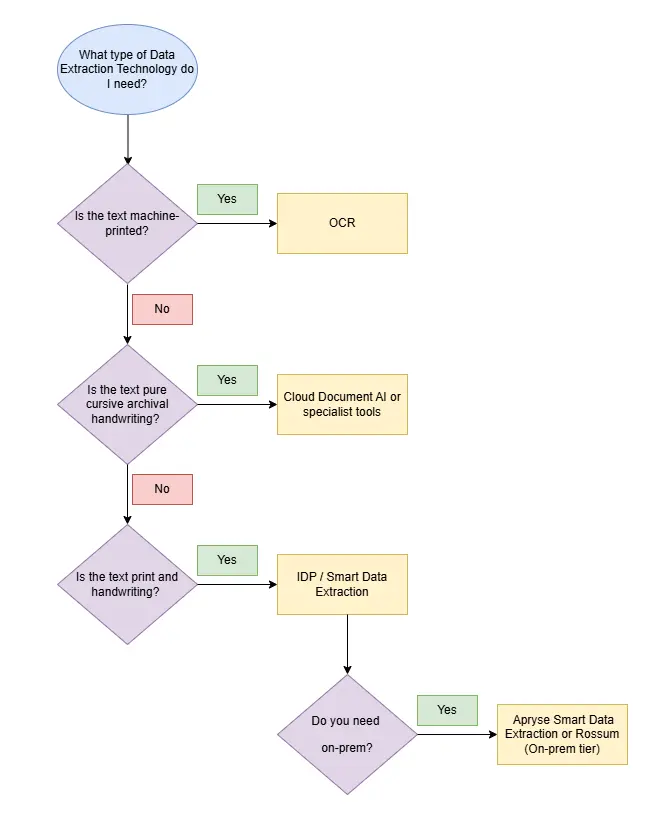
Figure 1: Flowchart of the decision tree for selecting OCR or ICR.
OCR vs ICR Example: A Side-by-Side Comparison
In this example, I’m going to show the difference in how the data turned out using OCR and ICR on the same form.
To get started with the Apryse Server SDK, follow the guides for OCR and ICR for your favorite language or framework.
For this example, I’m using Windows 11 and .NET 10.0. I’m also using Visual Studio Code to edit the projects. The code is in C#, but it’s available in other languages as well.
Note: You’ll also need to download the OCR Module and the Handwriting ICR Module. And of course, get an Apryse trial key if you don’t already have one.
Now let’s get comparing.
First, imagine a scanned insurance form. The scanned PDF is just an image with no selectable text.
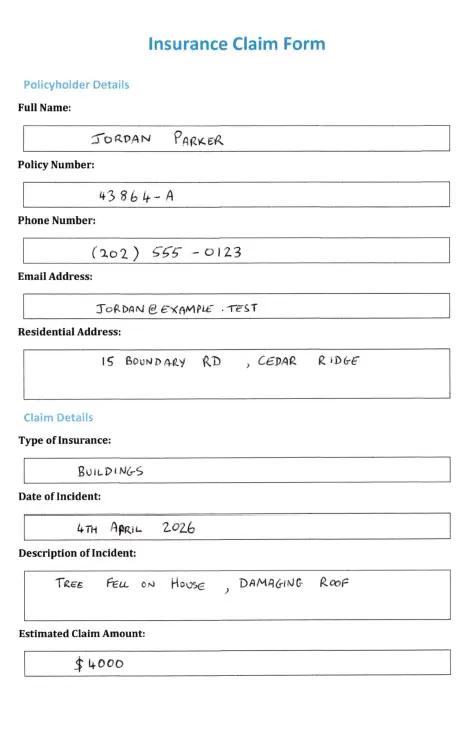
Figure 2: Basic insurance claim form with handwritten data.
Now, let’s run this same form through OCR and ICR and see how the results turn out.
Here’s the code for each process.
OCR
ICR
The output PDF for each process has selectable text, that’s good. Let’s look at how each process did.
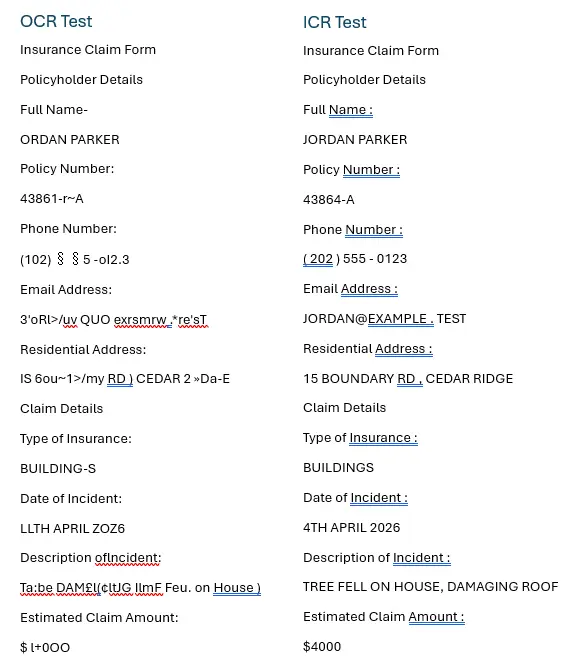
Figure 3: Selectable text from the same scanned form being processed with OCR and ICR.
Well, we can certainly see a difference in the quality of the results right away. OCR did not fare nearly as well with the handwritten text as ICR did.
Ok, but what about extracting the data into JSON format? I included code in each process to extract the data to a separate JSON file.
OCR
ICR
So, let’s take a look at what we got.
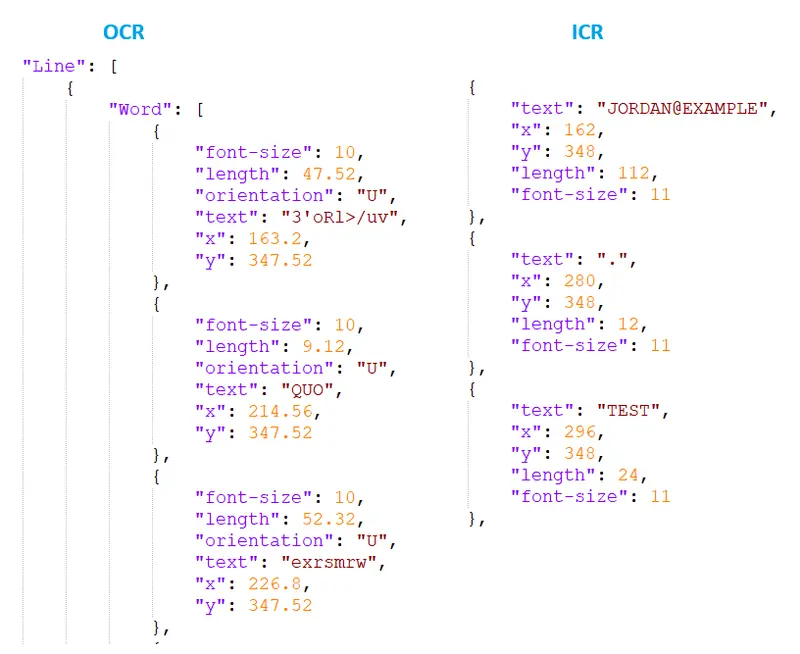
Figure 4: Comparison of the extracted JSON files using OCR and ICR on the same scanned form.
And again, we can see that OCR just doesn’t handle the handwritten text anywhere close to the way ICR does.
From the examples, we can clearly see that ICR is the way to go when processing any document with handwriting.
Now of course, this was just a basic scanned form with some simple print handwriting on it. The Handwriting ICR module is able to handle much more complex handwriting examples as well, such as cursive.
FAQ
Conceptually yes, but practically, it requires neural architectures that handle the lack of character boundaries.
Yes, but you need a massive amount of labeled data and GPU time. The IAM dataset is the standard starting point.
GPT-4V and Claude are good at reading handwriting, but it’s expensive, slow, and non-deterministic compared to purpose-built recognition models.
Those use a hybrid of MICR and ICR and is a specialist domain. You’ll want to go with a prebuilt option rather than training your own.
Yes. The Apryse ICR module runs entirely locally on Windows, Linux, and macOS.
Conclusion
The choice between OCR and ICR isn't about which is better; it’s about which fits your data. If your workflow involves standardized, machine-printed invoices, a traditional OCR engine is your fastest, most cost-effective route. However, if your business still relies on the human touch, such as signatures, checkmarks, and handwritten notes, standard OCR will leave your data trapped in an unusable state. Bridging this analog gap requires a shift toward Intelligent Character Recognition.
By implementing a solution like Apryse Smart Data Extraction, you’re turning messy, unstructured human input into high-quality digital data. Most importantly, by choosing an on-premises approach, you ensure that as you bridge that gap, your sensitive client data stays exactly where it belongs: under your control.
Don’t let your most valuable data stay trapped in an analog state. Whether you’re processing thousands of handwritten claims or building a more efficient patient intake system, the right tools can turn your most unruly documents into structured, actionable intelligence.
The Apryse Server SDK lets you easily get started with OCR and ICR to extract the data you need and handle many other document processing tasks. So, why not check it out for yourself with a free trial.
If you have any questions, contact us for support.
Suggested Reads
- Blog: Unlock Efficiency with Apryse OCR and ICR: Fueling Your Digital Transformation
- Blog: Finding the Right OCR SDK for Your Business and How Apryse Stands Out
- Blog: How AI Powers Smart Data Extraction: A Deep Dive