
Isaac Maw
Technical Content Creator
Published June 24, 2026
Updated September 29, 2026

5 min


How to Edit Word & Excel Files in the Browser with JavaScript
Isaac Maw
Technical Content Creator
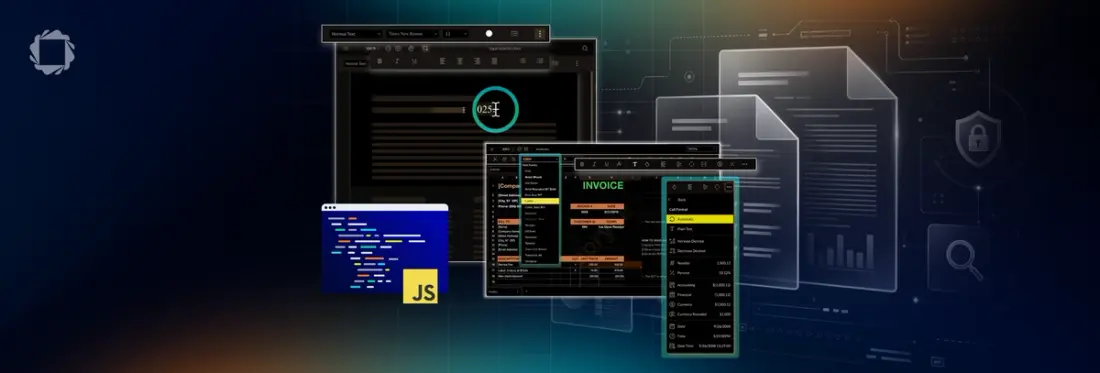
Summary: Learn how to add DOCX and XLSX editing to web applications by comparing WOPI integrations, rich text editors, and Apryse Office editors. This article overviews some of the the tradeoffs in document fidelity, deployment complexity, security, and user experience, and see how Apryse enables high-fidelity Office document editing entirely in the browser.
Office documents are the main format that users are most familiar with for editing documents and spreadsheets. When you’re building a platform that handles document workflows, supporting DOCX and spreadsheet editing is a great way to keep the end-to-end workflow in your platform, eliminating the need for additional Saas licenses, and avoid the security and compliance issues involved with downloading or transferring documents into and out of your platform.
Office documents are the main format that users are most familiar with for editing documents and spreadsheets. When you’re building a platform that handles document workflows, supporting DOCX and spreadsheet editing is a great way to keep the end-to-end workflow in your platform, eliminating the need for additional Saas licenses, and avoid the security and compliance issues involved with downloading or transferring documents into and out of your platform.
Building client-side Office editing is a challenge. Some approaches require conversion to PDF, API services such as Microsoft Cloud, or a full office server, such as OnlyOffice. However, Apryse WebViewer gives you a full-featured, familiar DOCX and Spreadsheet editing experience that runs fully client-side in JavaScript. Apryse provides ‘what you see is what you get’ word editing, knowing that formatting and styling stays consistent across Word processors.
Office Editing Development Approaches
Third-party Integrations
- Benefits: Embeds familiar document editing experiences into your application by connecting documents to Microsoft or Google services through protocols such as WOPI. Microsoft 365, Google Workspace, and open-source options such as Collabora offer these integrations. With this approach, users benefit from mature, familiar editing, collaboration, and co-authoring features.
- Drawbacks: However, documents are processed by third-party cloud services and organizations must manage dependencies on those platforms. Infrastructure complexity can be higher because authentication, permissions, storage integration, and service availability must be coordinated.
Rich Text Editors (TinyMCE, CKEditor, Quill, etc.)
Benefits: Designed for HTML content authoring rather than native Office document editing. Easy to integrate and lightweight. Many free and open-source options available.
Drawbacks: Limited when working with DOCX or XLSX files because complex formatting, layouts, and spreadsheet functionality may not be preserved. Often rely on import/export conversions that can introduce formatting inconsistencies. Best for web content creation, simple document drafting, and applications that do not require Office-level fidelity.
Apryse WebViewer
Benefits: Provides true in-browser editing of DOCX and XLSX files with high fidelity to Microsoft Office formats. Preserves complex layouts, formatting, tables, images, formulas, and other advanced document features. Can be deployed within your own infrastructure, helping organizations meet security, privacy, and compliance requirements. Best for applications that need a full document editing experience similar to desktop Office tools.
Drawbacks: WebViewer is a full-featured document SDK, meaning that integration is a little more complex than a simple API integration or rich text editor. However, we provide detailed documentation, sample code and live support to help developers get up and running fast.
Apryse DOCX Editor Features
The DOCX Editor is an add-on to the WebViewer SDK that provides a secure, reliable way to collaborate on DOCX files in your application. DOCX Editor includes:
- True WYSIWYG Word Editing, including font styles, sizes, and colors as well as text alignment, columns, headers and footers, and other familiar features such as line spacing, bullet points and tables.
- Tracked changes: Implement centralized document collaboration. View a detailed summary of other users’ changes, real-time collaboration, and accepting, rejecting, or filtering document changes.
- Secure and self-hosted: With rendering and processing fully client-side within your app, it keeps documents on device and minimizes security surfaces.
Spreadsheet Editor Features
Spreadsheet Editor is part of the Apryse Web SDK’s Office editing suite, offering client-side access viewing and editing of XLSX files with a familiar, Excel-like interface. It gives developers a complete set of tools for embedding rich spreadsheet editing into their applications. Used alongside the DOCX Editor and WebViewer’s PDF editing capabilities, it completes a full set of in-app document editing capabilities for developers.
Viewing capabilities include:
- Navigation mirrors spreadsheets in a standard grid format.
- View formulas within a cell and the calculated results.
- View/navigate across multiple sheets.
- Search across a workbook.
- View existing floating objects: standard charts, text boxes, shapes.
Editing capabilities include:
- Cut/copy/paste content.
- Cell styling (text size, text color, font, background color, borders).
- Cell adjustments (insert + delete rows/columns, merge/unmerge cells, text wrapping).
- Cell formatting.
- Formula editing.
- Rename, add, or delete sheets.
- Insert images.
- Undo/redo.
- Search and replace across a workbook.
- View, edit and save chart values.
- Export files in XLSX or PDF format.
How to Build with the Apryse DOCX Editor
The DOCX Editor is an add-on to the Apryse Web SDK, enabling native in-browser and desktop editing of Word documents. Combined with WebViewer’s PDF editing capabilities and the Spreadsheet Editor, it gives developers a complete set of tools for embedding rich document editing into their applications.
As an add-on to the WebViewer SDK, you can get started by integrating WebViewer first with your free trial key, then enabling DOCX editor.
- Before you start:
- Install Node.js and npm. We recommend using the latest active LTS release.
- Create a folder for your project.
- Integrate WebViewer into your project.
- Open a text editor like Visual Studio Code.
- Get your Apryse trial key.
Enable and open existing DOCX document
If you have a URL for a document, you can pass it to the WebViewer constructor or loadDocument function to open it.
WebViewer constructor: Load the office document with the WebViewer constructor, and it will load with the viewer.
You can also initialize WebViewer constructor without the initialDoc property, and the viewer will load with an empty document, ready to be edited.
WebViewer({
  ...,
  enableOfficeEditing: true,
}, document.getElementById('viewer'));
You can find full details on the DOCX Editor, including using tracked changes and changing the initial mode, in our documentation.
How to Build with the Apryse Spreadsheet Editor
The web component version of the Web SDK Modular UI is the recommended integration method and supports the latest WebViewer features.
Enable Spreadsheet Editor
To enable the Spreadsheet Editor, set the initialMode parameter in the WebViewer constructor. Supported values are defined in the Modes enum. Omitting initialDoc will load an empty spreadsheet. The following example loads an existing spreadsheet.
Spreadsheet Editor includes both View and Edit modes, supporting different levels of control for different users. Spreadsheet Editor is in view mode by default, allowing users to view calculated cells and formulas, and view different workbook sheets without making unexpected changes.
Spreadsheet Editor Edit mode allows users to modify and interact with spreadsheets using familiar grid-based, Excel-like interactions. Users can interact with cells, including:
- Cell Formatting: Modify text size and color, fonts, border styles, cell colors, border colors, and text styling for bold, italic, underline, and strikethrough.
- Formula and Function Support: Execute standard mathematical operations, statistical calculations, date/time functions, and other common formulas.
- Dynamic Data Manipulation: Easily add, edit, and delete rows and columns. Seamlessly cut, copy, and paste data.
- Cell Adjustments: Merge cells and preserve formatting.
- File Support: Open and export files in .xlsx format.
Edit mode is ideal for tasks like data entry, adjusting cell styles, and organizing sheet content. Users can click the dropdown on the Mode flyout in the upper right corner of the Spreadsheet Editor UI to switch between Viewing and Editing mode.
You can find full details and sample code for Spreadsheet Editor, including Charts and Formulas, in our documentation. Please contact sales with any questions.
FAQ
Q: Can I edit DOCX files directly in a web browser?
A: Yes. Apryse DOCX Editor enables true in-browser DOCX editing with support for formatting, tables, headers, footers, tracked changes, and other Microsoft Word features, without requiring desktop software.
Q: Can I edit Excel spreadsheets in a web application?
A: Yes. Apryse Spreadsheet Editor allows users to view and edit XLSX files directly in the browser, including formulas, cell formatting, sheet management, charts, search and replace, and exporting back to XLSX or PDF.
Q: What is the difference between a rich text editor and a DOCX editor?
A: Rich text editors such as TinyMCE and CKEditor are designed for editing HTML content. A DOCX editor works directly with Microsoft Word files and preserves complex layouts, formatting, tables, images, and other Office document features.
Q: Can Apryse Office editors be self-hosted?
A: Yes. Apryse DOCX Editor and Spreadsheet Editor run client-side and can be deployed within your own infrastructure, helping organizations maintain control over document security, privacy, and compliance requirements.
Q: Do I need Microsoft 365 or Google Workspace licenses to edit Office documents with Apryse?
A: No. Apryse provides native DOCX and XLSX editing capabilities within your application, allowing users to create and edit Office documents without relying on Microsoft 365, Google Workspace, or other third-party editing services.


Ready to get started?
Sign up for a free trial to begin implementing the Apryse SDK in your application!
