Roger Dunham
Published October 20, 2026
Updated October 20, 2026

11 min


The Table Is Set… but What Counts?
Roger Dunham

Learn how to build a fair way to score PDF table detection on realistic, multi-page documents. You’ll see a gallery of real tables, from simple grids to borderless, wrapped, and rotated layouts, plus the gray areas that may or may not count as tables, then get a practical scoring system with penalties and quality ratings you can reuse with your own files.
Introduction
People want to know which is the best tool for extracting data from PDFs, and all software vendors will tell them it is the one that they sell.
But what if you wanted to come up with a fair and objective measurement? Sounds straightforward until you actually try to do it.
Surely all that is needed is a selection of PDFs that have tables, and a “ground truth” which can be used to compare what the data extraction tool generates with what should be found.
In practice, though, documents are messy, tables are ambiguous, and the notion of a single “correct” answer quickly starts to unravel. This is made worse since (with untagged PDFs at least), tables are just collections of positioned text and graphics, more like a photograph than a spreadsheet. What looks like a table to a human reader is really just carefully aligned characters.
And it gets harder. Column boundaries might need to be implied rather than being marked explicitly; merged cells may exist (and not be consistently represented), and visual cues like lines or shading can be absent or, worse, misleading.
Before you even think about scoring detection quality, you’re already dealing with multiple interpretations of what even constitutes a table.
Then there’s the question of ground truth. Where exactly does a table start and end? Does it include the title rows or not? If it is split over a page boundary is that one table or two? Is it even a table or just columns of text? The list goes on and on.
And then we need a mechanism for measuring accuracy. Finding something, anything, is not enough. Does it matter if the table is detected in the wrong location, but its data is correct? Or if the data is wrong but the location is correct? That probably depends on what you want to do with the data.
Ultimately, building an impartial scoring process for table detection isn’t just a technical problem, it’s a philosophical one.
To solve this, we’ll first explore the different types of tables that make scoring difficult, then define a practical scoring system that accounts for ambiguity.”
In a future post, we will see what the results were (spoiler alert Apryse wasn’t perfect but did really well).
Sample Documents
In a previous article, I wrote about the problem with the type of corpus that most benchmarks use. Those corpora are often comprised of single pages taken from longer documents.
That might be great at getting a number, but is it useful? Most real-life use cases work with documents that are many pages long.
I’ve therefore put together a set of born-digital (rather than scanned) test documents taken from the huge GovDocs collection. Other corpora exist, but this was chosen as being freely distributable, and with a wide range of documents.
Three folders of documents were manually reviewed: 042, 142, and 242, which yields about 650 PDFs. These files were processed using the Apryse SDK to get an initial view of the data with the number of list items, tables, table of contents, headers and footers counted, as well as recording the time to process the file.
A subset was then created that chose 10 files from each folder that had a mixture of interesting elements (lists, tables etc.) detected, and which converted very fast, very slow, or at a typical speed. This subset was then manually reviewed to get six documents that had a range of table and list item types.
The screenshots used in this article are taken from a corpus of test documents.
If you have documents that you would like to add to the corpus, which can be shared publicly, then please let us know at blog-feedback@apryse.com.
Let’s first look at the types of table that are found in these documents.
Different Types of Tables. From the Simple to the Bizarre.
A Simple Grid
At its simplest, a table can be a grid of cells, with borders on all sides, and each cell holding a single value.
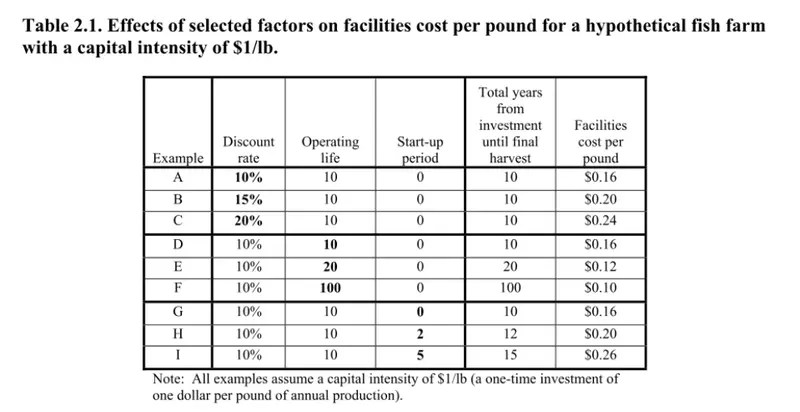
Figure 1: A table at its simplest. Each cell has a border (from 042732.pdf).
Merged Cells
The next level of complexity is when some cells are merged, which is common in row and column headers.
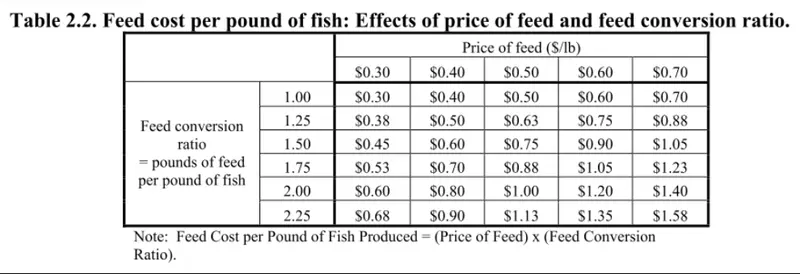
Figure 2: An easy to identify table with merged cells (from 042732.pdf).
This is remarkably common. As a human we can see that for the table in Figure 2, the five data columns all relate to different values of Price of Feed, and the six data rows relate to Fee conversion ratio.
When it comes to a scoring system though we have a problem, basic markdown does not support the concept of cells that span either rows or columns. While markdown allows HTML based table syntax which does offer row and column spanning, the tools that export markdown from PDFs generally don’t use that.
This leaves a problem. How can we reasonably and fairly score table quality, when some tools do support merged rows, and others do not?
Tables with Incomplete Borders
In our simplest table, every cell had a border. That makes it a cinch to work out what is in a cell.
Humans are clever though and can imply borders even when they are not explicitly marked. For example, in Figure 3, the table has enough borders to imply that there are three rows and three columns of data, and our brains work out the rest.
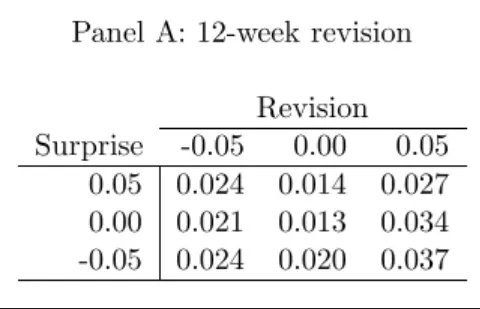
Figure 3: A partially bordered table (from 242722.pdf).
However, the presence of border in a table is a spectrum that ranges from none to all, and as the number of borders decreases, the difficultly of identifying data in the table increases.
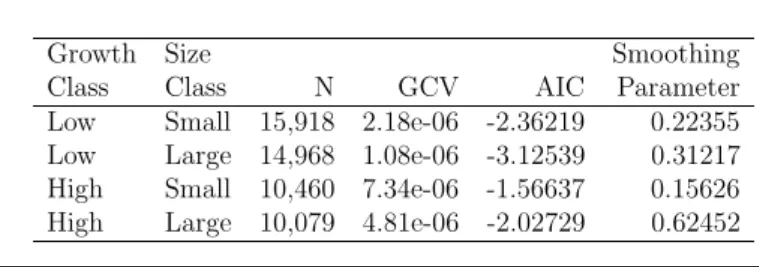
Figure 4: A table with no vertical borders (from 242722.pdf).
Figure 4, for example shows a table that has six columns. As humans, we are once again able to work out (probably) what was intended, based on the vertical alignment of the data.
This can be more complex by the presence of additional context in the table breaking it up into sections, such as in Figure 5.
But it’s already getting gnarly. In this case, the data is all left-aligned, but the alignment for the column titles is inconsistent. One is left-aligned, one is right-aligned and two are centered.
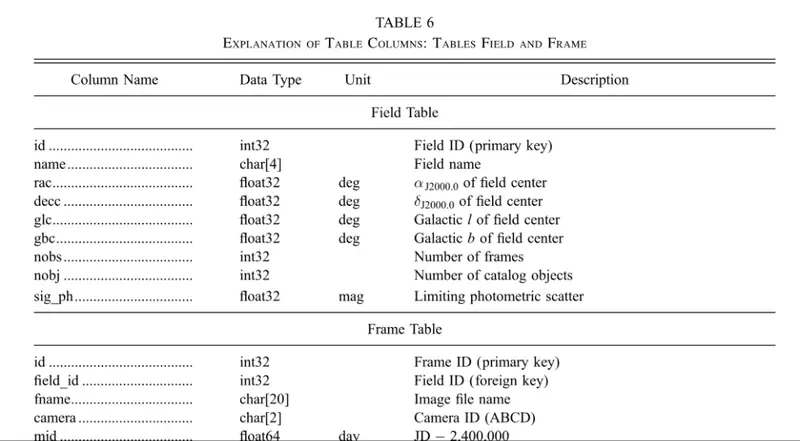
Figure 5: A table with no vertical borders and only partial horizontal ones (from 242407.pdf).
Furthermore, there is uncertainty. Should the nine lines of data for “Field table” be one data row, or nine separate ones? It’s fair to suggest that the presence of clearly defined row data means that there are 9 rows.
You don’t need to look far to find examples that challenge assumptions. Perhaps with bullet points in one column, but not in the others such as in Figure 6.
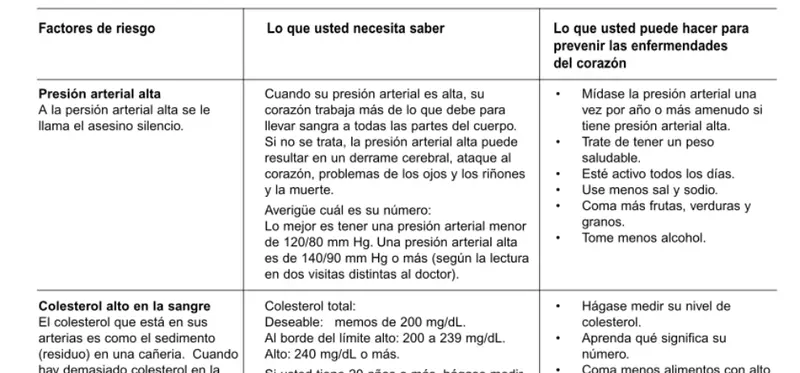
Figure 6: A partially bordered table with bullet points in one column (from 042980.pdf).
If we push the idea of removing borders to the limit then we can get tables with no borders at all, and need to infer the start and end of the table as well as the rows and the columns just from the text that is present.
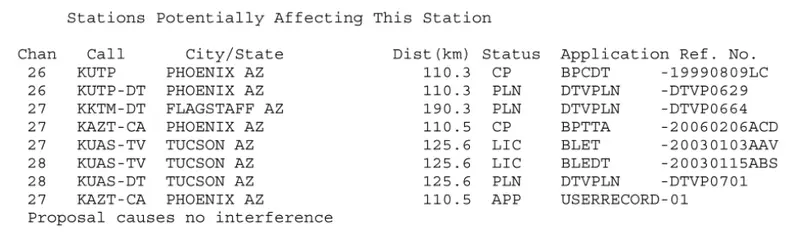
Figure 7: A table with no borders and unclear columns (from 142195.pdf).
But that can be tricky, for example in Figure 7 is the last column “Application Ref No.”, or is that two columns? Both seem possible, and domain expertise is needed to be certain.
Multipage Tables
So far, we have only looked at tables that fit on a single page. But what if there is so much data that it won’t fit? In that case, the tables might overflow from one page onto another.
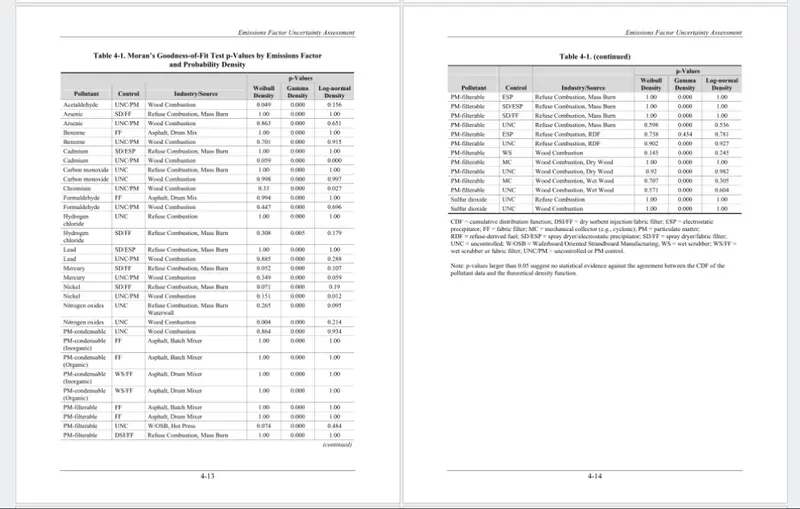
Figure 8: A table that wraps from one page onto another.
It’s even possible that the table may be so wide that it needs to be split not just vertically but also horizontally. I don’t have any files like that in my corpus, but they do exist, and they might be common in your use cases.
Tables with Wrapped Rows
As an alternative to splitting a page across multiple pages, the data for each row might just wrap onto the next line.
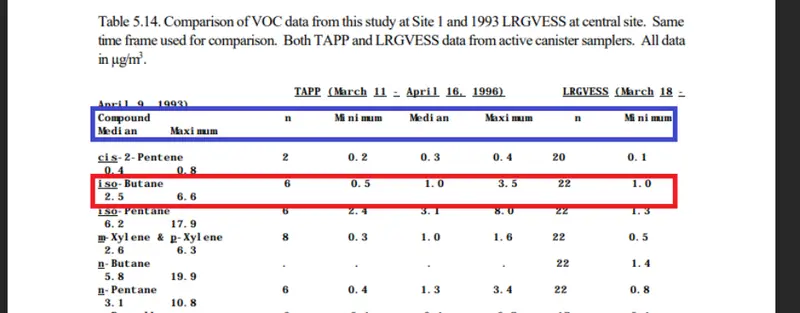
Figure 9: A table from 042338.pdf. The column headers are shown in blue, and data for one record in red. Note that the data not just wraps but has variable vertical alignment from row to row.
That gives a really challenging test for table detection, and sometimes even for human understanding.
Rotated Tables
An alternative to splitting a table across multiple pages or wrapping rows is to rotate the table, which is great for tables with large numbers of columns.
Everything that we have already seen, bordered, or borderless tables can be found in rotated tables.
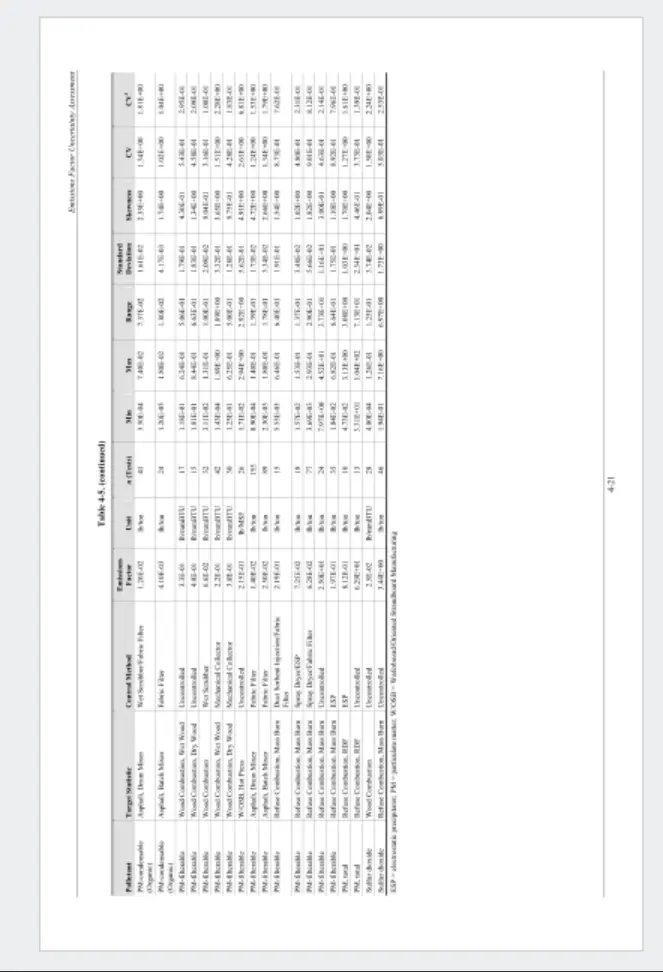
Figure 10: A rotated table.
Wow! That a lot of variability in tables.
And we aren’t finished yet, we also need to specify what should not be detected as a table.
Things That Are Not Tables
What a table is, turns out to be much more of a spectrum that just simply black and white.
For example, many of the “clues” that suggest a table can be misleading.
A border around text, might just group and highlight information that should be considered together.
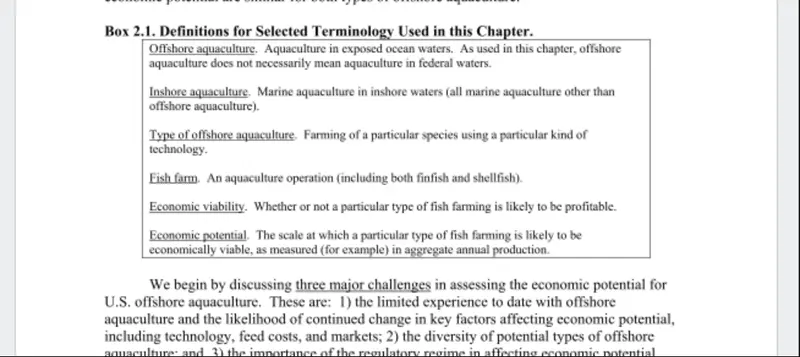
Figure 11: A text box, not a table, from 042732.pdf.
And sometimes, things could have been created as a table but very likely weren’t, or if they were it was only because a specific layout was required, even though the data is not tabular. You could, for example, create graphics in table cells, but that doesn't mean that identifying it as a table is sensible.
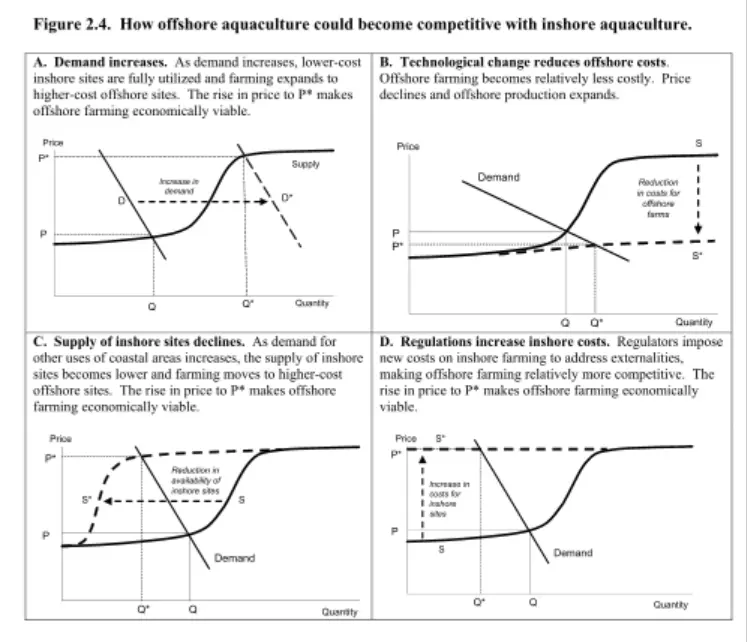
Figure 12: The presence of borders could imply that this is a table, but it is hard to consider that is "reasonable table" (from 042732.pdf).
Similarly, sets of vertically aligned numbers don’t, in themselves, define a table.
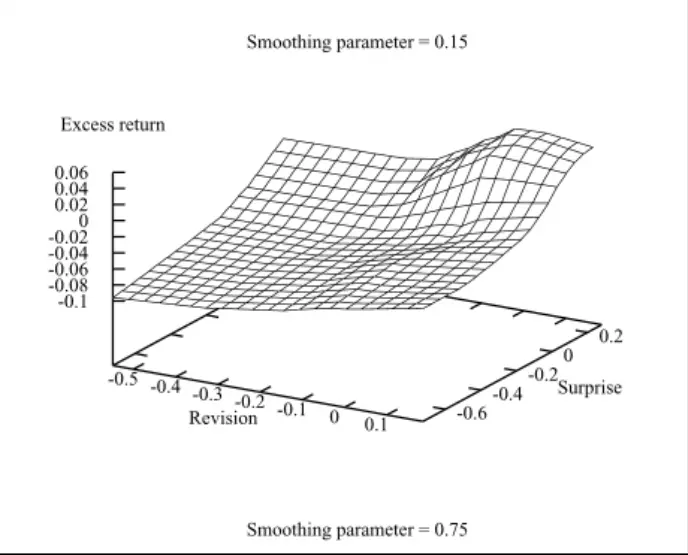
Figure 13: The presence of numbers and implied grid lines does not make this a table (from 242722.pdf).
Sometimes though, there is no obvious reason why a tool would detect a table at a specific location on a page. For example, some tools find tables in seemingly obvious paragraph text.
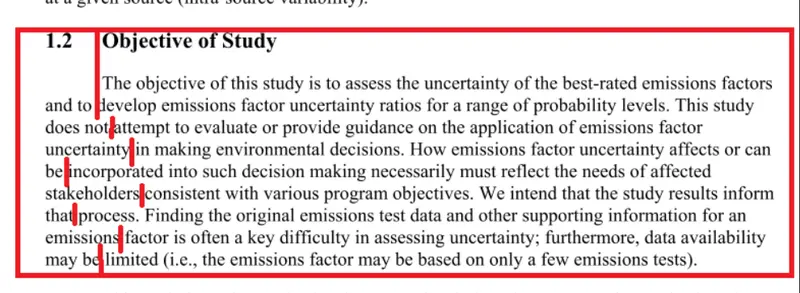
Figure 14: A table detected by some tools within regular paragraph text (from 142413.pdf). The red lines indicate the column boundaries as detected.
Clearly that is wrong, but it’s not always so easy to be certain whether something should, or should not, be a table.
Things That Might or Might Not Be a Table
Finally, we come to the category of things that might or might not be a table.
For example, what about a “Table of Contents”? The title certainly suggests that this is a table, but should it be considered one?
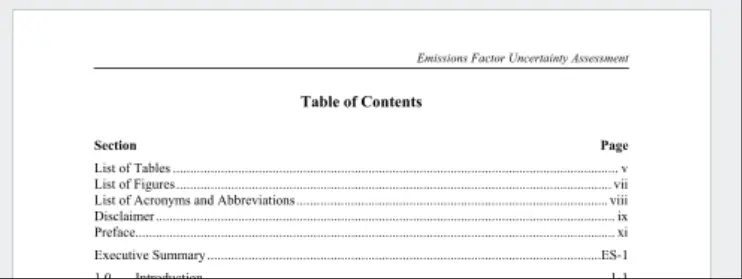
Figure 15: A table of contents in a report.
That is made more complex since Apryse, for example, can detect Table of Contents (Toc) as a dedicated object type, while other tools consider them to be either ordinary text, or a table.
Similarly, should a "List of Tables" or "List of Figures" be considered a table or not?
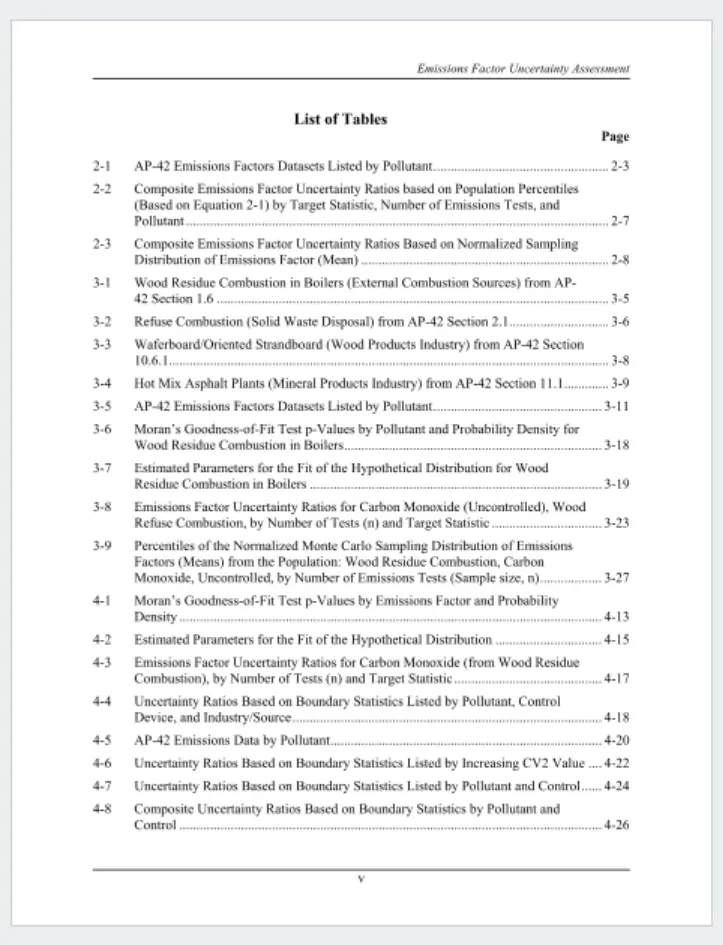
Figure 16: A list of Tables or Figures often looks very much like a table.
Sometimes, text could be laid out in multiple ways to give the same visual result.
For example, Figure 17 shows a set of definitions. While there are no borders, this could be considered a table as there is row–based data.
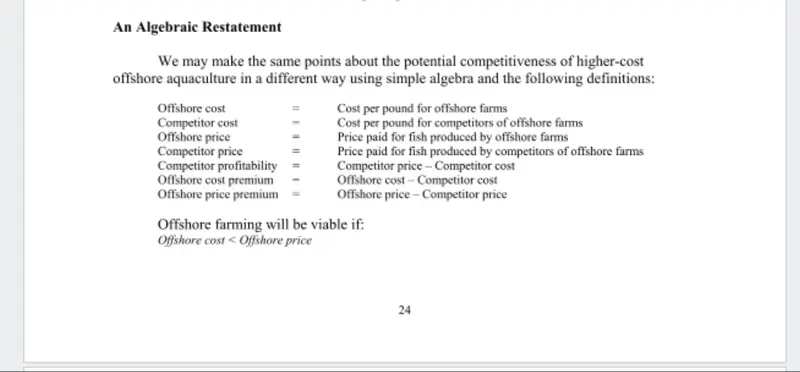
Figure 17: A possible table from 042732.pdf. Would it do any harm if this was detected as a table?
If we accept that Figure 17 might be a table, what about the data in Figure 18? In that example, there are both rows and columns.
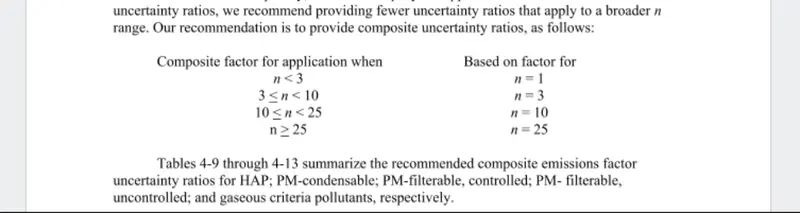
Figure 18: This data could possibly be considered to be a table (from 142413.pdf).
Similarly, the presence of two columns of data, each with bullet points, could “look” like a table, even though it isn’t one.
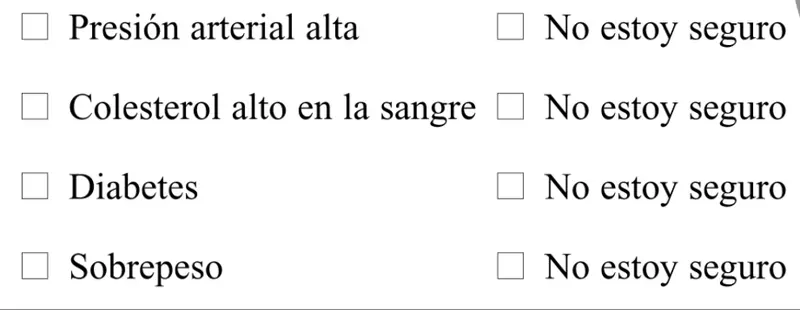
Figure 19: Columns of bullet points could look like a table (from 042980.pdf).
I don't think that is a table, but I can understand why software might.
Then there are real oddities where the rules of tables are broken (or at least bent) with arbitrary graphics superimposed on a table. Is that a table or a graphic? In reality, it’s a bit of both.
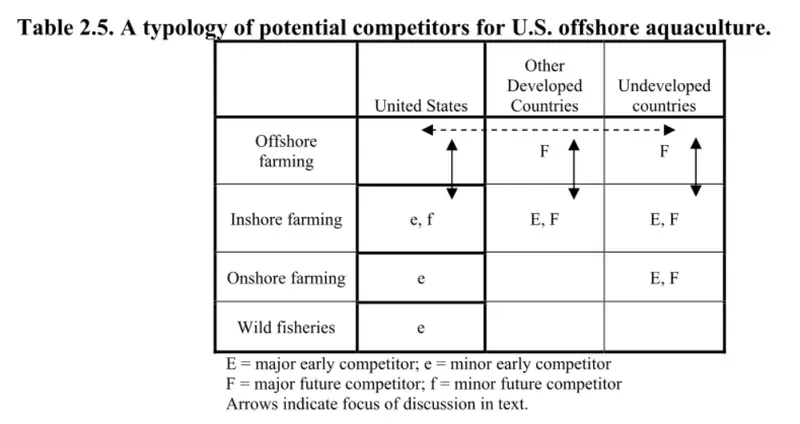
Figure 20: A simple table with added graphics (from 042732.pdf).
That means we have to allow for things whether they are detected as a table.
How I Solved This
It’s a gnarly problem, but ultimately there are three categories:
- Things that should be detected as a table
- Things that should not be detected as a table
- Things that could, but don’t have to be detected as a table
Defining that was the easy part. Working out which part of each document fell into each category was harder. Although the test corpus had been reduced to 6 files, since they ranged in length from 10 to 250 pages, creating ground truth was non-trivial.
Are six documents enough to be meaningful? Not really, but the only thing that matters for you is your documents, not any number of my ones. At best, my collection offers a set of documents with a range of table types that might be similar to the ones that you use.
But please benchmark the tools with your own files! Use my system, or whatever is meaningful to you.
Scoring System
The location of each table in each document was recorded following manual review.
Each PDF was then processed with table detection tools.
If something that was marked as being a table was correctly detected, or similarly if something that was not a table was detected as non-table, then things were easy.
However, if text was detected as a table when it wasn’t (a false positive), or it was not being a table when it was (a false negative) then a penalty score was applied.
False positives and negatives are both problems. Detecting a table where one does not exist results in “noise”. Not detecting a table results in lost data.
Lost data is the bigger problem, and a false negative therefore resulted in a penalty of -10 points.
A false positive on the other hand was given a penalty of -5. The penalty is less severe since it is relatively easy for a human to find and review the tables and correct the data (although much slower than getting the answers correct in the first place!).
Things that could be considered to be a table (and would not cause harm if they were, but similarly add little value), were excluded from the scoring system by giving them a score of zero.
Next, when a table was detected, it was given a quality score of 0-10.
A value of 0 shows that a table was found and had no useful data within it. A value of 10 indicates that the table was perfectly detected. While subjective, the intention is to quantify how useful the extracted data is to get value from the document.
What’s Next?
In the next article, we apply this scoring system (and see some quality examples) to data extracted using four different tools (including Apryse Smart Data Extraction). We'll see where they succeed, and fail, across real-world documents.
But before we do that, have a look at the types of documents that you need to process:
- How long are they?
- How complex?
- Do they have simple tables with borders, or without borders?
- Are they rotated?
Ultimately, it doesn’t matter what files, or what process, I use. What really matters is how the tools work with your documents, not with some corpus of single page documents.
And watch out for claims about speed. Processing speed does matter, but not if it results in low quality data. If you are going to feed extracted data into a LLM to help with decision making, you need to be aware of any tradeoffs that you make between quantity and quality.
After all, if the output doesn’t need to be right, then the processing can take no time at all.
If you have any questions about this blog, or there are other blogs that you would like us to write, then please contact us at blog-feedback@apryse.com.