Ian Morris
Technical Writer
Published July 03, 2024
Updated October 23, 2026

7 min


PHI Redaction for HIPAA Compliance
Ian Morris
Technical Writer

Protected health information has to come out of a record before it is shared, and covering it is not the same as removing it. This article covers how to permanently remove PHI from patient records in the browser with Apryse WebViewer, how to review redactions before they are applied, and what has to be recorded afterwards.
This article covers redacting protected health information in the browser with Apryse WebViewer, on the Web SDK. For headless redaction across an archive or a records backlog on a server, see redacting documents in bulk.
Introduction
In the healthcare industry, ensuring the security of confidential patient information is not just desirable but a legal obligation. The Health Insurance Portability and Accountability Act (HIPAA) mandates stringent measures to safeguard the confidentiality, integrity, and availability of patient data shared between healthcare providers and business associates. One such measure is the HIPAA Privacy Rule, which requires the removal of sensitive data from health information; a process also known as redaction.
We’ve written previously about how the secure redaction capabilities of the Apryse WebViewer SDK can serve the needs of the legal and financial sectors. In this article, we’ll explore how healthcare companies can leverage WebViewer to meet these compliance requirements.
Redaction is the step that makes a record shareable, and because applying it destroys content permanently, the review that happens before it matters as much as the removal itself.
What is Redaction Anyway?
First, let’s explain what we mean by redaction and secure (or “true”) redaction. In essence, redaction describes various ways of concealing or eliminating confidential information from documents.
Secure redaction refers to the physical removal of the chosen content: the text, image and vector content inside the marked region is destroyed rather than covered, so it cannot be selected, copied, extracted or found by search. Applying a redaction is permanent and irreversible.
It does not touch the document’s hidden, non-visual data. Metadata, embedded scripts, form data and hidden layers are removed by PDF sanitization, which is a separate operation on the Apryse Server SDK. A patient record that has been redacted but not sanitized can still carry extractable data, so a record going outside the organization usually needs both. See redaction versus sanitization.
Covering text with a black rectangle is not redaction at all. The characters remain in the content stream underneath and can be copied or extracted. See true redaction versus visual masking for what the difference looks like inside a file.
For more background, see our Ultimate Redaction Guide to learn more about redaction techniques and what can go wrong if it’s not done correctly.
Data Privacy and Compliance Requirements
Healthcare runs on electronic records that move constantly between providers, payers and business associates, and every one of those transfers is a point where protected health information can leave with the document. That is the compliance problem redaction solves.
One of the challenges is the need to secure confidential and sensitive information in digital records such as EHRs. Signed into US federal law in 1996, HIPAA aims to protect sensitive health information from being disclosed without the patient’s knowledge or consent. This introduced specific requirements to govern the protection of personal data in healthcare, which are defined by the HIPAA Privacy Rule.
Similar legislation exists in other countries and regions. In Canada there is the Personal Information Protection and Electronic Documents Act (PIPEDA), while the European Union’s General Data Protection Regulation (GDPR) applies to healthcare and life sciences, as well as other industries.
Since HIPAA is healthcare-specific legislation, we’ll concentrate on meeting its compliance requirements. However, data privacy and protection regulations around the world have similar obligations for the healthcare and related sectors. So, wherever you are in the world, this advice should be generally applicable.
The obligation is similar across regimes, which is why the redaction process matters more than the regulation’s name. See the compliance redaction process for the workflow that applies regardless of jurisdiction.
What Does HIPAA Compliance Require?
HIPAA mandates stringent measures to safeguard the following:
- Personal Identifiable Information (PII) refers to any data that can be used to identify an individual, either directly or indirectly. This could include names, social security numbers (SSNs), phone numbers, addresses, and email addresses.
- Protected Health Information (PHI), meanwhile, is a specific category of PII. This includes any health-related information that can be associated with a particular individual. HIPAA defines PHI as including medical records, billing details, health insurance specifics, plus any other data collected by a healthcare provider or health insurance plan to provide care or coverage.
Healthcare providers and insurance companies, recognized as “covered entities” under HIPAA, are obligated to follow several rules to uphold patient confidentiality and ensure adherence to the Act:
- Privacy: They are required to honor the rights of patients to their PHI. This includes granting patients access to their health records, providing them with a copy, and allowing them to make corrections.
- Security: They must put in place physical, technical, and administrative security measures to protect health information that is stored or transferred electronically.
- Enforcement: They are required to cooperate with investigations into a breach.
- Breach Notification: In the event of a breach, they must follow certain procedures to inform the individuals affected.
- Business Associate Compliance: If a covered entity employs a business associate to assist with its healthcare activities and functions, the covered entity must have a written contract or other agreement with the business associate. This agreement must clearly define the tasks of the business associate and require the associate to adhere to the Rules’ requirements for the protection of privacy and security of PHI.
- Compliance with the Omnibus Rule: This rule makes business associates of covered entities directly responsible for complying with certain requirements of the HIPAA Rules.
These requirements aim to safeguard the privacy of individuals’ health information while enabling covered entities to embrace new technologies to enhance the quality and efficiency of patient care.
The 18 HIPAA Identifiers a Redaction Rule Set Has to Cover
HIPAA defines the identifiers that make health information individually identifiable. A redaction rule set for patient records has to account for all of them:
- Names
- Geographic subdivisions smaller than a state, including street address, city, county and ZIP code
- All elements of dates related to an individual, other than year, and all ages over 89
- Telephone numbers
- Fax numbers
- Email addresses
- Social Security Numbers
- Medical record numbers
- Health plan beneficiary numbers
- Account numbers
- Certificate and license numbers
- Vehicle identifiers and serial numbers, including license plate numbers
- Device identifiers and serial numbers
- Web URLs
- IP addresses
- Biometric identifiers, including fingerprints and voiceprints
- Full-face photographs and comparable images
- Any other unique identifying number, characteristic or code
Not all of these behave the same way under automated detection. Structured identifiers such as Social Security numbers, account and medical record numbers, telephone numbers, email addresses, URLs and dates are regular enough to match with a pattern. Names in free-text clinical notes, handwritten entries and photographs are not, which is why the review step described below is part of the workflow rather than an optional extra.
The Dangers of Non-Compliance
Failure to comply with HIPAA can lead to civil and criminal penalties, including fines up to $1.5 million per year for each violation. While over in Europe, GDPR violations can result in fines of up to €20 million or 4% of the company's global annual turnover, whichever is higher.
Such penalties are not just empty threats. A 2021 data leak concerning almost 500,000 persons resulted in a software company receiving a 1.5 million euro fine for failing to secure health data, the maximum amount permitted by French regulations.
Moreover, non-compliance can lead to reputational damage, loss of patient trust, and potential legal action. Therefore, it's crucial for healthcare organizations to implement robust data protection measures, including secure redaction of PII and PHI.
The Need for Secure Redaction in Healthcare
In the healthcare industry, information is commonly shared between healthcare providers, insurance companies, and other parties. For compliance with HIPAA requirements, PII and PHI may need to be securely removed from medical records, insurance claims, and other documents, before being shared with third parties.
For example, a hospital may share a patient's medical records with an insurance company for billing purposes. Since these records likely contain sensitive information such as the patient's name, address, social security number, and medical history, these would first need to be redacted.
However, traditional redaction methods, such as manual redaction or simple black-out tools, are not sufficient in the digital age. These methods can be time-consuming, prone to human error, and may not completely remove the sensitive information.
For instance, metadata, bookmarks and hidden layers in a PDF may contain information that also has to be dealt with before release. That is a separate operation from redaction: it is sanitization, and it runs on the Server SDK.
Sharing Claim Files with Third Parties
The most common redaction workflow in healthcare is not a single record going to a single recipient. It is a claim file going to a third-party administrator, an external reviewer, a subrogation vendor or a payer’s auditor, where the recipient needs part of the file and is not entitled to the rest.
What comes out depends on who is receiving it. A billing reviewer may need the procedure codes and the dates of service but not the clinical narrative. An external auditor may need the narrative but not the patient’s identifiers. Because the recipient changes what is in scope, the same source record often has to produce more than one redacted derivative, each prepared for a different recipient.
That is also why per-document review is normal in this workflow rather than a bottleneck. The person approving the redaction is usually the only one who knows which recipient this copy is for, and applying the redaction is irreversible, so the approval has to happen before the apply step rather than after it. See redaction use cases by industry.
De-identification is Not Redaction
The two terms are used interchangeably in healthcare content and they are not the same thing. De-identification is a standard for rendering a data set no longer individually identifiable, and it can involve generalizing values, suppressing them or replacing them with surrogates so the data set stays analytically useful.
Redaction removes content from a document outright. It does not generalize a date into a year or replace a name with a token; it destroys what was there. A de-identification program may use redaction as one of its mechanisms, but applying redaction to a document does not by itself make a data set de-identified, and the two requirements should not be treated as satisfied by the same step.
Using WebViewer to Securely Redact PHI and PII
To meet the HIPAA requirements, here is how you could use Apryse WebViewer to redact PHI and PII from a document before sharing it with another provider.
WebViewer’s redaction capabilities are powerful yet incredibly easy to use. When viewing a document, simply click the redaction tool icon and click and drag to select specific content to be redacted.
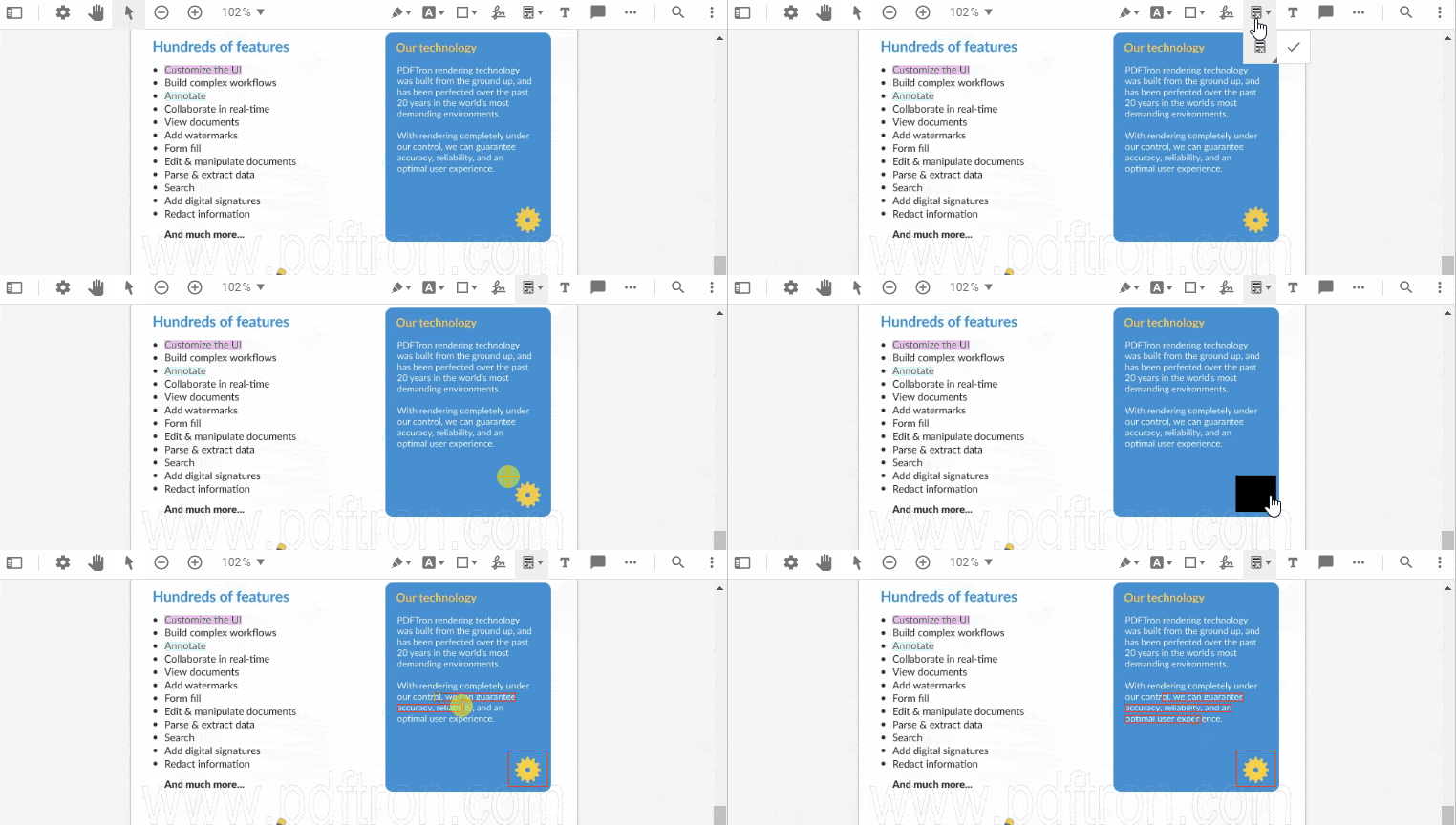
Creating a new redaction annotation.
Content selected for redaction can be reviewed before applying the redaction operation, which physically removes the content from documents, ensuring that the sensitive information cannot be retrieved.
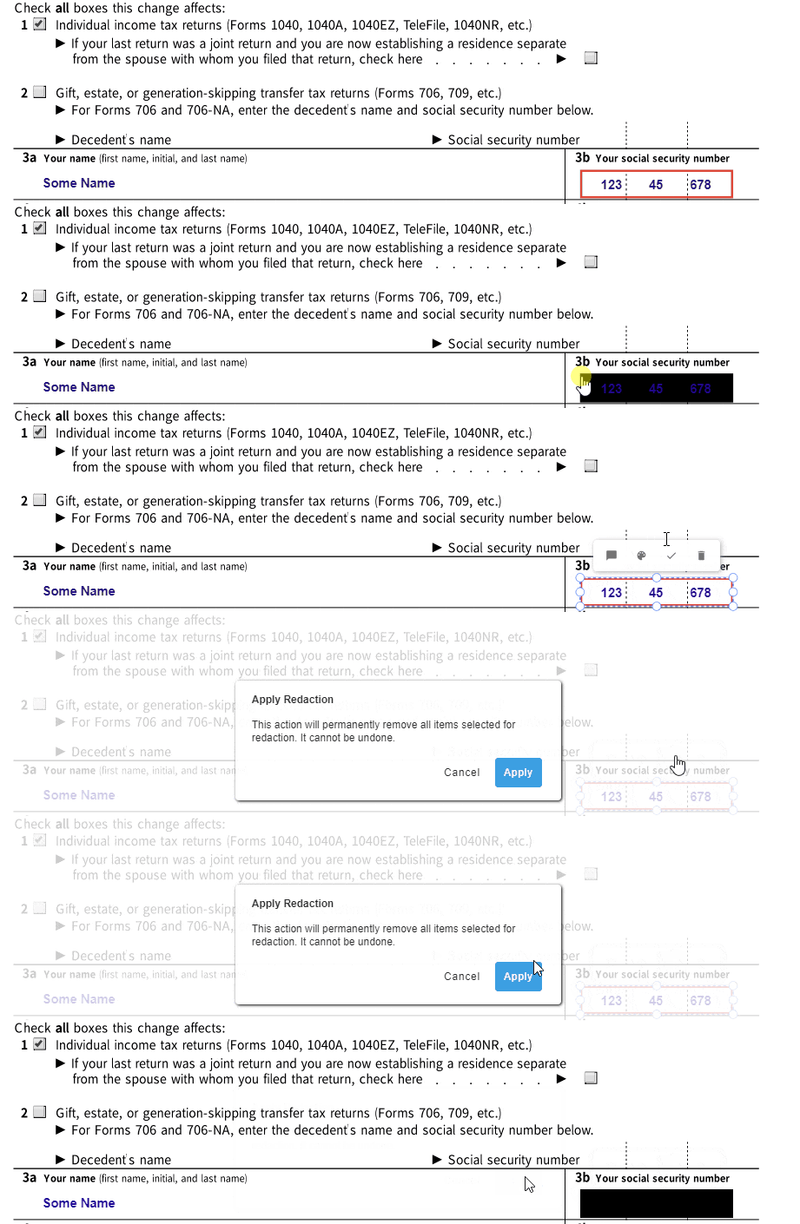
Applying a selected redaction.
You can also redact areas of images and text and even entire pages from documents. This is all covered in the following video on our YouTube channel, which walks you through the process of searching and redacting for PII and PHI:
Two constructor properties are required before any of this is available. Both fullAPI: true and enableRedaction: true must be set in the WebViewer constructor; Full API alone is not sufficient. All redaction operations wait for the documentLoaded event. See the secure PDF redaction developer guide for the wider integration picture.
Stepping Things Up a Notch: Automated Redaction
If you’d like to get a little more advanced, redaction templates can also be created with predefined redaction annotations for documents with consistent, unchanging layouts.
That’s not all though. Since WebViewer is an SDK, of course you can fully automate redaction operations too. See our comprehensive documentation to learn how to create and apply redactions programmatically.
Automated detection works by pattern. Ambient string matching, wildcards and regular expressions cover the structured identifiers listed earlier, which is most of the HIPAA set. They do not reliably catch names inside free-text clinical notes, which is the single most common source of a missed identifier in a patient record.
If you’d like to try out WebViewer’s redaction functionality for yourself, the redaction demo on our Showcase site shows just how intuitive the process is.
Review and Audit Requirements
Redact annotations mark the regions to be removed and stay visible, movable and re-definable until the apply step runs. That is what makes a review step possible: a clinician, privacy officer or records lead can approve, adjust or reject each candidate before anything is destroyed.
Applying the redaction is the irreversible step, and that has a consequence for evidence. Once the content is gone it cannot be re-examined, so the record of the process is the only thing left to demonstrate that the release was handled correctly. That record should hold what was detected and by which rule, what the reviewer approved or rejected, when the redaction was applied, and what the verification returned.
See enterprise-grade redaction for how the review and audit layer fits with the rest of the workflow.
Redacting a Records Backlog on the Server
In-browser redaction suits per-record review, where someone is looking at the document before it goes out. An archive or an onboarding backlog is a different problem: there is no reviewer per document and no UI, so it runs headlessly on the Apryse Server SDK, using the same detect, mark, apply and verify sequence.
Two things are worth knowing before planning that work. The Server SDK provides no work queue, job scheduler or batch orchestration, so the loop, the parallelism and the retry behavior belong to your application. And scanned records with no text layer have nothing for a pattern to match against, so they need OCR first, with handwritten entries needing ICR rather than OCR. See redacting documents in bulk and redacting scanned documents.
Custom Integration of Apryse WebViewer
Healthcare organizations can leverage the WebViewer SDK’s advanced capabilities to bring the power of the Apryse SDK to web applications, including its best-in-class redaction capabilities.
WebViewer’s user-friendly and collaborative interface can be easily embedded into web applications that require advanced document-handling capabilities, such as custom healthcare portals and online collaboration platforms.
Documents of almost any file type can be redacted since the WebViewer supports over 30 different document types, including PDFs, Microsoft Office files, and more.
Because WebViewer renders and redacts in the browser, the record does not have to be uploaded to an external service to be redacted. For server-side workloads the same principle applies: the Server SDK installs on infrastructure you control. See on-premises and air-gapped redaction.
WebViewer SaaS Plugins and Salesforce Integration
WebViewer plugins are available for low-code SaaS platforms and environments like Appian, Mendix, OutSystems, and SharePoint, providing users with a high-quality, customizable and secure document experience - free from server-side dependencies.
Thanks to WebViewer’s support for Salesforce integration as a Lightning Web Component, healthcare providers using the popular Salesforce Health Cloud health platform benefit from not just fully-integrated secure redaction, but also a comprehensive and collaborative document experience. Check out the Salesforce WebViewer documentation to get started.
Frequently Asked Questions
Does redacting a PDF also remove the metadata?
No. Redaction removes visible content from the page: the text, images and vector regions inside the marked areas. Metadata, embedded scripts, form data and hidden layers are removed by sanitization, which is a separate capability included in the base Apryse Server SDK package. A record that has been redacted but not sanitized can still carry extractable data.
Which PHI identifiers can be detected automatically?
Structured identifiers suit automated detection: Social Security Numbers, account and medical record numbers, telephone numbers, email addresses, URLs and dates can be matched with ambient string, wildcard and regular expression patterns. Names in free-text clinical notes, handwritten entries and photographs do not match reliably and need a human review step.
Can a clinician review redactions before they are applied?
Yes. Redact annotations mark the regions to be removed and stay visible, movable and re-definable until the apply step runs, so a reviewer can approve or adjust them first. Applying the redaction is the irreversible step.
Is in-browser redaction enough, or do we need server-side redaction too?
In-browser redaction on the Web SDK suits per-record review, where someone looks at the document before releasing it. An archive or an onboarding backlog is a headless workload and belongs on the Server SDK. Many healthcare workflows use both.
Does the document leave our environment to be redacted?
Not with WebViewer. The document is rendered and redacted in the browser, so it does not have to be uploaded to an external service. Server-side redaction likewise runs on infrastructure you control.
Is de-identification the same as redaction?
No. De-identification is a standard for rendering a data set no longer individually identifiable and may generalize or replace values to keep the data useful. Redaction removes content from a document outright. Redaction can be one mechanism inside a de-identification program, but applying it does not by itself make a data set de-identified.
What should a HIPAA redaction audit trail record?
What was detected and by which rule, what the reviewer approved or rejected, when the redaction was applied, and the verification result. Because the redacted content is permanently gone, that record is the only remaining evidence that the release was handled correctly.
Conclusion
Secure redaction is a critical part of data privacy and security in the healthcare industry. By understanding the requirements of HIPAA and similar legislation, healthcare organizations can protect sensitive information, ensure regulatory compliance, and maintain the trust of their patients.
Three things are worth carrying out of this article. True redaction destroys content rather than hiding it, so a covered black box is not a redaction. The review step exists because applying a redaction cannot be undone. And redaction alone does not remove hidden data, so sanitization on the Server SDK is a separate step before a record goes outside the organization.
Apryse WebViewer handles manual, text-based and pattern-based redaction in the browser across PDFs and more than 30 other document types. For the wider capability, see PDF redaction.
When you’re prepared to begin, consult the SDK documentation to get started quickly.
Start a Free Trial. No credit card required.