Garry Klooesterman
Senior Technical Content Creator
Published June 04, 2026
Updated September 16, 2026

7 min


How to Extract Text from PDFs Using AI: From Basic OCR to Smart Data Extraction
Garry Klooesterman
Senior Technical Content Creator

Summary: Moving text from a PDF into an application often fails when developers treat every document the same way. This practical, code-first tutorial breaks down document processing into three tiers: OCR for scanned files, layout-aware text extraction, and AI-powered extraction for complex data. Learn when to use each approach, how to implement them using Python, and how to navigate the infrastructure choice between cloud APIs and on-premises deployments.
Introduction
Getting text out of a PDF usually goes wrong when you assume one tool handles every file type. A simple text layer requires basic extraction. A scanned document needs optical character recognition (OCR). A collection of variable vendor invoices needs layout-aware AI models. This guide covers the code and workflows required to navigate this progression, implement Smart Data Extraction, and handle the infrastructure trade-offs between on-prem models and cloud APIs.
The Real Extraction Problem
If you pass an engineered PDF invoice, a multi-column academic paper, and a phone-photographed contract into a basic parsing script like pdftotext or PyPDF, you will quickly find the limitations of traditional text extraction.
Standard parsers rely entirely on the document's internal text layer. They read character coordinate strings sequentially. When they encounter multi-column layouts, sidebars, or tables, they read straight across the page horizontally, merging separate sentences into a scrambled mess. If the document is scanned or photographed, these tools return an empty string because no internal text layer exists.
Rules-based extraction paired with AI fixes this in two steps. First, it resolves the page's structure deterministically, identifying columns, tables, and reading order the same way every time, regardless of how the content is arranged. For the photographed contract, OCR runs first to recover a text layer at all. Once structure is resolved, purpose-built AI interprets what it means: associating a value with its label, recognizing a table cell as part of a row, grouping content the way a person would read it, not the order it happens to be stored in.
The 3 Tiers of Extraction Architecture
The first step to building a resilient extraction architecture is to categorize your document pipeline into a three-tiered progression based on the nature of your files:
- Tier 1: Basic Text Extraction: Best for programmatic, digital-native PDFs with a searchable text layer.
If no text layer exists...
- Tier 2: OCR Based Extraction: Best for scans and photos that must be converted into machine-readable characters.
If the document layout is complex or variable...
- Tier 3: Smart Data Extraction: Best for shifting layouts, tables, and labels, recovers document structure deterministically, then interprets what the data means.
Tier 1: Basic Text Extraction
If your PDFs are purely digital exports, invoices generated natively from accounting software, for example, you don't need OCR or AI models. The Server SDK's base Extraction capability pulls the raw text strings directly. It runs in milliseconds, on CPU, at effectively no compute cost, for clean, single-column, searchable PDFs with no hidden tables.
Let’s run this code on our newsletter sample.
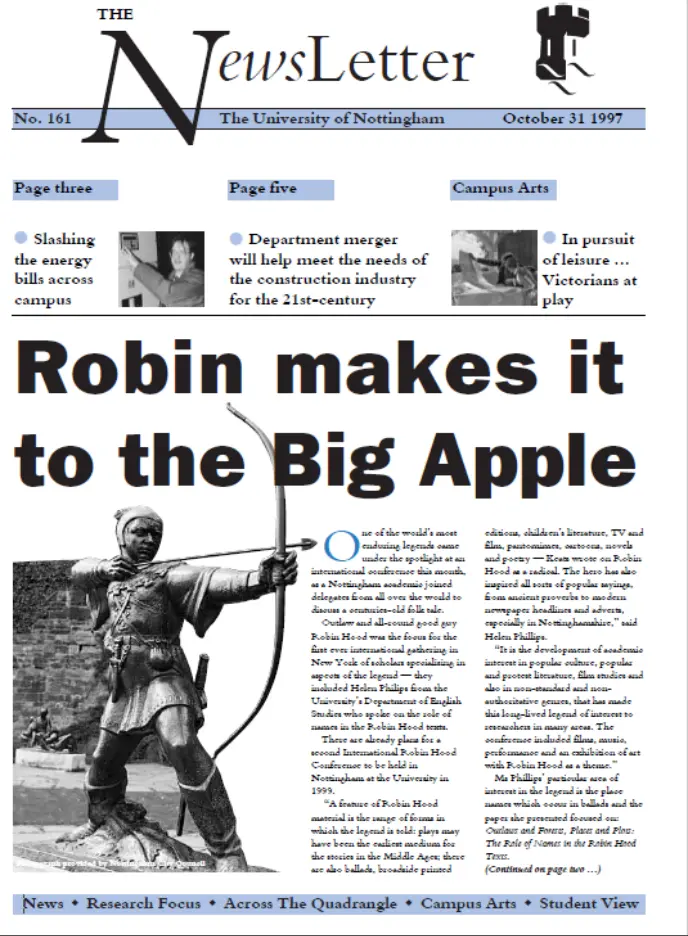
Figure 1: Our sample newsletter.
The result is the following raw, unformatted string in the terminal window:
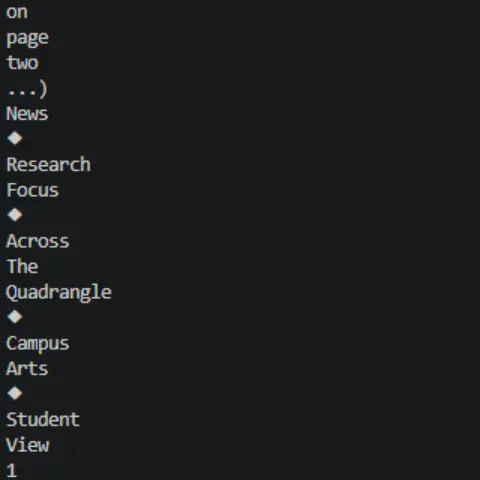
Figure 2: The raw, unformatted string in the terminal window.
Tier 2: OCR-Based Extraction
OCR-based extraction is great for documents like scanned receipts, physical intake forms, and faxed records. The document is just a collection of pixels inside a raster image wrapper. An OCR engine must parse the image matrix, detect character edges, binarize the pixel densities, and construct an overlaying searchable text layer.
When the PDF lacks an internal text layer, you must route the file through an OCR preprocessor. This stage cleans the image data before turning pixel blocks into characters. Modern engines add a learned recognition layer here too - see AI OCR for how that compares with traditional template matching
Let's test this OCR code on a sample PDF. At first glance, the document is just a flat image, meaning you can’t select any of the text.
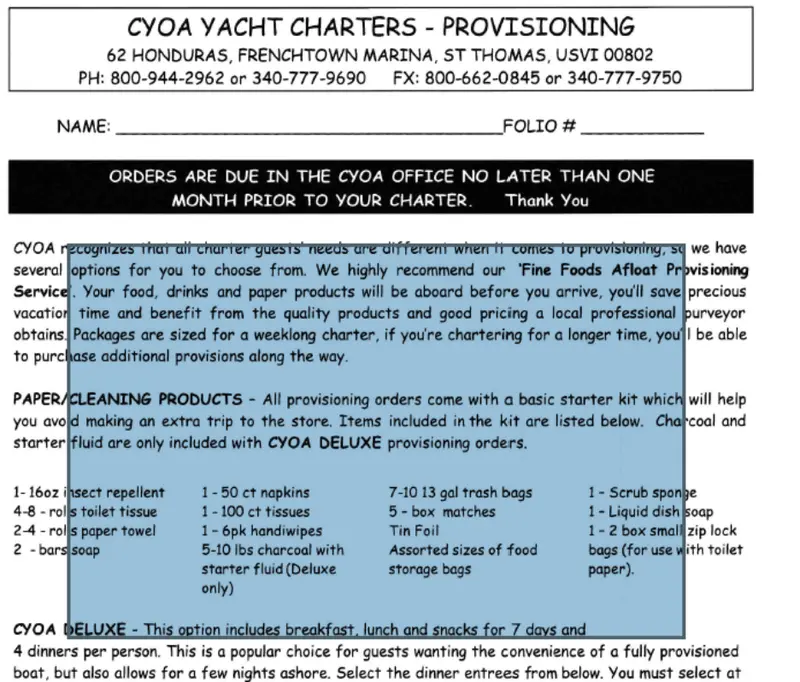
Figure 3: Sample PDF with non-selectable text.
After running the code, we can now select the text to copy and paste somewhere else.
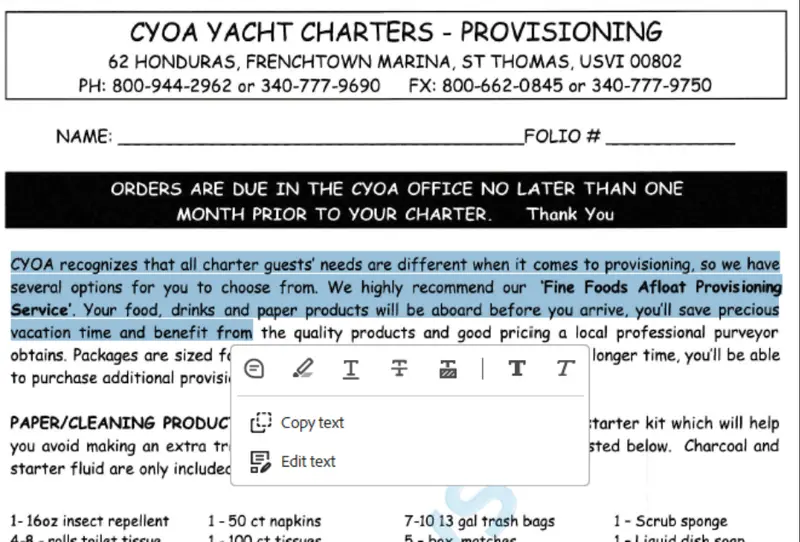
Figure 4: The sample PDF with selectable text.
Tier 3: Smart Data Extraction
Smart Data Extraction is what you need when text location varies across files, five different invoice layouts from five different vendors, for example. It resolves the page's structure first, then interprets what that structure means.
This pipeline combines three models across those two stages:
- YOLO-based Object Detection (structure): Maps the visual coordinates of tables, form boundaries, and paragraphs, the same layout, the same coordinates, every time.
- Document Classification Models (interpretation): Identifies the document type across 19 document types, distinguishing a tax form from a utility bill, for example.
- Transformer-Based Language Models (interpretation): Evaluates semantic context to link key-value field blocks, matching "Amount Due" to its corresponding numerical total.
Output returns as structured JSON, or Excel for tabular data.
For the last example, we’ll look at a financial report and apply our Smart Data Extraction code sample.
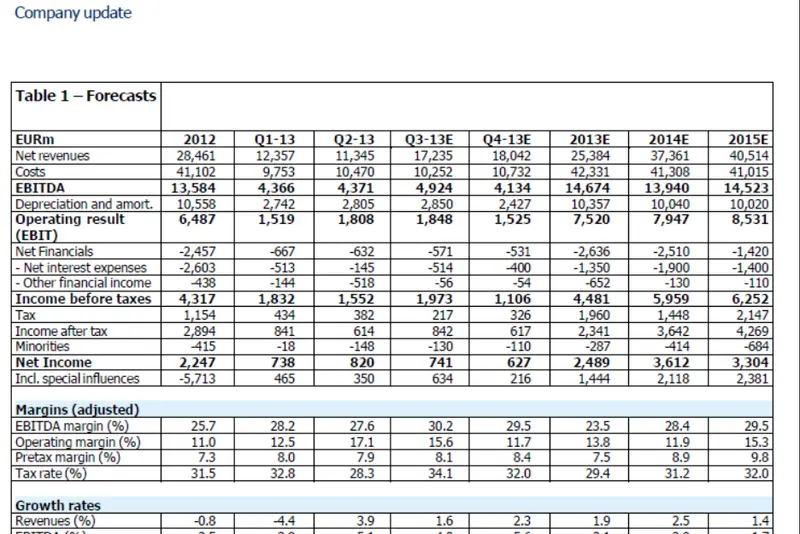
Figure 5: The sample financial report.
The code sample will process this PDF to extract the data in JSON format and classify the document. Let’s look at the output files with the extracted data and the classification data including confidence scores.
Extracted data
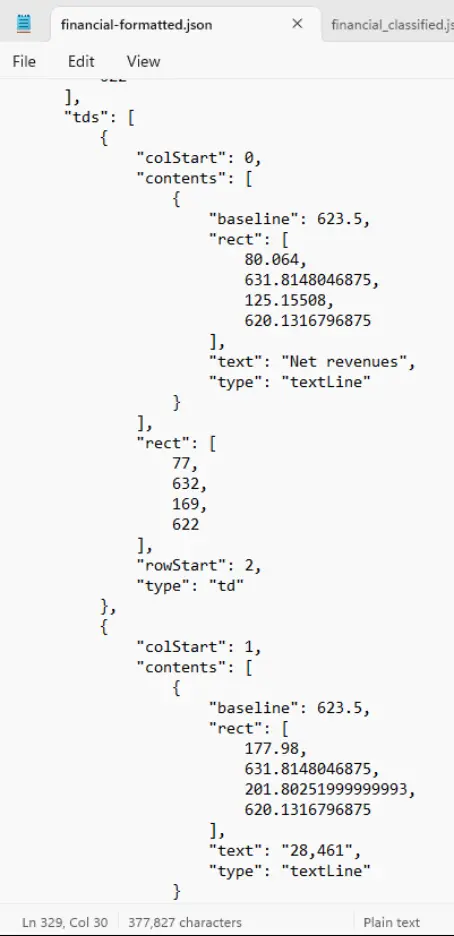
Figure 6: The data extracted from the financial report in JSON format.
Document classification data
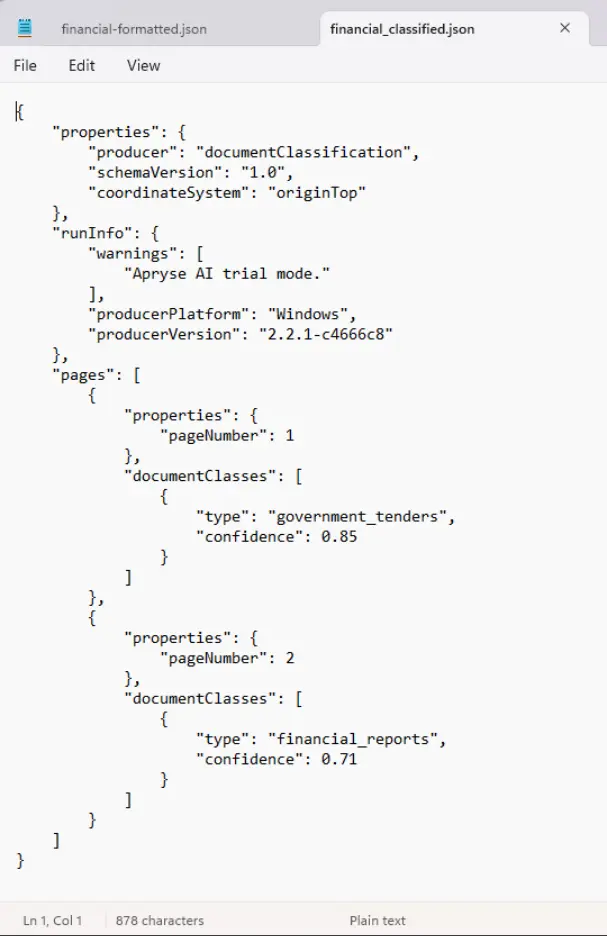
Figure 7: The document classification data in JSON format.
Infrastructure: Cloud vs. On-Premises
When you deploy an AI data extraction pipeline, your primary architectural decision centers on where the data processing happens.
Feature | Cloud APIs (Google Document AI / AWS Textract) | On-Prem SDKs (Apryse SDE / Local Models) |
|---|---|---|
Data Privacy | Files leave your secure network boundaries. | Files remain fully air-gapped on your private hardware. |
Cost Structure | Variable, recurring per-page micro-billing. | Fixed, predictable enterprise core runtime licensing. |
Network Dependency | Requires active internet connections and handles latency. | Runs locally at native bus speeds with zero network overhead. |
Compliance | Harder to validate for strict HIPAA, PCI-DSS, or gov regs. | Simplifies absolute data governance compliance audits. |
Production Engineering Tips
To run these models successfully at scale without crashing background workers or logging inaccurate data, apply these rules:
Image Resolution Metrics: Do not pass 72 DPI thumbnail images into an OCR or layout detection engine. Your target threshold for structural text recognition should be 300 DPI or higher.
Binarization Preprocessing: If users upload mobile photos of documents, run a grayscale contrast filter first. Binarization strips out uneven background shadows, making it easier for tokenizers to separate ink strokes from background noise.
Confidence Threshold Gates: Don’t blindly accept all machine output into your primary database. Set up a three-tiered automated validation system:
- Score > 95%: Automatically accept and write the data directly to production tables.
- Score 70–95%: Route the data to an internal human-in-the-loop (HITL) dashboard for manual verification.
- Score < 70%: Reject the data and flag the document for a clean re-scan.
Benchmark Real Data: Ignore vendor demo accuracy charts. A model that achieves a 99% accuracy score on pristine digital files can easily drop to 65% when processing crumpled, faxed invoices. Always evaluate candidate models against your messiest real-world production datasets.
FAQ
You can for small ad-hoc batches, but it introduces major operational challenges at scale. The per-page API token costs climb rapidly, token limits restrict heavy parallel batch tasks, you risk data exposure, and LLMs suffer from numerical hallucinations, meaning they can make up or switch numbers in financial columns.
These are designed for retrieval-augmented generation (RAG) chunking workflows. They split documents into clean text segments for vector databases, but they are less effective when you need a rigid, schema-locked JSON output for structured accounting databases.
It depends entirely on the layout consistency. For semi-structured documents like commercial bills and invoices, modern models reliably achieve 90–98% accuracy. For low-contrast handwritten health forms or old historical documents, accuracy can drop significantly, which is why confidence gating is essential.
Conclusion
Building a resilient data extraction pipeline means matching your files to the right tool instead of forcing every document through a complex machine learning model. By using this tiered approach, you optimize your application for speed, minimize infrastructure overhead, and preserve advanced AI resources for your messiest files.
- Run a local test: Start a trial of the Apryse Core Server SDK to test basic extraction, OCR, and AI-powered Smart Data Extraction workflows directly against your production datasets.
- Explore the docs: View comprehensive documentation with code samples for Python, Node.js, Java, and more.
- Secure your data: If you need help deploying a fully isolated, air-gapped extraction engine for regulated workflows such as HIPAA or PCI-DSS, contact us today for help.